Join us at FabCon Atlanta from March 16 - 20, 2026, for the ultimate Fabric, Power BI, AI and SQL community-led event. Save $200 with code FABCOMM.
Register now!Get Fabric Certified for FREE during Fabric Data Days. Don't miss your chance! Request now
Hi there,
I have the following situation and I also hope for help.
My report consists of two tables. A date table that outputs the date from today's date 5 days in the past and 3 days in the future -> Date = CALENDAR (TODAY () -5, TODAY () +3) and then a appointment table. This includes values such as the appointment date, the employee name and much more. Now I have created a matrix table that shows me all appointments grouped by day. So far no problem, everything works fine up to this point.
However, I would like that the period (-5 days and +3 days from today's date) is always given in the matrix, regardless of whether there is an appointment in my appointment table or not.
As an an example:
Date table:
01/01/2022
01/02/2022
....
01/09/2022
appointment table:
01/01/2022 Employee A
01/01/2022 Employee B
01/03/2022 Employee B
01/08/2022 Employee A
Result:
| 01/01/2022 | Employee A |
| Employee B | |
| 01/02/2022 | |
| 01/03/2022 | Employee B |
| 01/04/2022 | |
| 01/05/2022 | |
| 01/06/2022 | |
| 01/07/2022 | |
| 01/08/2022 | Employee A |
| 01/09/2022 |
I'm looking forward to your ideas on how I can solve this 🙂
Kind regards
Solved! Go to Solution.
Hi @Meeresblume
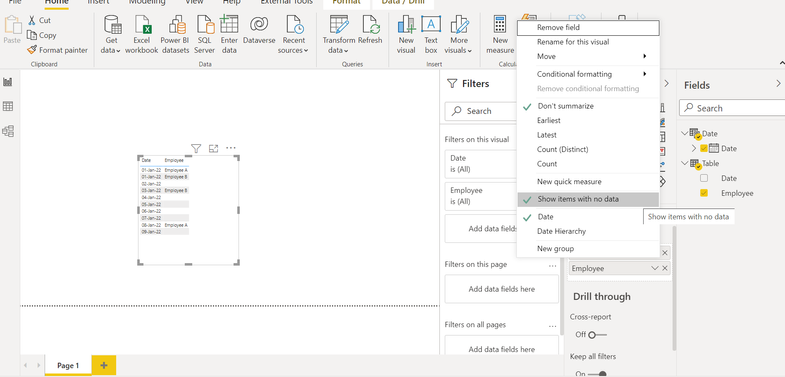
In the Visualizations pane, for the Date column from the Date table, change the option to show items with now value:
If this post helps, please consider accepting it as the solution to help the other members find it more quickly.
Appreciate your Kudos!!
LinkedIn: www.linkedin.com/in/vahid-dm/
Hi @Meeresblume
In the Visualizations pane, for the Date column from the Date table, change the option to show items with now value:
If this post helps, please consider accepting it as the solution to help the other members find it more quickly.
Appreciate your Kudos!!
LinkedIn: www.linkedin.com/in/vahid-dm/
Thanks for your answer.
I added the option once, but unfortunately the other dates still don't appear to me.
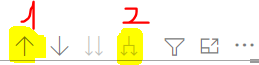
Solution found.
After selecting the option, I had to click on the following symbols:
Check out the November 2025 Power BI update to learn about new features.
Advance your Data & AI career with 50 days of live learning, contests, hands-on challenges, study groups & certifications and more!