cancel
Showing results for 
Search instead for 
Did you mean: 

The Power BI Data Visualization World Championships is back! Get ahead of the game and start preparing now! Learn more

Reply
Anonymous
Not applicable

Matrix row columns without drill down

I'm working with a Matrix, wanting the row columns to not involve drill down.

For example.  A row would contain a Client Name, State, and Territory.  As this data would all involve a single record it would be visually more appealing to simply see |ABC Corp| VA| East Region|.   I've had little luck in finding out how to do this.  I've attempted turning Stepping Off which made no difference.  Any suggstions would be appreciated.  I know in Excel using a pivot table I believe the feature was called Classic Mode.


1 ACCEPTED SOLUTION
v-kelly-msft
Community Support
Community Support

Hi @Anonymous ,


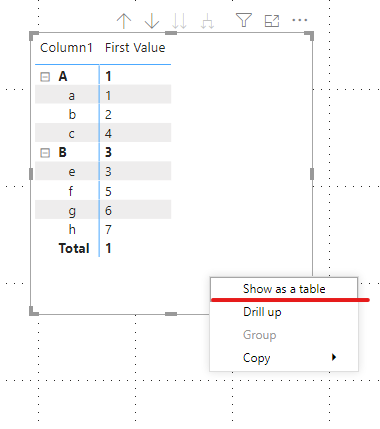
Right click the matrix then choose "show as a table":

Annotation 2020-03-13 110934.png

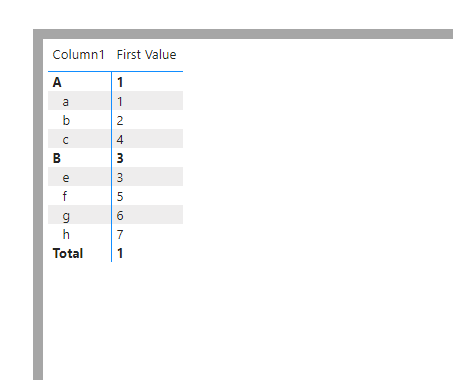
Finally you will see:


Annotation 2020-03-13 111000.png


Best Regards,
Kelly
Did I answer your question? Mark my post as a solution!

View solution in original post

1 REPLY 1
v-kelly-msft
Community Support
Community Support

Hi @Anonymous ,


Right click the matrix then choose "show as a table":

Annotation 2020-03-13 110934.png

Finally you will see:


Annotation 2020-03-13 111000.png


Best Regards,
Kelly
Did I answer your question? Mark my post as a solution!

Helpful resources

Announcements
Power BI DataViz World Championships

Power BI Dataviz World Championships

The Power BI Data Visualization World Championships is back! Get ahead of the game and start preparing now!

December 2025 Power BI Update Carousel

Power BI Monthly Update - December 2025

Check out the December 2025 Power BI Holiday Recap!

FabCon Atlanta 2026 carousel

FabCon Atlanta 2026

Join us at FabCon Atlanta, March 16-20, for the ultimate Fabric, Power BI, AI and SQL community-led event. Save $200 with code FABCOMM.