
Join us at FabCon Atlanta from March 16 - 20, 2026, for the ultimate Fabric, Power BI, AI and SQL community-led event. Save $200 with code FABCOMM.
Register now!The Power BI Data Visualization World Championships is back! Get ahead of the game and start preparing now! Learn more
Hi everyone!
I'm trying to create a matrix visualization in which, depending on the day of the month, will display different measures.
On the rows i have item ID (from a sales table) and on the columns i have the days of the month (from a calendar table). Both tables are linked by a date key.
The thing is that the row subtotals are not adding up correctly.
What have i done so far?
Before day 15, i have the sum of units sold. And on or after the 16th only a number 2.
pre15 =
IF (
DAY ( LASTNONBLANK ( FECHAS[FECHA], 1 ) ) <= 15,
SUM ( DS_SUGERENCIA_COMPRA[VENTAS] ),
2
)...and then created a little fix to see if I had different results:
pre15 FIX =
IF (
HASONEVALUE ( FECHAS[Day] ),
[pre15],
SUMX ( VALUES ( DS_SUGERENCIA_COMPRA[SKU] ), [pre15] )
)(for this last one, I followed the steps listed in this post --> Subtotals and Grand Totals That Add Up “Correctly”)
So i get the following:
What I want is that grand total to sum the month total for that SKU (and the many others i'm not showing for this example purpose).
What am I doing wrong? ![]()
Solved! Go to Solution.
Hi santt66,
You could try to follow below steps:
create a meaurse
day's value = IF ( LASTNONBLANK ( 'calendar'[day], 1 ) <= 15, SUM ( Sheet7[ventas] ), 2 )
monthly value =
SUMX (
FILTER (
ALLSELECTED ( 'calendar' ),
'calendar'[year] = MAX ( 'calendar'[year] )
&& 'calendar'[month] = MAX ( 'calendar'[month] )
),
[day's value]
)
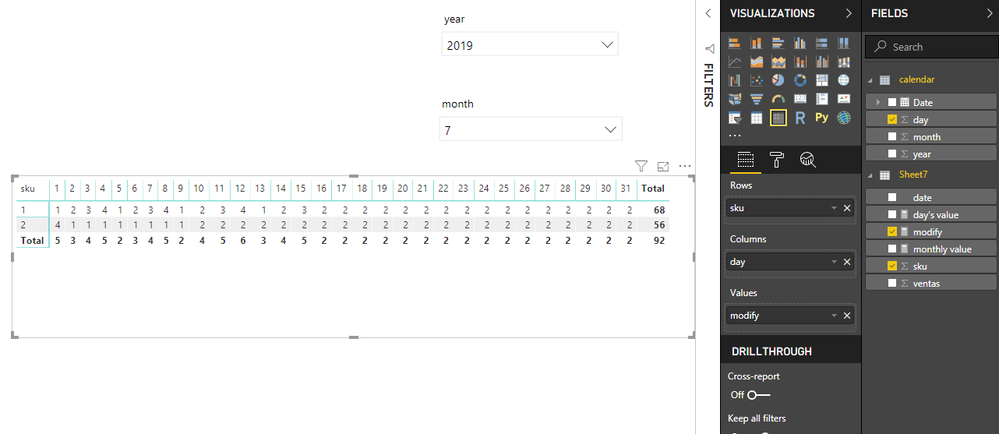
modify = IF(HASONEVALUE('calendar'[day]),[day's value],[monthly value])Then use this in Matrix like below
Best Regards,
Zoe Zhi
If this post helps, then please consider Accept it as the solution to help the other members find it more quickly.
Hi santt66,
You could try to follow below steps:
create a meaurse
day's value = IF ( LASTNONBLANK ( 'calendar'[day], 1 ) <= 15, SUM ( Sheet7[ventas] ), 2 )
monthly value =
SUMX (
FILTER (
ALLSELECTED ( 'calendar' ),
'calendar'[year] = MAX ( 'calendar'[year] )
&& 'calendar'[month] = MAX ( 'calendar'[month] )
),
[day's value]
)
modify = IF(HASONEVALUE('calendar'[day]),[day's value],[monthly value])Then use this in Matrix like below
Best Regards,
Zoe Zhi
If this post helps, then please consider Accept it as the solution to help the other members find it more quickly.
Hi @dax
As I continued working, I encounter a similar problem but this time regarding subtotals and grand totals;
This time, the suggestion you gave me did not work... or maybe i'm doing something wrong again?
The Power BI Data Visualization World Championships is back! Get ahead of the game and start preparing now!
Check out the November 2025 Power BI update to learn about new features.
| User | Count |
|---|---|
| 66 | |
| 47 | |
| 43 | |
| 26 | |
| 19 |
| User | Count |
|---|---|
| 196 | |
| 127 | |
| 102 | |
| 67 | |
| 49 |