Don't miss your chance to take the Fabric Data Engineer (DP-600) exam for FREE! Find out how by attending the DP-600 session on April 23rd (pacific time), live or on-demand.
Learn moreNext up in the FabCon + SQLCon recap series: The roadmap for Microsoft SQL and Maximizing Developer experiences in Fabric. All sessions are available on-demand after the live show. Register now
Dear All,
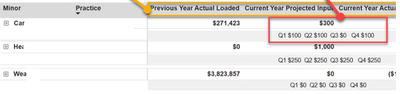
I have prepared a matrix visualization with hirarchy where total values are reporting perfectly fine,. but here for one of the column total values need to report how the values is getting on each quarter split as shown in below image:
Example: Current year projected input value is $300, need to split Quarterly as shown. Q1 $100 Q2 $100 Q3 $0 Q4 $100
please suggest and support to acheive this.
Hi @Anonymous ,
May I ask if your problem has been resolved? If @ray_aramburo 's response was helpful, you may consider marking it as resolved. If the issue has not been resolved, please provide detailed data (excluding private information) and your desired output so that we can better understand and resolve the issue you are experiencing.
How to Get Your Question Answered Quickly - Microsoft Fabric Community
If it does not help, please provide more details with your desired out put and pbix file without privacy information.
Best Regards,
Ada Wang
If this post helps, then please consider Accept it as the solution to help the other members find it more quickly.
Just add your Quarter field from your calendar table under the Columns field in your matrix. Just be aware that the Quarter columns will appear in the whole matrix and not only under the "Current Year" section.
Proud to be a Super User!
If you have recently started exploring Fabric, we'd love to hear how it's going. Your feedback can help with product improvements.
A new Power BI DataViz World Championship is coming this June! Don't miss out on submitting your entry.
Experience the highlights from FabCon & SQLCon, available live and on-demand starting April 14th.
| User | Count |
|---|---|
| 47 | |
| 44 | |
| 40 | |
| 20 | |
| 15 |
| User | Count |
|---|---|
| 70 | |
| 67 | |
| 32 | |
| 27 | |
| 25 |