Join us at FabCon Atlanta from March 16 - 20, 2026, for the ultimate Fabric, Power BI, AI and SQL community-led event. Save $200 with code FABCOMM.
Register now!The Power BI Data Visualization World Championships is back! Get ahead of the game and start preparing now! Learn more
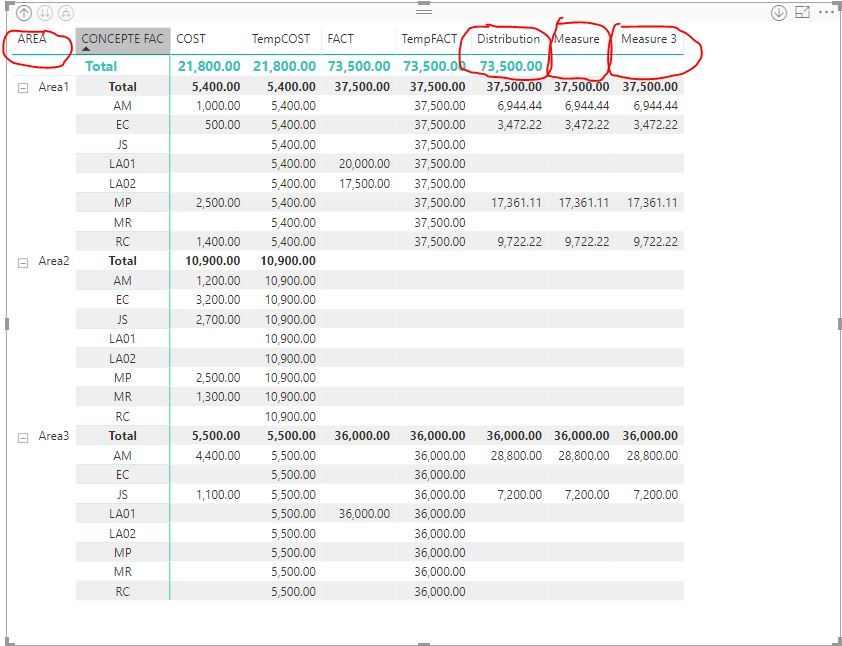
Its a matrix report
We do not want to show the value in Grand total row for Target, as mentioned in the pic.
Solved! Go to Solution.
HI, @Anonymous
Yes, if you select a value in slicer, ISFILTERED and HASONEVALUE() will return true() and show the value.again in total row.
So you could continue to add a step like this:
for the slicer in this matrix visual, add a new field for it and use it as a slicer
or use the new field as matrix Rows Value.
For example:
add a new AREA column
New AREA = Areas[AREA]Then drag it into slicer and select value from it.
Best Regards,
Lin
Please help why the report is showing wrong total for a simple report.
hi, @Anonymous
After my research, it could achieve by custom format Settings for one measure of the measures.
But you may try this way:
Use ISFILTERED or HASONEVALUE() to create a new measure for this measure
for example:
Measure = IF(ISFILTERED(Areas[AREA]),[Distribution]) Measure 3 = IF(HASONEVALUE(Areas[AREA]),[Distribution])
Result:
Best Regards,
Lin
Sorry Lin, I am facing an issue that when I select a value in Slicer it starts showing the value.again in total row.
Measure = IF(ISFILTERED('Book by week by line'[Site]),[Target])
HI, @Anonymous
Yes, if you select a value in slicer, ISFILTERED and HASONEVALUE() will return true() and show the value.again in total row.
So you could continue to add a step like this:
for the slicer in this matrix visual, add a new field for it and use it as a slicer
or use the new field as matrix Rows Value.
For example:
add a new AREA column
New AREA = Areas[AREA]Then drag it into slicer and select value from it.
Best Regards,
Lin
Even if it does not work then use the visual level filters instead of page level or report level filters.
The Power BI Data Visualization World Championships is back! Get ahead of the game and start preparing now!
| User | Count |
|---|---|
| 38 | |
| 38 | |
| 36 | |
| 28 | |
| 28 |
| User | Count |
|---|---|
| 124 | |
| 88 | |
| 74 | |
| 66 | |
| 65 |