
cancel
Showing results for 
Search instead for 
Did you mean: 

The Power BI Data Visualization World Championships is back! Get ahead of the game and start preparing now! Learn more

Reply
justinharter
Frequent Visitor

Matrix Table - Data Transformation to Support

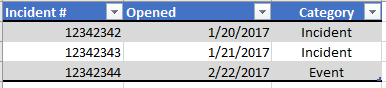
I am looking to create a Matrix table that has the following structure, but am unsure as to the easiest path to transform my data to support the structure. The data structure I have is below along with the matrix structure I would like. I could have a job run that summarizes the data like the matrix I want, but was wondering if I can do it directly in Power BI.


DATA STRUCTURE

data.PNG


MATRIX I WOULD LIKE

matrix.PNG


Any high level guidance would be appreciated.

1 ACCEPTED SOLUTION
MFelix
Super User
Super User

Hi @justinharter,


Create the following measures:

Total Incidentes = CALCULATE(COUNT(Incident[Incident]))

Total Incidentes (Minus Event Category) = CALCULATE(COUNT(Incident[Incident]),Incident[Category] = "Incident")

% Incidents = DIVIDE([Total Incidentes (Minus Event Category)],[Total Incidentes])

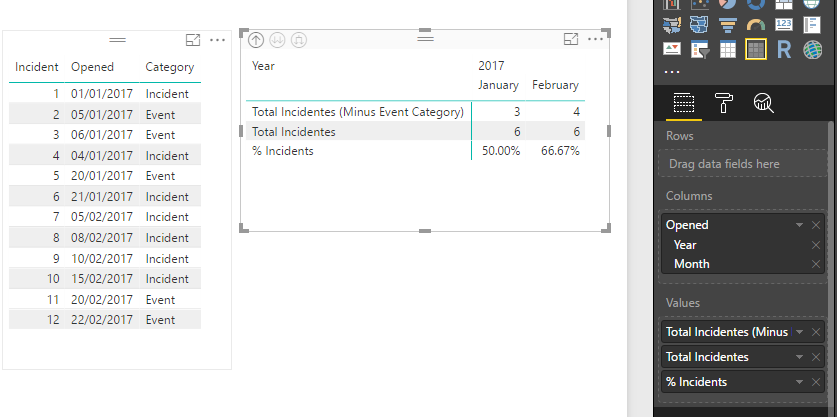
Then add it to the matrix visual and should get what you need:


Matrix.png


regards,

MFelix


Regards

Miguel Félix


Did I answer your question? Mark my post as a solution!

Proud to be a Super User!

Check out my blog: Power BI em Português


View solution in original post

3 REPLIES 3
MFelix
Super User
Super User

Hi @justinharter,


Create the following measures:

Total Incidentes = CALCULATE(COUNT(Incident[Incident]))

Total Incidentes (Minus Event Category) = CALCULATE(COUNT(Incident[Incident]),Incident[Category] = "Incident")

% Incidents = DIVIDE([Total Incidentes (Minus Event Category)],[Total Incidentes])

Then add it to the matrix visual and should get what you need:


Matrix.png


regards,

MFelix


Regards

Miguel Félix


Did I answer your question? Mark my post as a solution!

Proud to be a Super User!

Check out my blog: Power BI em Português


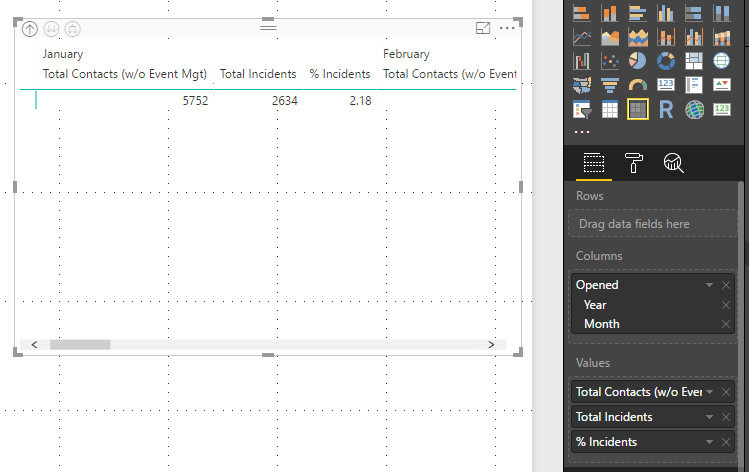
Thanks for the reply @MFelix. When creating the measures and putting them in the matrix as you have them, I do not get the same result for the Matrix. Is there something else I need to change?


issue.PNG

I've figured it out @MFelix. I see you simply need to turn on row groups in the properties of the matrix.

Helpful resources

Announcements
Power BI DataViz World Championships

Power BI Dataviz World Championships

The Power BI Data Visualization World Championships is back! Get ahead of the game and start preparing now!

December 2025 Power BI Update Carousel

Power BI Monthly Update - December 2025

Check out the December 2025 Power BI Holiday Recap!

FabCon Atlanta 2026 carousel

FabCon Atlanta 2026

Join us at FabCon Atlanta, March 16-20, for the ultimate Fabric, Power BI, AI and SQL community-led event. Save $200 with code FABCOMM.