cancel
Showing results for 
Search instead for 
Did you mean: 

The Power BI Data Visualization World Championships is back! It's time to submit your entry. Live now!

Reply
Chitemerere
Responsive Resident
Responsive Resident

Matrix Subheaders

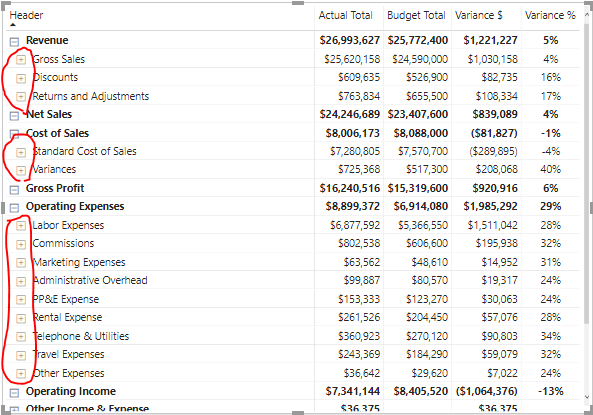
I have created the following income statement in PowerBI


P&L Statement.PNG

The marked subheaders in red should not be expandable.  Is there a way to disable the expansion in PowerBI.  I can provide the PowerBI file.


Best regards,

Chris

1 ACCEPTED SOLUTION
Anonymous
Not applicable

screenshot.jpg


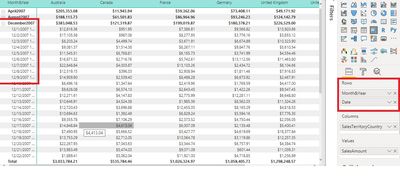
You can restrcit  the expansion  using the section of Rows columns , have a look at above screenshot 

View solution in original post

2 REPLIES 2
Anonymous
Not applicable

screenshot.jpg


You can restrcit  the expansion  using the section of Rows columns , have a look at above screenshot 

Thank you very much, i had a row which was not supposed to be there, removed it and all worked well.


Regards,

Chris

Helpful resources

Announcements
Power BI DataViz World Championships

Power BI Dataviz World Championships

The Power BI Data Visualization World Championships is back! It's time to submit your entry.

January Power BI Update Carousel

Power BI Monthly Update - January 2026

Check out the January 2026 Power BI update to learn about new features.

FabCon Atlanta 2026 carousel

FabCon Atlanta 2026

Join us at FabCon Atlanta, March 16-20, for the ultimate Fabric, Power BI, AI and SQL community-led event. Save $200 with code FABCOMM.