cancel
Showing results for 
Search instead for 
Did you mean: 

The Power BI Data Visualization World Championships is back! Get ahead of the game and start preparing now! Learn more

Reply
UncleLewis
Responsive Resident
Responsive Resident

Matrix SubTotal Column Different Number Format Than Field Column

Hi all,


Using Desktop 2.78.5.

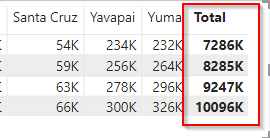
How can I add a different number format to the Column Subtotal in my Matrix that is different from Field Formatting.

My Fields are formatted to to display Thousands. I would like the Column Subtotal to display Millions.


matrix.png


Thanks

-w

1 ACCEPTED SOLUTION

Hi,


It is a little different from my dax expression about the field in ISINSCOPE function.

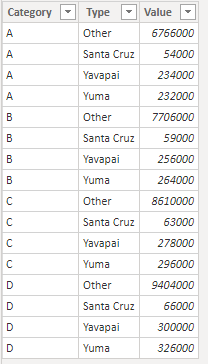
This field should be the [Type] in my test table not the [Value]:

10.PNG


Best Regards,

Giotto Zhi

View solution in original post

4 REPLIES 4
v-gizhi-msft
Community Support
Community Support

Hi,


Please try this measure to replace original value:

Measure = IF(ISINSCOPE('Table'[Type]),SUM('Table'[Value])/1000&"K",FIXED(SUM('Table'[Value])/1000000,0)&"M")

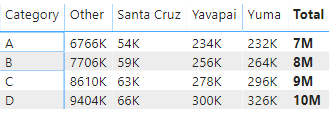
The result shows:

3.PNG

Tips: By this way, the value's format will convert to text.

Hope this helps.


Best Regards,

Giotto Zhi

Thanks Giotto,


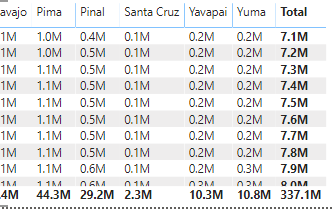
Definitely on the right track. However, all of my numbers show up as Millions?

I believe my DAX formula is the same as yours?


Population_Text = If(ISINSCOPE(Population[Population Est]),SUM(Population[Population Est])/1000&"K",FIXED(SUM(Population[Population Est])/1000000,1)&"M")
matrix2.png
 
Thanks,
-w

Hi,


It is a little different from my dax expression about the field in ISINSCOPE function.

This field should be the [Type] in my test table not the [Value]:

10.PNG


Best Regards,

Giotto Zhi

Anonymous
Not applicable

Hey @UncleLewis 


There isn't currently an option to format the totals in a matrix. Check out the link below as it very clearly details and outlines what you can and can't do and provides the link for the Ideas page to allow formatting totals and null values:


https://community.powerbi.com/t5/Desktop/Conditional-Formatting-on-Total-and-Null-Values/td-p/313725


If this helps please kudo.

If this solves your problem please accept it as a solution.

Helpful resources

Announcements
Power BI DataViz World Championships

Power BI Dataviz World Championships

The Power BI Data Visualization World Championships is back! Get ahead of the game and start preparing now!

December 2025 Power BI Update Carousel

Power BI Monthly Update - December 2025

Check out the December 2025 Power BI Holiday Recap!

FabCon Atlanta 2026 carousel

FabCon Atlanta 2026

Join us at FabCon Atlanta, March 16-20, for the ultimate Fabric, Power BI, AI and SQL community-led event. Save $200 with code FABCOMM.