cancel
Showing results for 
Search instead for 
Did you mean: 

The Power BI Data Visualization World Championships is back! Get ahead of the game and start preparing now! Learn more

Reply
Anonymous
Not applicable

Matrix Sorting Problem

Hi,


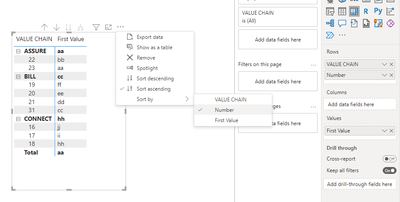
I want to sort the number under value chain (bold format) in the very first column. Sorting it by number does not change the order. 

jdalfonso_0-1669217666759.png

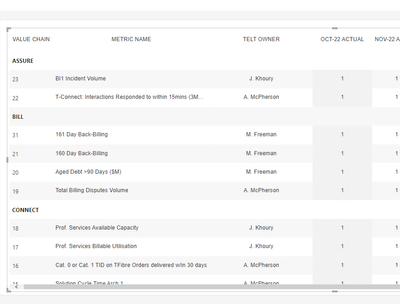
I want to be able to sort it by number in ascending sequence 


jdalfonso_1-1669217783857.png


1 ACCEPTED SOLUTION
Anonymous
Not applicable

Hi @Anonymous ,


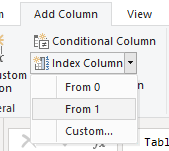
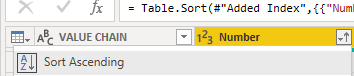
In the Power Query editor, sort the numbers in ascending order, and then add an index column.

vtangjiemsft_0-1669254719028.pngvtangjiemsft_1-1669254744090.pngvtangjiemsft_2-1669254809264.png

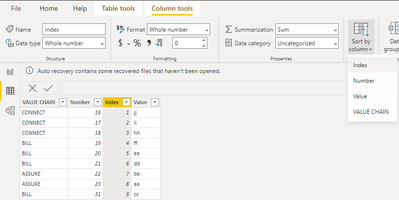
Click "Close and Apply" and sort the index columns in Desktop.

vtangjiemsft_4-1669254951025.png

Then the result is as follows.

vtangjiemsft_5-1669255140580.png

You can refer to the following documents that may be helpful to you:

Custom sort / reorder rows & columns in Power BI - Inforiver

Hierarchical Sorting in Power BI - Stuff by Yuki

Quick Tips: How to Sort Matrix by Column in Descending Order - BI Insight

Sorting matrices in Power BI - Kohera


If you want to sort by both [VALUE CHAIN] and [Number]. You can create a table 2, enter the data of the [VALUE CHAIN] field in the desired order, and then create an index column in the power query, sort by the index column, and put the [VALUE CHAIN] field of table 2 in the matrix, note that the model relationship is created between table 1 AND TABLE 2.

vtangjiemsft_6-1669255900655.png


Best Regards,

Neeko Tang

If this post helps, then please consider Accept it as the solution to help the other members find it more quickly. 

View solution in original post

1 REPLY 1
Anonymous
Not applicable

Hi @Anonymous ,


In the Power Query editor, sort the numbers in ascending order, and then add an index column.
vtangjiemsft_0-1669254719028.pngvtangjiemsft_1-1669254744090.pngvtangjiemsft_2-1669254809264.png

Click "Close and Apply" and sort the index columns in Desktop.
vtangjiemsft_4-1669254951025.png

Then the result is as follows.

vtangjiemsft_5-1669255140580.png

You can refer to the following documents that may be helpful to you:

Custom sort / reorder rows & columns in Power BI - Inforiver

Hierarchical Sorting in Power BI - Stuff by Yuki

Quick Tips: How to Sort Matrix by Column in Descending Order - BI Insight

Sorting matrices in Power BI - Kohera


If you want to sort by both [VALUE CHAIN] and [Number]. You can create a table 2, enter the data of the [VALUE CHAIN] field in the desired order, and then create an index column in the power query, sort by the index column, and put the [VALUE CHAIN] field of table 2 in the matrix, note that the model relationship is created between table 1 AND TABLE 2.

vtangjiemsft_6-1669255900655.png


Best Regards,

Neeko Tang

If this post helps, then please consider Accept it as the solution to help the other members find it more quickly. 

Helpful resources

Announcements
Power BI DataViz World Championships

Power BI Dataviz World Championships

The Power BI Data Visualization World Championships is back! Get ahead of the game and start preparing now!

November Power BI Update Carousel

Power BI Monthly Update - November 2025

Check out the November 2025 Power BI update to learn about new features.

FabCon Atlanta 2026 carousel

FabCon Atlanta 2026

Join us at FabCon Atlanta, March 16-20, for the ultimate Fabric, Power BI, AI and SQL community-led event. Save $200 with code FABCOMM.