cancel
Showing results for 
Search instead for 
Did you mean: 

Get Fabric Certified for FREE during Fabric Data Days. Don't miss your chance! Request now

Reply
ExcelMonke
Super User
Super User

Matrix Results and Bar Chart not Calculating the Same

Hello,

I am running into an issue where a measure that I have is behaving correctly within a Matrix. However, when in a barchart, the behaviour is not correct. 
This is the measure I am using for the "Distro_ClinPercent" column:

DIVIDE([ClinicVisits],CALCULATE(SUMX('TABLE',[ClinicVisits]),ALL('Table'[ApptLength])))

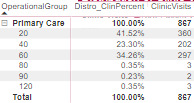
It gives me the following result:

ExcelMonke_0-1708710062179.png

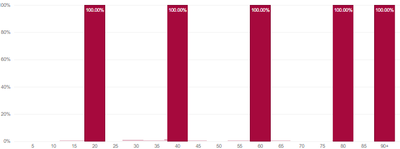
However, in a bar chart, it looks like the clinic visits row just divides by itself, rather than the SUMX value. this results in a 100% result for each apptlength category.

ExcelMonke_1-1708710126293.png


How do I correct this behavior? 


Did I answer your question? Mark my post as a solution!

Proud to be a Super User!


1 ACCEPTED SOLUTION
ExcelMonke
Super User
Super User

thanks everyone for the input. I managed to figure it out, and it was really my mistake... I figured out that the x-axis was not properly connected to the model. Once I did that it all worked.


Did I answer your question? Mark my post as a solution!

Proud to be a Super User!


View solution in original post

4 REPLIES 4
ExcelMonke
Super User
Super User

thanks everyone for the input. I managed to figure it out, and it was really my mistake... I figured out that the x-axis was not properly connected to the model. Once I did that it all worked.


Did I answer your question? Mark my post as a solution!

Proud to be a Super User!


Anonymous
Not applicable

Hi @ExcelMonke 


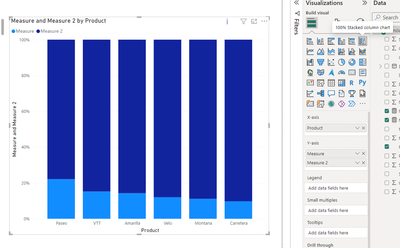
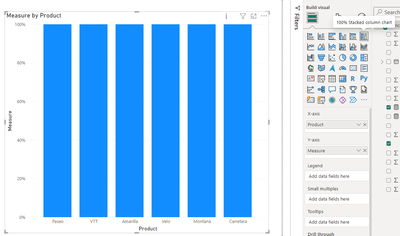
Do you use the visualization shown below? As you can see below, I put in two measures, and the visualization calculates the ratio of each of the two measures to the whole bar, and then displays them in different colors. A 100% stacked column chart is designed to illustrate the relative percentage of multiple data series in stacked columns. In this chart, the cumulative of the stacked columns always equals 100%. If you put in a measure, it will just show 100%.

vxuxinyimsft_1-1708925941282.png


vxuxinyimsft_2-1708926512108.png


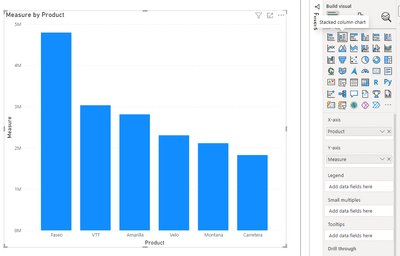
You can use the stacked column chart to display the results you want.

vxuxinyimsft_3-1708926600570.png


If you are not using this chart, then could you provide a sample of the raw data so that we can better assist you?

How to provide sample data in the Power BI Forum - Microsoft Fabric Community . Or show it as a screenshot or pbix. Please remove any sensitive data in advance. If uploading pbix files please do not log into your account.


Best Regards,
Yulia Xu


If this post helps, then please consider Accept it as the solution to help the other members find it more quickly.

amitchandak
Super User
Super User

@ExcelMonke , Try one of the two


DIVIDE([ClinicVisits],CALCULATE(SUMX('TABLE',[ClinicVisits]),ALL()))


DIVIDE([ClinicVisits],CALCULATE(SUMX('TABLE',[ClinicVisits]),removefilters('Table'[Operation Group])))

Share with Power BI Enthusiasts: Full Power BI Video (20 Hours) YouTube
Microsoft Fabric Series 60+ Videos YouTube
Microsoft Fabric Hindi End to End YouTube

Unfortunately neither of those worked. for context, the Operation Group is on a seperate table. The apptlength is from the fact table. 


Did I answer your question? Mark my post as a solution!

Proud to be a Super User!


Helpful resources

Announcements
November Power BI Update Carousel

Power BI Monthly Update - November 2025

Check out the November 2025 Power BI update to learn about new features.

Fabric Data Days Carousel

Fabric Data Days

Advance your Data & AI career with 50 days of live learning, contests, hands-on challenges, study groups & certifications and more!

FabCon Atlanta 2026 carousel

FabCon Atlanta 2026

Join us at FabCon Atlanta, March 16-20, for the ultimate Fabric, Power BI, AI and SQL community-led event. Save $200 with code FABCOMM.

Top Solution Authors
Top Kudoed Authors