Join us at FabCon Atlanta from March 16 - 20, 2026, for the ultimate Fabric, Power BI, AI and SQL community-led event. Save $200 with code FABCOMM.
Register now!Get Fabric Certified for FREE during Fabric Data Days. Don't miss your chance! Request now
Hello,
I have been searching the boards and the web, but can't quite find this specific angle on "ragged hierarchies" (for example discussed here: Removing Blanks from Organizational Ragged Hierarchy in Power BI Matrix Visual - RADACAD and Solved: Ragged Hierarchy in a Matrix - Microsoft Fabric Community )
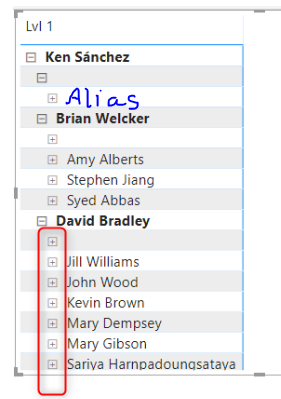
Taking the RADACAD example, I am not looking to remove BLANKS. I am looking to create an "alias" label on that row instead of Blank. In my particular dataset, the blanks represent data for individual managers, while the hierarchies with their names in them represent their team's data. I would like to replace the "Blank" row with a lable like "Direct". Tableau allows users to do this. I'm wondering if there is a way to do this in Power BI without completely re-engineering the hierarchy itself (which is working very well including with RLS).
Sample screenshot modified from RADACAD examples:
Thanks for any suggestions you can offer!
@mbahonen not in this case, that's why having clean data and awesome data model is core to Power BI, otherwise, we deal with these situations and unfortunately there is nothing can be done. Sorry, not sure what else to tell.
Subscribe to the @PowerBIHowTo YT channel for an upcoming video on List and Record functions in Power Query!!
Learn Power BI and Fabric - subscribe to our YT channel - Click here: @PowerBIHowTo
If my solution proved useful, I'd be delighted to receive Kudos. When you put effort into asking a question, it's equally thoughtful to acknowledge and give Kudos to the individual who helped you solve the problem. It's a small gesture that shows appreciation and encouragement! ❤
Did I answer your question? Mark my post as a solution. Proud to be a Super User! Appreciate your Kudos 🙂
Feel free to email me with any of your BI needs.
@mbahonen I think you have a bigger problem than the null values as you described. Most likely you have values in the fact tables which doesn't have the rows in the dimension table and that can lead to blank values in the slicer.
Subscribe to the @PowerBIHowTo YT channel for an upcoming video on List and Record functions in Power Query!!
Learn Power BI and Fabric - subscribe to our YT channel - Click here: @PowerBIHowTo
If my solution proved useful, I'd be delighted to receive Kudos. When you put effort into asking a question, it's equally thoughtful to acknowledge and give Kudos to the individual who helped you solve the problem. It's a small gesture that shows appreciation and encouragement! ❤
Did I answer your question? Mark my post as a solution. Proud to be a Super User! Appreciate your Kudos 🙂
Feel free to email me with any of your BI needs.
Oh, this is definitely not a perfect star schema with nice fact/dims. There's nothing I can really do about that. The report and the data are all working very well actually. If this is my only problem, I can live with it, but it would be nice to be able to create an alias for a blank row.
@mbahonen In PQ, replace null or blank value with whatever value you want to display in the hierarchy and that should take care of it.
Subscribe to the @PowerBIHowTo YT channel for an upcoming video on List and Record functions in Power Query!!
Learn Power BI and Fabric - subscribe to our YT channel - Click here: @PowerBIHowTo
If my solution proved useful, I'd be delighted to receive Kudos. When you put effort into asking a question, it's equally thoughtful to acknowledge and give Kudos to the individual who helped you solve the problem. It's a small gesture that shows appreciation and encouragement! ❤
Did I answer your question? Mark my post as a solution. Proud to be a Super User! Appreciate your Kudos 🙂
Feel free to email me with any of your BI needs.
The problem is that the data is not actually blank or null... I don't want to replace the actual data. TBH, I'm not entirely even sure why in this situation its showing as a blank, because in my data every single record has a next level up without blanks (at least at the level I'm displaying).
Check out the November 2025 Power BI update to learn about new features.
Advance your Data & AI career with 50 days of live learning, contests, hands-on challenges, study groups & certifications and more!