I'm currently struggling with this one detail within my Matrix table. In my Matrix table I have multiple rows consisting of these rows. The requirement for the report is to have a subtotal for the Lead Source Group AND a grand total for Dealership.

Here is what is currently returning in my matrix table. In the green the totals are correct for the total 'Lead Source Group' but it fails to add properly in the total 'Dealership' value, which should be '112' instead of '108'.
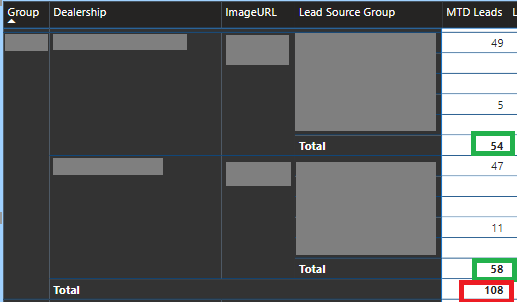
'MTD Leads' field is a complex measure comprised of many other measures; now I understand why it does this total as it's technically correct doing the calculations in context to Dealership level instead of the typical Lead Source Group.
The formula for 'MTD Leads' is:
Display_Reallocated_Count_LeadInPeriod_New_Leads = sumx(VALUES(view_LeadSourceGroupName[LeadSourceGroupName]), [Reallocated_Count_LeadInPeriod_New_Leads])
Which when further broken down you'll find the pre-sumx statement as:
Reallocated_Count_LeadInPeriod_New_Leads = [Count_LeadInPeriod_New_Leads]+([Count_LeadInPeriod_Unknown_Leads]*[Percentage_LeadInPeriod_New_Leads])
Typically when there is only one matrix row I know we can use SUMX to get the desired total context. However, I'm stumped as how to get different totals for a single measure like in the desired screenshot above when we have multiple rows in a matrix table...
How do I get a matrix table to reflect the correct total on the 'Lead Source Group' total AND the 'Dealership' in the mentioned desired manner (54+58 = 112)?
As always, thank you for your help!


