Hi @talenzmeier ,
I will show you how to make this martix table in your case.
- Prepare some data as you said.
| product |
date |
department |
income |
| P001 |
12/1/2021 |
HR |
2 |
| P001 |
12/1/2021 |
IT |
3 |
| P001 |
12/1/2021 |
Warehouse |
4 |
| P001 |
12/2/2021 |
HR |
5 |
| P001 |
12/2/2021 |
IT |
6 |
| P001 |
12/2/2021 |
Warehouse |
7 |
| P001 |
12/3/2021 |
HR |
8 |
| P001 |
12/3/2021 |
IT |
9 |
| P001 |
12/3/2021 |
Warehouse |
10 |
| P222 |
12/1/2021 |
HR |
11 |
| P222 |
12/1/2021 |
IT |
12 |
| P222 |
12/1/2021 |
Warehouse |
13 |
| P222 |
12/2/2021 |
HR |
14 |
| P222 |
12/2/2021 |
IT |
15 |
| P222 |
12/2/2021 |
Warehouse |
16 |
| P222 |
12/3/2021 |
HR |
17 |
| P222 |
12/3/2021 |
IT |
18 |
| P222 |
12/3/2021 |
Warehouse |
19 |
| P222 |
12/1/2021 |
HR |
20 |
| P333 |
12/1/2021 |
IT |
21 |
| P333 |
12/1/2021 |
Warehouse |
22 |
| P333 |
12/2/2021 |
HR |
23 |
| P333 |
12/2/2021 |
IT |
24 |
| P333 |
12/2/2021 |
Warehouse |
25 |
| P333 |
12/3/2021 |
HR |
26 |
| P333 |
12/3/2021 |
IT |
27 |
| P333 |
12/3/2021 |
Warehouse |
28 |
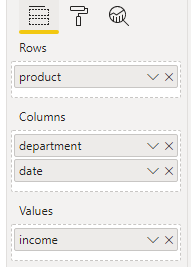
- Put thes fields into rows, columns and values as the screenshot.
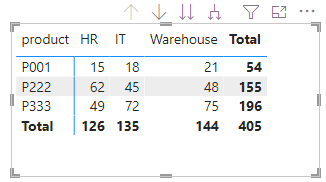
- After that it looks like this.
- You should turn on the second icon and then the fouth icon.
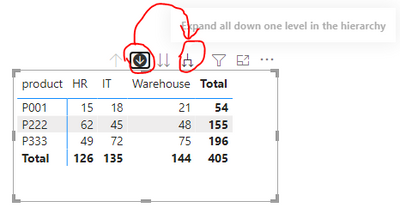
This will expend the columns to two levels. Do some change on the style and will get the following matrix table.

pbix in the end you can refer.
Best Regards
Community Support Team _ chenwu zhu
If this post helps, then please consider Accept it as the solution to help the other members find it more quickly.


