cancel
Showing results for 
Search instead for 
Did you mean: 

Learn from the best! Meet the four finalists headed to the FINALS of the Power BI Dataviz World Championships! Register now

Reply
richiearora2001
Frequent Visitor

Matrix Calculations

I am Trying to Flter some Rows in the Matrix Calcualtion , But unable to do the same.


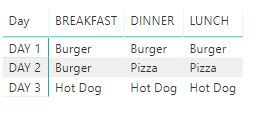
This is how my matrix Looks Like, I want to filter the rows for Day 1 , Which has similar foods for Lunch/Breakfast and Dinner


 BREAKFASTLUNCHDINNER
DAY 1BurgerBurgerBurger
DAY 2BurgerPizza Pizza
DAY 3Hot Dog Hot DogHot Dog


Any help will be appreciated


Note: The Data set is in 1 Flat Table

1 ACCEPTED SOLUTION

hi, @richiearora2001

After my test, you may try this way as below:

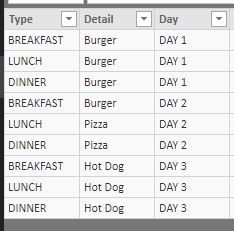
Assume this is basic data

7.JPG

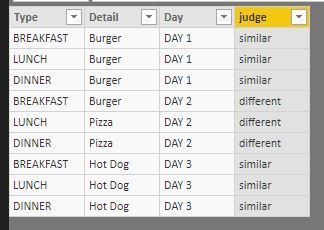
Step1:

Add a column to adjust whether it has similar foods for Lunch/Breakfast and Dinner each day

judge = IF(CALCULATE(DISTINCTCOUNT(Table1[Detail]),FILTER(Table1,Table1[Day]=EARLIER(Table1[Day])))>1,"different","similar")

8.JPG

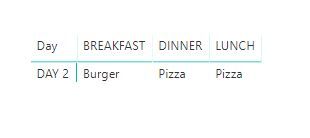
Step2:

Darg this field into visual level filter or page level filter to filter is different.

10.JPG

Result:

BeforeBeforeAfterAfter


or you could use another way:

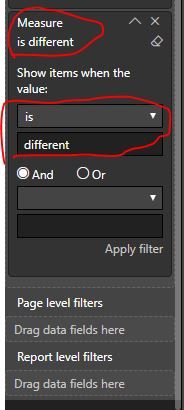
Add a measure to adjust whether it has similar foods for Lunch/Breakfast and Dinner each day

Measure = IF( CALCULATE(DISTINCTCOUNT(Table1[Detail]),ALLEXCEPT(Table1,Table1[Day]))>1,"different","similar")

Then Darg this field into visual level filter to filter is different.

12.JPG

It has the same effect.


Best Regards,
Lin


Community Support Team _ Lin
If this post helps, then please consider Accept it as the solution to help the other members find it more quickly.

View solution in original post

3 REPLIES 3
Greg_Deckler
Community Champion
Community Champion

Why not Day 3, which also has similar foods?


Follow on LinkedIn
@ me in replies or I'll lose your thread!!!
Instead of a Kudo, please vote for this idea
Become an expert!: Enterprise DNA
External Tools: MSHGQM
YouTube Channel!: Microsoft Hates Greg
Latest book!:
DAX For Humans

DAX is easy, CALCULATE makes DAX hard...

Thanks for Pointing out- Yes Even Third Row .

hi, @richiearora2001

After my test, you may try this way as below:

Assume this is basic data

7.JPG

Step1:

Add a column to adjust whether it has similar foods for Lunch/Breakfast and Dinner each day

judge = IF(CALCULATE(DISTINCTCOUNT(Table1[Detail]),FILTER(Table1,Table1[Day]=EARLIER(Table1[Day])))>1,"different","similar")

8.JPG

Step2:

Darg this field into visual level filter or page level filter to filter is different.

10.JPG

Result:

BeforeBeforeAfterAfter


or you could use another way:

Add a measure to adjust whether it has similar foods for Lunch/Breakfast and Dinner each day

Measure = IF( CALCULATE(DISTINCTCOUNT(Table1[Detail]),ALLEXCEPT(Table1,Table1[Day]))>1,"different","similar")

Then Darg this field into visual level filter to filter is different.

12.JPG

It has the same effect.


Best Regards,
Lin


Community Support Team _ Lin
If this post helps, then please consider Accept it as the solution to help the other members find it more quickly.

Helpful resources

Announcements
Join our Fabric User Panel

Join our Fabric User Panel

Share feedback directly with Fabric product managers, participate in targeted research studies and influence the Fabric roadmap.

February Power BI Update Carousel

Power BI Monthly Update - February 2026

Check out the February 2026 Power BI update to learn about new features.

FabCon Atlanta 2026 carousel

FabCon Atlanta 2026

Join us at FabCon Atlanta, March 16-20, for the ultimate Fabric, Power BI, AI and SQL community-led event. Save $200 with code FABCOMM.