cancel
Showing results for 
Search instead for 
Did you mean: 

The Power BI Data Visualization World Championships is back! Get ahead of the game and start preparing now! Learn more

Reply
Anonymous
Not applicable

Matrix - Adding values from same excel row

Hi,


I have a simple table (below).

Power BI Table.PNG

I need to add a column to the Matrix which substract the "Red" Type 24/20 for September 2022 with the "Red" Type 24/20 for June 2022. Ideally, it would look something like the below:

Power BI Result.PNG


How would you go about doing this in DAX? The issue I have is that I am trying to pick and combine/substract two values from the same column.


Any help would be appreciated.


Thanks


Alexis

1 ACCEPTED SOLUTION
Anonymous
Not applicable

Hi @Anonymous ,


According to your description, here are my steps you can follow as a solution.

(1)Click "Transform data" to enter the power query editor, click "Advanced Editor", and paste the following code.

let
    Source = Table.FromRows(Json.Document(Binary.Decompress(Binary.FromText("dc07CoBADATQu2wtaD6jsbXwALaynRaClej93ayCKFhNBuaRcQzDPIUicMVctiWlkxoAnlbBOyux9347lj3E4kXqixDniaqBvSdDL9Ktx/x5QyySt9bWKUVhza+5/4jAsoH6lhQkj4kn", BinaryEncoding.Base64), Compression.Deflate)), let _t = ((type nullable text) meta [Serialized.Text = true]) in type table [Type = _t, Date = _t, #"24/20" = _t, #"24/30" = _t, #"24/40" = _t, #"Food type" = _t]),
    #"Changed Type" = Table.TransformColumnTypes(Source,{{"Type", type text}, {"Date", type date}, {"24/20", Int64.Type}, {"24/30", Int64.Type}, {"24/40", Int64.Type}, {"Food type", type text}}),
    #"Unpivoted Columns" = Table.UnpivotOtherColumns(#"Changed Type", {"Type", "Date", "Food type"}, "Attribute", "Value"),
    #"Renamed Columns" = Table.RenameColumns(#"Unpivoted Columns",{{"Attribute", "Column Name"}})
in
    #"Renamed Columns"
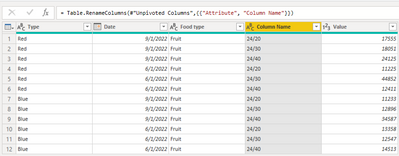
vtangjiemsft_0-1669363623457.png

(2)Click "Apply and Close" to create a new calculated column in Desktop.

 Column = FORMAT( [Date] ,"mmm") & " " & [Type]

(3)Then we can create a new table 2.

Table 2 = UNION( VALUES('Table'[Column]) ,{"Red Difference"})

(4)Then we can create a measure.

Measure = var _coloum = SELECTEDVALUE('Table 2'[Column])

var _Sept_red =SUMX(FILTER('Table' , MONTH('Table'[Date]) = 9 && 'Table'[Type]="Red") , [Value])

var _June_red =SUMX(FILTER('Table' , MONTH('Table'[Date]) = 6 && 'Table'[Type]="Red") , [Value])

return

IF(_coloum ="Red Difference" ,_Sept_red-_June_red ,CALCULATE(SUM('Table'[Value]), TREATAS(VALUES('Table 2'[Column]) , 'Table'[Column] )))

(5)Finally, a matrix visual is created, and the result is shown in the following image.
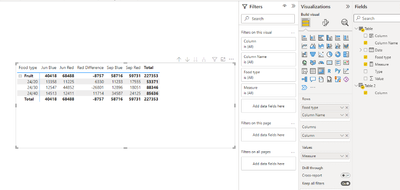
vtangjiemsft_1-1669363867353.png

Best Regards,

Neeko Tang

If this post helps, then please consider Accept it as the solution to help the other members find it more quickly. 

View solution in original post

1 REPLY 1
Anonymous
Not applicable

Hi @Anonymous ,


According to your description, here are my steps you can follow as a solution.

(1)Click "Transform data" to enter the power query editor, click "Advanced Editor", and paste the following code.

let
    Source = Table.FromRows(Json.Document(Binary.Decompress(Binary.FromText("dc07CoBADATQu2wtaD6jsbXwALaynRaClej93ayCKFhNBuaRcQzDPIUicMVctiWlkxoAnlbBOyux9347lj3E4kXqixDniaqBvSdDL9Ktx/x5QyySt9bWKUVhza+5/4jAsoH6lhQkj4kn", BinaryEncoding.Base64), Compression.Deflate)), let _t = ((type nullable text) meta [Serialized.Text = true]) in type table [Type = _t, Date = _t, #"24/20" = _t, #"24/30" = _t, #"24/40" = _t, #"Food type" = _t]),
    #"Changed Type" = Table.TransformColumnTypes(Source,{{"Type", type text}, {"Date", type date}, {"24/20", Int64.Type}, {"24/30", Int64.Type}, {"24/40", Int64.Type}, {"Food type", type text}}),
    #"Unpivoted Columns" = Table.UnpivotOtherColumns(#"Changed Type", {"Type", "Date", "Food type"}, "Attribute", "Value"),
    #"Renamed Columns" = Table.RenameColumns(#"Unpivoted Columns",{{"Attribute", "Column Name"}})
in
    #"Renamed Columns"

vtangjiemsft_0-1669363623457.png

(2)Click "Apply and Close" to create a new calculated column in Desktop.

 Column = FORMAT( [Date] ,"mmm") & " " & [Type]

(3)Then we can create a new table 2.

Table 2 = UNION( VALUES('Table'[Column]) ,{"Red Difference"})

(4)Then we can create a measure.

Measure = var _coloum = SELECTEDVALUE('Table 2'[Column])

var _Sept_red =SUMX(FILTER('Table' , MONTH('Table'[Date]) = 9 && 'Table'[Type]="Red") , [Value])

var _June_red =SUMX(FILTER('Table' , MONTH('Table'[Date]) = 6 && 'Table'[Type]="Red") , [Value])

return

IF(_coloum ="Red Difference" ,_Sept_red-_June_red ,CALCULATE(SUM('Table'[Value]), TREATAS(VALUES('Table 2'[Column]) , 'Table'[Column] )))

(5)Finally, a matrix visual is created, and the result is shown in the following image.

vtangjiemsft_1-1669363867353.png

Best Regards,

Neeko Tang

If this post helps, then please consider Accept it as the solution to help the other members find it more quickly. 

Helpful resources

Announcements
Power BI DataViz World Championships

Power BI Dataviz World Championships

The Power BI Data Visualization World Championships is back! Get ahead of the game and start preparing now!

December 2025 Power BI Update Carousel

Power BI Monthly Update - December 2025

Check out the December 2025 Power BI Holiday Recap!

FabCon Atlanta 2026 carousel

FabCon Atlanta 2026

Join us at FabCon Atlanta, March 16-20, for the ultimate Fabric, Power BI, AI and SQL community-led event. Save $200 with code FABCOMM.