Dear Lovely Community,
I am having difficulty to create a conditional column, I would really appreciakte if you could help me in the formula (Conditonal Column (want to create this in Data view and not in Query editor) of powerBi Desktop.
So scenario is below
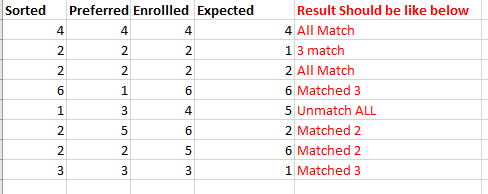
I have an Excel table consisting of four columns labeled "Sorted," "Preferred," "Enrolled," and "Expected." I'm looking to create a new conditional column called "result" based on the following criteria:
- If all corresponding rows in these four columns match, I want the result to be "Matched."
- If only three out of the four corresponding rows match, I want the result to be "Unmatched 1."
- If two rows match while the other two do not, I want the result to be "Unmatched 2."
- If none of the four corresponding rows match, the result should be "Unmatched all."
I have given an example below screen shot with the column that I want the results to be like.