cancel
Showing results for 
Search instead for 
Did you mean: 

Get Fabric certified for FREE! Don't miss your chance! Learn more

Reply
GCGradwell
Helper I
Helper I

Map Visualization Formatting

Hi,


When I use the map visualisation to display my data, it is very hard to understand the map because there are thousands of individual datapoints on the map - I want the map to combine the datapoints which are close together to form a larger bubble on the map, rather than many individual bubbles.


Is this possible?


Thanks,


Greg

3 REPLIES 3
MarcusHussey
Frequent Visitor

Have you tried the Filled Map option?

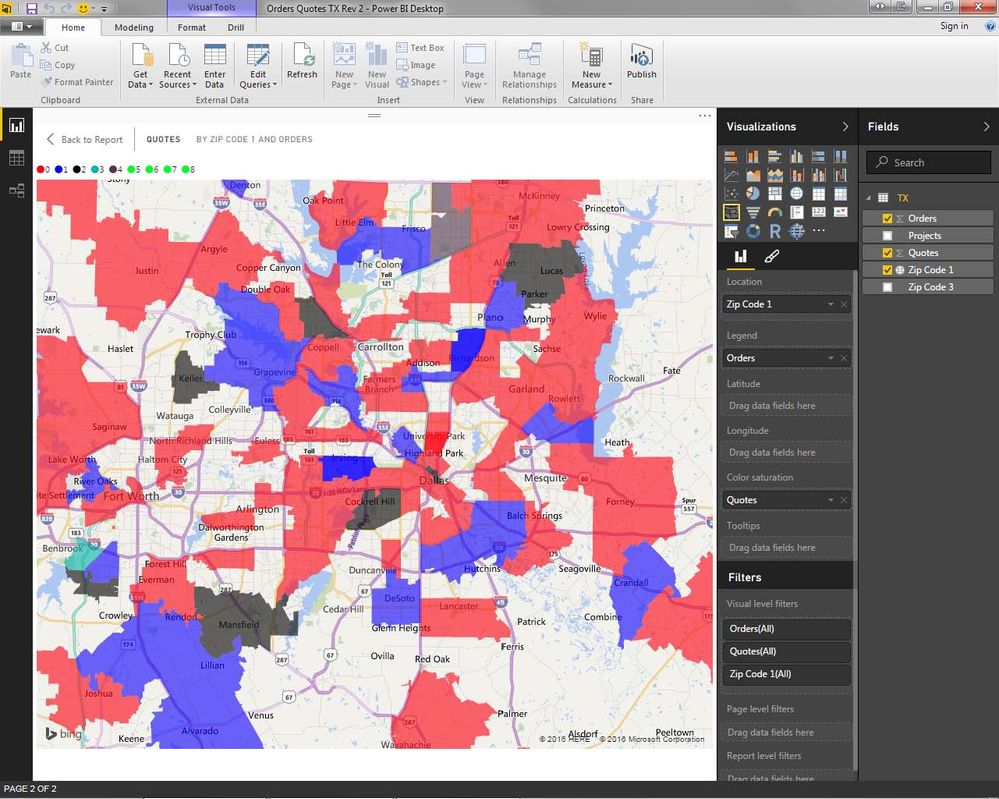
This allows you to group all of the "bubbles" into a larger defined space.  You can define the space by Country, State, or even Zip Code if you want to.

Thank you for your reply.


I have tried this, but the problem is that the data is localised mainly within addresses of 1 country, so it is very difficult to see any of the city names due to the dark shading of the areas. Also, some of the areas it groups the addresses in are very large, so the shading does not represent the locations very well because it shades a very large area.


Any other ideas?


Thanks

I think the Filled Map may work for you - but you may have to re-align the area size you wish to view in the report.  As an exmple, I am also interested in what is going on in a given area, but in my case I have broken the areas out to be individual US States.  That way when I look at the areas, all of my Sales Activity is linked to an individual Zip Code....


Power BI Image 2.jpg

.....You stated, you are looking at "1 Country".  Is there a way you could break it out into smaller regional sections so the above would work for you?


-Marcus

Helpful resources

Announcements
Sticker Challenge 2026 Carousel

Join our Community Sticker Challenge 2026

If you love stickers, then you will definitely want to check out our Community Sticker Challenge!

January Power BI Update Carousel

Power BI Monthly Update - January 2026

Check out the January 2026 Power BI update to learn about new features.

FabCon Atlanta 2026 carousel

FabCon Atlanta 2026

Join us at FabCon Atlanta, March 16-20, for the ultimate Fabric, Power BI, AI and SQL community-led event. Save $200 with code FABCOMM.