Join us at FabCon Atlanta from March 16 - 20, 2026, for the ultimate Fabric, Power BI, AI and SQL community-led event. Save $200 with code FABCOMM.
Register now!The Power BI Data Visualization World Championships is back! Get ahead of the game and start preparing now! Learn more
Hi Community,
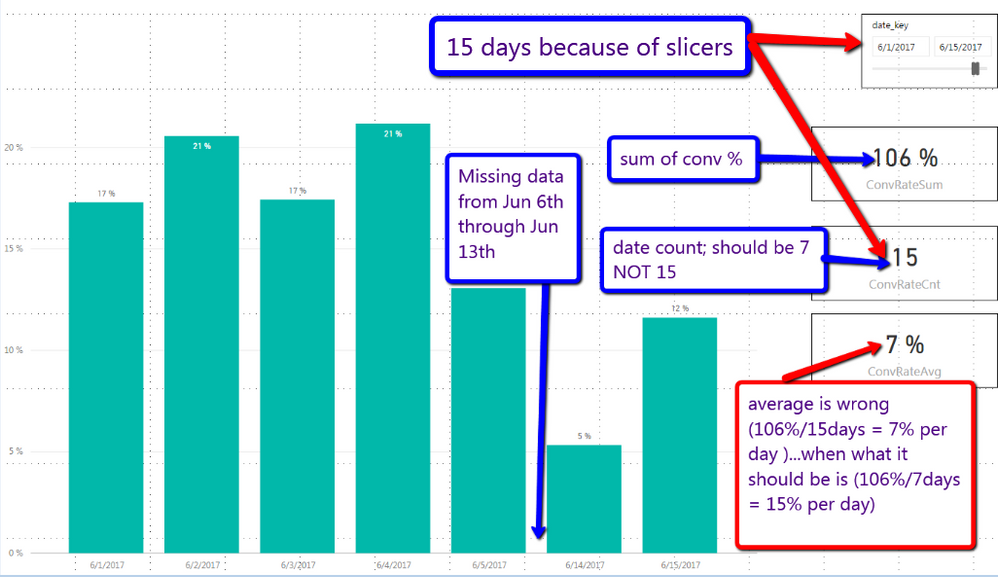
I'm trying to manually calculate the average because using AVERAGE funtion is not returning result I want.
What I'm trying to do:
numerator=106%
denominator (should be) 7 days
average (should be) 15% per day <<<<< this is the correct answer that I'm after.
However, as you can see in the screenshot below the AVERAGE function is return 7% which is NOT correct. It's counting the number of days as 15 but there's only data for 7 days.
Solved! Go to Solution.
You may modify the measures as shown below.
Cnt =
CALCULATE (
DISTINCTCOUNT ( Table1[date_key] ),
NOT ( ISBLANK ( Table1[percent] ) )
)
Avg = DIVIDE ( SUM ( Table1[percent] ), [Cnt] )
You may modify the measures as shown below.
Cnt =
CALCULATE (
DISTINCTCOUNT ( Table1[date_key] ),
NOT ( ISBLANK ( Table1[percent] ) )
)
Avg = DIVIDE ( SUM ( Table1[percent] ), [Cnt] )
The Power BI Data Visualization World Championships is back! Get ahead of the game and start preparing now!
| User | Count |
|---|---|
| 40 | |
| 37 | |
| 33 | |
| 29 | |
| 27 |
| User | Count |
|---|---|
| 133 | |
| 104 | |
| 61 | |
| 59 | |
| 55 |