cancel
Showing results forย 
Search instead forย 
Did you mean:ย 

Data Days is here! Join us now for 60+ days of learning, challenges, and connection. Learn more

Reply
Anonymous
Not applicable

Make the button on page 1 green if there are values in the table on page 2

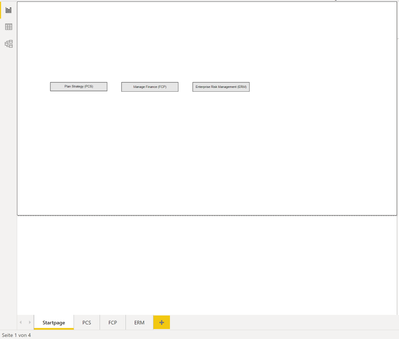
I have a report with several pages and on the first page (start page) there are text fields as buttons that link to the other pages. On the other pages are tables with values. But the tables do not always contain values.

Now I want that if in a table values are contained the button on the start page is displayed in green.

Does anyone have an idea ?

Thank you

1 ACCEPTED SOLUTION
v-xiaotang
Community Support
Community Support

Hi @Anonymous 

Thanks for reaching to us.

First, you need a measure to get the table status, e.g.

HasValue = IF(COUNTROWS(ALLSELECTED('Table')),"Green","Red")

well, the measure depends on your need.

then, put it into Format Button  - Fill -

vxiaotang_0-1634092428328.png

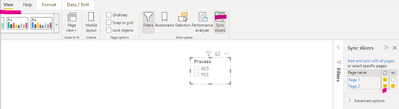
finally, enable Sync slicers

vxiaotang_1-1634092580155.png

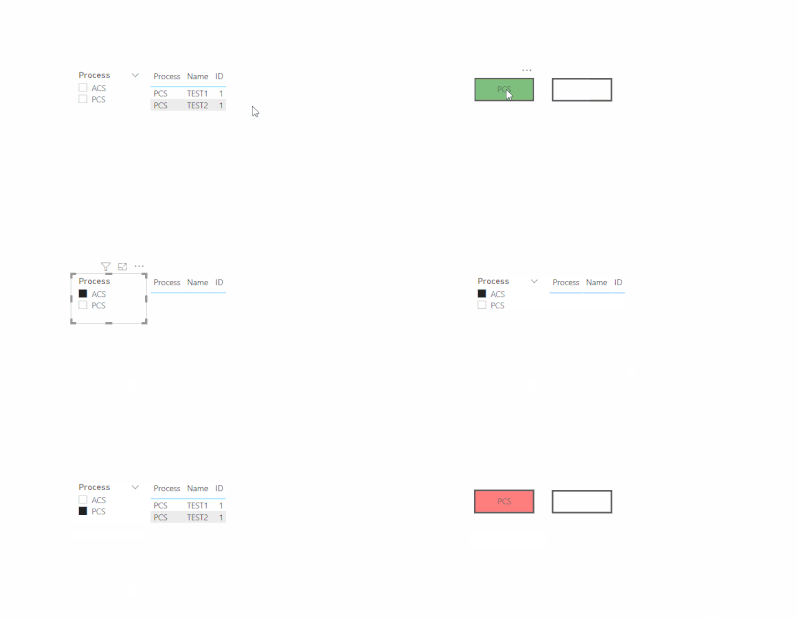
result

vxiaotang_2-1634092951757.gif

FYI:

https://www.wiseowl.co.uk/blog/s2722/conditional-format-button-properties.htm


Best Regards,

Community Support Team _ Tang

If this post helps, please consider Accept it as the solution to help the other members find it more quickly.

View solution in original post

3 REPLIES 3
v-xiaotang
Community Support
Community Support

Hi @Anonymous 

Thanks for reaching to us.

First, you need a measure to get the table status, e.g.

HasValue = IF(COUNTROWS(ALLSELECTED('Table')),"Green","Red")

well, the measure depends on your need.

then, put it into Format Button  - Fill -

vxiaotang_0-1634092428328.png

finally, enable Sync slicers

vxiaotang_1-1634092580155.png

result

vxiaotang_2-1634092951757.gif

FYI:

https://www.wiseowl.co.uk/blog/s2722/conditional-format-button-properties.htm


Best Regards,

Community Support Team _ Tang

If this post helps, please consider Accept it as the solution to help the other members find it more quickly.

jaideepnema
Solution Sage
Solution Sage

Hi @Anonymous ,
Not very clear for me but is it possible for you to share a sample pbix with sensitive data removed ?


Regards,

Jaideep

Anonymous
Not applicable

Dom898_0-1633968446137.png

My test file: sry i cant upload a pbix file.


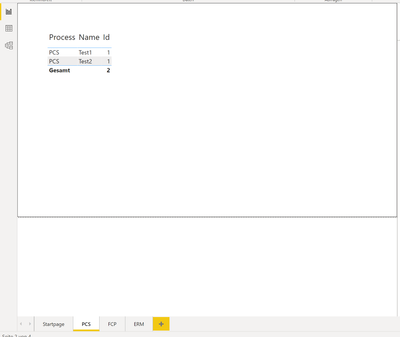
on the Startpage there are 3 buttons that navigate to the pages (with Aktion/sitenavigate). If there are values in the table one page PCS (Screenshot below) , then the PCS button on the Startpage should be highlighted in green.


Dom898_1-1633968518838.png


is that enough as a description ?

Helpful resources

Announcements
Fabric Data Days is here Carousel

Fabric Data Days 2026

Don't miss out on Data Days, June 15 through August 7. Learn Fabric, Power BI, SQL, AI and more.

May Power BI Update Carousel

Power BI Monthly Update - May 2026

Check out the May 2026 Power BI update to learn about new features.

Power BI DataViz World Championships carousel

Power BI DataViz World Championships - June 2026

A new Power BI DataViz World Championship is coming this June! Don't miss out on submitting your entry.