Join us at FabCon Atlanta from March 16 - 20, 2026, for the ultimate Fabric, Power BI, AI and SQL community-led event. Save $200 with code FABCOMM.
Register now!The Power BI Data Visualization World Championships is back! Get ahead of the game and start preparing now! Learn more
I would like to make only ONE line in a line chart thicker, so it stands out. How do I do this?
Solved! Go to Solution.
Hi @Anonymous ,
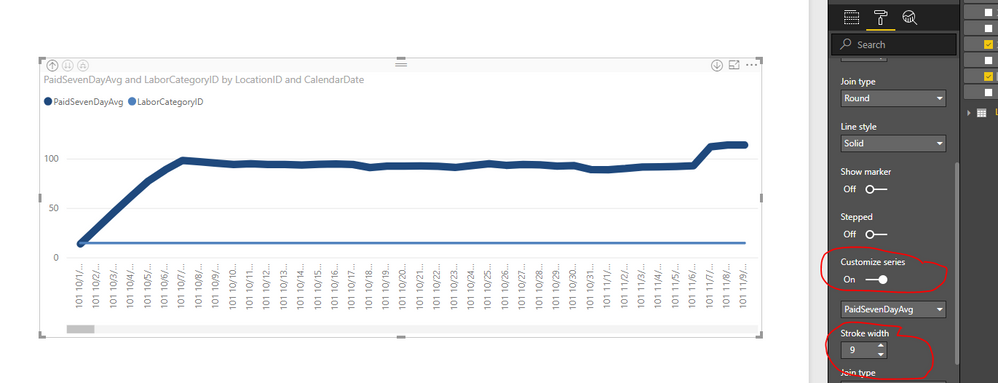
Could you have switched on the "Customize series" option and enlarge the "Stroke width" option:
Regards,
Daniel He
Hi @Anonymous ,
Could you have switched on the "Customize series" option and enlarge the "Stroke width" option:
Regards,
Daniel He
Hi @Anonymous
I am sure that this can be done in the formatting options?
The Power BI Data Visualization World Championships is back! Get ahead of the game and start preparing now!
| User | Count |
|---|---|
| 38 | |
| 37 | |
| 33 | |
| 32 | |
| 29 |
| User | Count |
|---|---|
| 132 | |
| 88 | |
| 82 | |
| 68 | |
| 64 |