FabCon is coming to Atlanta
Join us at FabCon Atlanta from March 16 - 20, 2026, for the ultimate Fabric, Power BI, AI and SQL community-led event. Save $200 with code FABCOMM.
Register now!- Power BI forums
- Get Help with Power BI
- Desktop
- Service
- Report Server
- Power Query
- Mobile Apps
- Developer
- DAX Commands and Tips
- Custom Visuals Development Discussion
- Health and Life Sciences
- Power BI Spanish forums
- Translated Spanish Desktop
- Training and Consulting
- Instructor Led Training
- Dashboard in a Day for Women, by Women
- Galleries
- Data Stories Gallery
- Themes Gallery
- Contests Gallery
- QuickViz Gallery
- Quick Measures Gallery
- Visual Calculations Gallery
- Notebook Gallery
- Translytical Task Flow Gallery
- TMDL Gallery
- R Script Showcase
- Webinars and Video Gallery
- Ideas
- Custom Visuals Ideas (read-only)
- Issues
- Issues
- Events
- Upcoming Events
The Power BI Data Visualization World Championships is back! Get ahead of the game and start preparing now! Learn more
- Power BI forums
- Forums
- Get Help with Power BI
- Desktop
- MTD and YTD headcount with dynamic slicers
- Subscribe to RSS Feed
- Mark Topic as New
- Mark Topic as Read
- Float this Topic for Current User
- Bookmark
- Subscribe
- Printer Friendly Page

- Mark as New
- Bookmark
- Subscribe
- Mute
- Subscribe to RSS Feed
- Permalink
- Report Inappropriate Content
MTD and YTD headcount with dynamic slicers
Dear Guru/s,
I am a novice in Power Bi desktop - learning the ways.
Have been trying to build a report based on slicer selection of Month / Location/ Status/ & Type.
Able to create MTD avg and %ages but slicers do not work in accordance to moving avg YTD or Total YTD exits - PBIX link attached.
This is a single table mentioned below :
Date | Zone | Entity_Desc | Ids | Type | Status | Unit | Status | Exits | DateKey | YearNumber | Year | MonthNumber | Month |
Apr-19 | NCR-1 | Discovery Network | XX01 | Employee | Full Time | LOS | Opening |
| 20190401 | 2020 | FY 2020 | 1 | April |
Apr-19 | NCR-1 | Walmart | XX02 | Temporary | Part Time | HOU | Opening |
| 20190401 | 2020 | FY 2020 | 1 | April |
Apr-19 | NCR-1 | Holiday Inn | XX03 | Contractual | Full Time | HOU | Opening | Inactive | 20190401 | 2020 | FY 2020 | 1 | April |
May-19 | NCR-1 | Discovery Network | XX01 | Employee | Full Time | LOS | Opening |
| 20190501 | 2020 | FY 2020 | 2 | May |
May-19 | NCR-1 | Walmart | XX02 | Temporary | Part Time | HOU | Opening | Inactive | 20190501 | 2020 | FY 2020 | 2 | May |
May-19 | NCR-1 | Holiday Inn | XX04 | Employee | Nursing | TEX | New joiner |
| 20190501 | 2020 | FY 2020 | 2 | May |
Jun-19 | NCR-1 | Discovery Network | XX01 | Employee | Full Time | LOS | Opening |
| 20190601 | 2020 | FY 2020 | 3 | June |
Jun-19 | NCR-1 | Walmart | XX04 | Temporary | Part Time | TEX | Opening | Inactive | 20190601 | 2020 | FY 2020 | 3 | June |
Jun-19 | NCR-1 | Holiday Inn | XX05 | Contractual | Full Time | HOU | New joiner | Inactive | 20190601 | 2020 | FY 2020 | 3 | June |
Jul-19 | NCR-1 | Discovery Network | XX01 | Employee | Nursing | LOS | Opening |
| 20190701 | 2020 | FY 2020 | 4 | July |
Jul-19 | NCR-1 | Walmart | XX06 | Contractual | Full Time | TEX | New joiner |
| 20190701 | 2020 | FY 2020 | 4 | July |
Solved! Go to Solution.


- Mark as New
- Bookmark
- Subscribe
- Mute
- Subscribe to RSS Feed
- Permalink
- Report Inappropriate Content
@Anonymous -
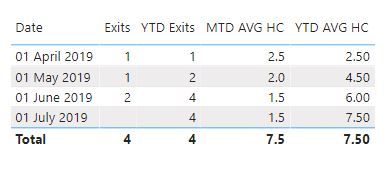
Here are measures
Exits = CALCULATE(COUNTROWS(Sheet1),FIND("Inact",Sheet1[Exits],,0))
//copied from your file
YTD Exits = CALCULATE([Exits],DATESYTD(Sheet1[Date]))MTD AVG HC = ('Measure'[Opening_HC]+'Measure'[Closing HC])/2
//copied from your fileYTD AVG HC = CALCULATE([MTD AVG HC],DATESYTD(Sheet1[Date]))
Output

Did I answer your question? Mark my post as a solution!
Appreciate with a kudos 🙂
Regards,
Nandu Krishna
- Mark as New
- Bookmark
- Subscribe
- Mute
- Subscribe to RSS Feed
- Permalink
- Report Inappropriate Content
@Anonymous - Use ALLEXCEPT() instead of ALL().
Reference link: https://excelkingdom.blogspot.com/2018/08/how-to-use-all-and-allexcept-functions.html
Did I answer your question? Mark my post as a solution!
Appreciate with a kudos 🙂
Regards,
Nandu Krishna
- Mark as New
- Bookmark
- Subscribe
- Mute
- Subscribe to RSS Feed
- Permalink
- Report Inappropriate Content
Thanks @nandukrishnavs, the ALLEXCEPT function did the trick partially.
As the report is now responding to Slicers - but the issue remains as the YTD total exits are showing in each row- and not as a YTD running total.
Please find below the screen shot of both YTD exits (running total) as against the 2YTD Exits (using AllExcept) :

The DAX formulae used for :
Exits
- Mark as New
- Bookmark
- Subscribe
- Mute
- Subscribe to RSS Feed
- Permalink
- Report Inappropriate Content
@Anonymous
Try this
YTD Exits = CALCULATE([Exits],DATESYTD(Sheet1[Date]))
Regards,
Nandu Krishna
- Mark as New
- Bookmark
- Subscribe
- Mute
- Subscribe to RSS Feed
- Permalink
- Report Inappropriate Content
Hi @ nandukrishnavs,
Really grateful to you for suggesting, this works!!
Now i get the exits for the month, but not cumulative i.e - April has1, May also has 1 - hence May YTD should reflect as 1+1 = 2.
Please Suggest,
Thanks again in advance,
Pratz
- Mark as New
- Bookmark
- Subscribe
- Mute
- Subscribe to RSS Feed
- Permalink
- Report Inappropriate Content
Regards,
Nandu Krishna
- Mark as New
- Bookmark
- Subscribe
- Mute
- Subscribe to RSS Feed
- Permalink
- Report Inappropriate Content
Hi @nandukrishnavs,
Thanks, sure.
Please find below the snapshot of FYYear and Month - N_YTD exits is the header.
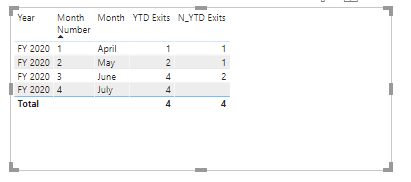
Please suggest,
Thanks again for your advise.
Regards,
Pratz
- Mark as New
- Bookmark
- Subscribe
- Mute
- Subscribe to RSS Feed
- Permalink
- Report Inappropriate Content
Regards,
Nandu Krishna
- Mark as New
- Bookmark
- Subscribe
- Mute
- Subscribe to RSS Feed
- Permalink
- Report Inappropriate Content
@Anonymous -
Here are measures
Exits = CALCULATE(COUNTROWS(Sheet1),FIND("Inact",Sheet1[Exits],,0))
//copied from your file
YTD Exits = CALCULATE([Exits],DATESYTD(Sheet1[Date]))MTD AVG HC = ('Measure'[Opening_HC]+'Measure'[Closing HC])/2
//copied from your fileYTD AVG HC = CALCULATE([MTD AVG HC],DATESYTD(Sheet1[Date]))
Output
Did I answer your question? Mark my post as a solution!
Appreciate with a kudos 🙂
Regards,
Nandu Krishna
- Mark as New
- Bookmark
- Subscribe
- Mute
- Subscribe to RSS Feed
- Permalink
- Report Inappropriate Content
Thanks a Ton @nandukrishnavs !!!. so patiently you have adressed the concerns.
Yes, the solution you had provided was working fine, only i got confused in selecting the month and Year seperately and not the date.
Thank you once again 🙂
Helpful resources

Power BI Dataviz World Championships
The Power BI Data Visualization World Championships is back! Get ahead of the game and start preparing now!

Power BI Monthly Update - November 2025
Check out the November 2025 Power BI update to learn about new features.

FabCon Atlanta 2026
Join us at FabCon Atlanta, March 16-20, for the ultimate Fabric, Power BI, AI and SQL community-led event. Save $200 with code FABCOMM.

| User | Count |
|---|---|
| 59 | |
| 46 | |
| 42 | |
| 23 | |
| 17 |


| User | Count |
|---|---|
| 190 | |
| 122 | |
| 96 | |
| 66 | |
| 47 |


