Join us at FabCon Atlanta from March 16 - 20, 2026, for the ultimate Fabric, Power BI, AI and SQL community-led event. Save $200 with code FABCOMM.
Register now!The Power BI Data Visualization World Championships is back! Get ahead of the game and start preparing now! Learn more
Hi there
I have a setup where Im using revenue measure and a Date Filter to look at annual revenues over sseveral years
Solved! Go to Solution.
Hi @Gareth_Hunt ,
From my test, I could sort decending correctly by YS revenue. Please try:
Method1:
YS-Revenue =
CALCULATE (
SUM ( DCalandar[Invoice] ),
FILTER (
'DCalandar',
'DCalandar'[Customer] = MAX ( 'DCalandar'[Customer] )
&& YEAR ( 'DCalandar'[Date] ) = YEAR ( MAX ( 'DCalandar'[Date] ) )
)
)
Method2:Calculate the sum separately:
2018 YS-revenue =
CALCULATE (
SUM ( 'DCalandar'[Invoice] ),
FILTER (
'DCalandar',
'DCalandar'[Customer] = MAX ( 'DCalandar'[Customer] )
&& YEAR ( 'DCalandar'[Date] ) = 2018
)
)2019 YS-revenue =
CALCULATE (
SUM ( 'DCalandar'[Invoice] ),
FILTER (
ALL ( 'DCalandar' ),
'DCalandar'[Customer] = MAX ( 'DCalandar'[Customer] )
&& YEAR ( 'DCalandar'[Date] ) = 2019
)
)
Method3:Use rank
Measure=
RANKX ( ALL ( 'DCalandar' ), [2019 YS-revenue],, DESC, DENSE )
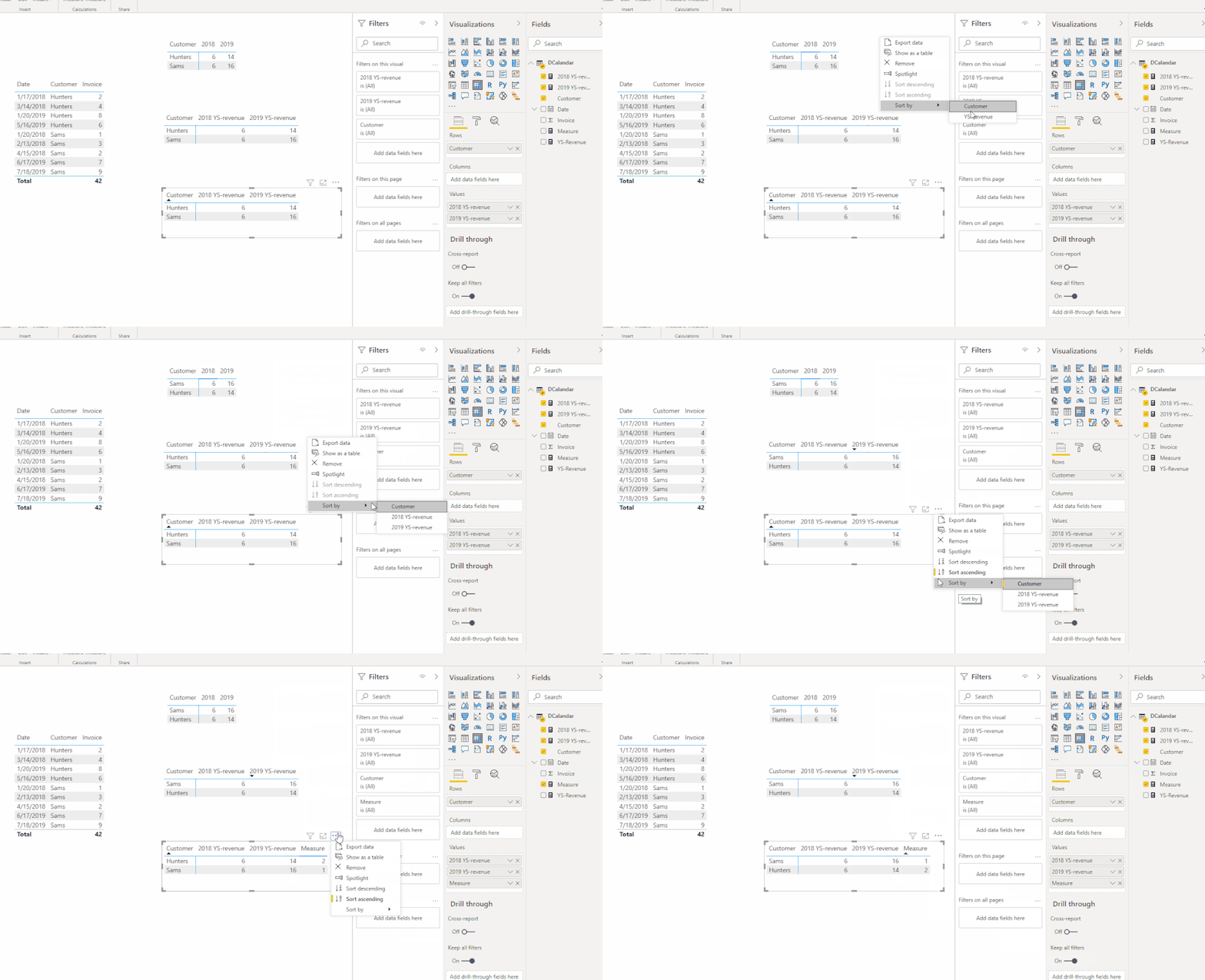
Did I answer your question ? Please mark my reply as solution. Thank you very much.
Or you are still confused about it, please provide me with more details about your table and your problem or share me with your pbix file from your Onedrive for Business.
Best Regards,
Eyelyn Qin
Hi @Gareth_Hunt ,
From my test, I could sort decending correctly by YS revenue. Please try:
Method1:
YS-Revenue =
CALCULATE (
SUM ( DCalandar[Invoice] ),
FILTER (
'DCalandar',
'DCalandar'[Customer] = MAX ( 'DCalandar'[Customer] )
&& YEAR ( 'DCalandar'[Date] ) = YEAR ( MAX ( 'DCalandar'[Date] ) )
)
)
Method2:Calculate the sum separately:
2018 YS-revenue =
CALCULATE (
SUM ( 'DCalandar'[Invoice] ),
FILTER (
'DCalandar',
'DCalandar'[Customer] = MAX ( 'DCalandar'[Customer] )
&& YEAR ( 'DCalandar'[Date] ) = 2018
)
)2019 YS-revenue =
CALCULATE (
SUM ( 'DCalandar'[Invoice] ),
FILTER (
ALL ( 'DCalandar' ),
'DCalandar'[Customer] = MAX ( 'DCalandar'[Customer] )
&& YEAR ( 'DCalandar'[Date] ) = 2019
)
)
Method3:Use rank
Measure=
RANKX ( ALL ( 'DCalandar' ), [2019 YS-revenue],, DESC, DENSE )
Did I answer your question ? Please mark my reply as solution. Thank you very much.
Or you are still confused about it, please provide me with more details about your table and your problem or share me with your pbix file from your Onedrive for Business.
Best Regards,
Eyelyn Qin
@Gareth_Hunt , Create a sort column on year
Year 1 = [year]
year sort = rankx(all(table), [year]),,desc)
sort year 1 on year sort and and use year 1 on column
Hi @Gareth_Hunt
Can you share the pbix, or one with mock data that reproes the issue?
Please mark the question solved when done and consider giving a thumbs up if posts are helpful.
Contact me privately for support with any larger-scale BI needs, tutoring, etc.
Cheers
The Power BI Data Visualization World Championships is back! Get ahead of the game and start preparing now!
Check out the November 2025 Power BI update to learn about new features.
| User | Count |
|---|---|
| 59 | |
| 43 | |
| 42 | |
| 23 | |
| 17 |
| User | Count |
|---|---|
| 190 | |
| 122 | |
| 96 | |
| 66 | |
| 47 |