cancel
Showing results for 
Search instead for 
Did you mean: 

The Power BI Data Visualization World Championships is back! Get ahead of the game and start preparing now! Learn more

Reply
some1else
Helper II
Helper II

Lookupvalue error

Hi guys.


Past week I had this working, now I made some adjustments to my data and it no longer works. So, I'm hoping someone can help me.


Background info:

The street name can exist in another county, so I need to extract just the street matching the county I selected in slicer.

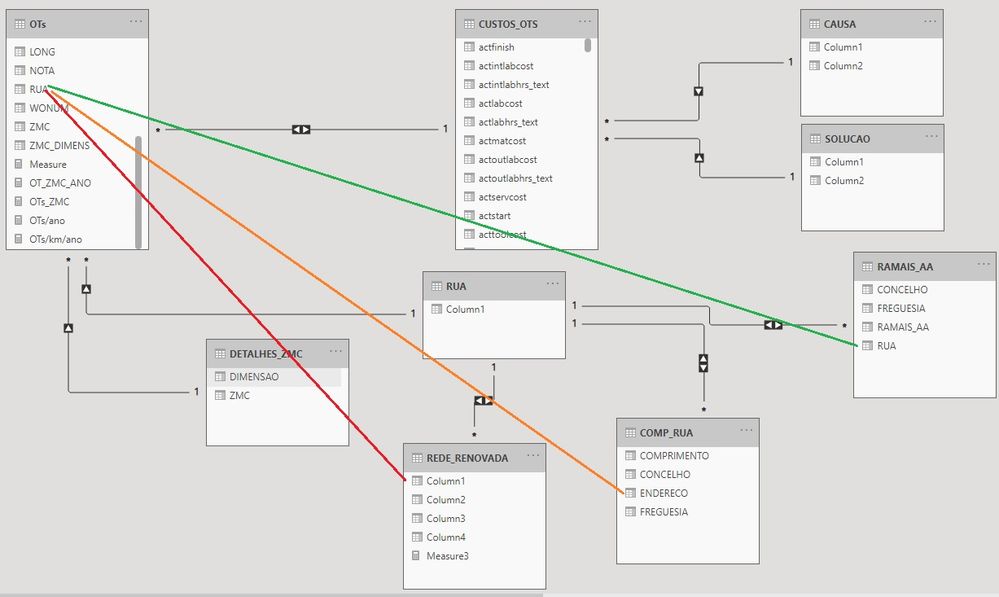
When selected, RUA from OTs has a name and county. I would need to retrieve COMPRIMENTO from COMP_RUA, RAMAIS_AA from RAMAIS_AA and Column1 from REDE_RENOVADA.


The function I was using before was like this in a calculated column: LOOKUPVALUE(COMP_RUA[COMPRIMENTO],COMP_RUA[ENDERECO],OTs[RUA],COMP_RUA[FREGUESIA],OTs[FREGUESIA])


But now it says the table supplied has multiple values.


I need to extract the exact COMPRIMENTO from the street (RUA) selected in OTs table.


Note: I'm using . for decimal values and , in regional settings.

That's why you probably will be confused in the function above.

relations.jpg

1 ACCEPTED SOLUTION

Hi @some1else ,

Try to use firstnoblank() to create columns:

Column = 
CALCULATE (
    FIRSTNONBLANK ( 'Folhal'[COMPRIMENTO], 1 ),
    FILTER (
        'Folhal',
        'Folhal'[RUA] = 'OTs'[RUA]
            && 'Folhal'[FREGUESIA] = 'OTs'[FREGUESIA]
    )
)

Please refer this viedo about how to deal with this error in lookupvalue.


In addition, attached a simple sample in the below, hopes it could help.


Best Regards,
Community Support Team _ Yingjie Li
If this post helps, then please consider Accept it as the solution to help the other members find it more quickly.


View solution in original post

3 REPLIES 3
amitchandak
Super User
Super User

@some1else , refer 4 ways to copy data from one table to another
https://www.youtube.com/watch?v=Wu1mWxR23jU
https://www.youtube.com/watch?v=czNHt7UXIe8

Share with Power BI Enthusiasts: Full Power BI Video (20 Hours) YouTube
Microsoft Fabric Series 60+ Videos YouTube
Microsoft Fabric Hindi End to End YouTube

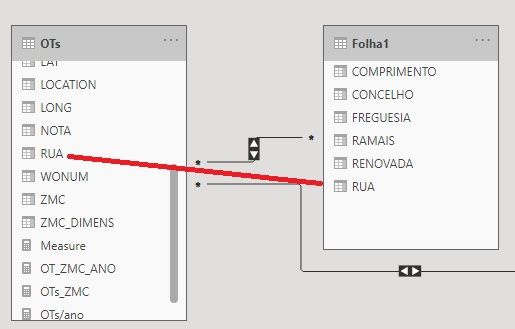
Thanks for the reply. I've watched the videos, but still facing the same problem. I've converged all the info that was spread in other tables into one single table that contains the details of each street.


Please check image below containing new relationships

Sem Título2.jpg


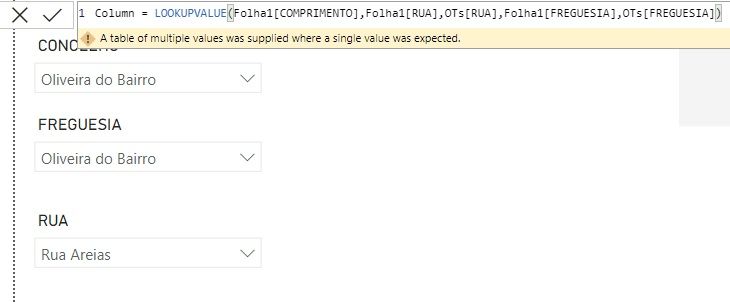
If I make a new column in OTs with this function it gives an error (see image below)

Sem Título3.jpg


I need it to give me the COMPRIMENTO value for the RUA and FREGUESIA user selects in slicer.

In this case, there's more than one "Rua Areias" in Folha1 table, that's why user needs to select FREGUESIA for it to grab the unique value.

Hi @some1else ,

Try to use firstnoblank() to create columns:

Column = 
CALCULATE (
    FIRSTNONBLANK ( 'Folhal'[COMPRIMENTO], 1 ),
    FILTER (
        'Folhal',
        'Folhal'[RUA] = 'OTs'[RUA]
            && 'Folhal'[FREGUESIA] = 'OTs'[FREGUESIA]
    )
)

Please refer this viedo about how to deal with this error in lookupvalue.


In addition, attached a simple sample in the below, hopes it could help.


Best Regards,
Community Support Team _ Yingjie Li
If this post helps, then please consider Accept it as the solution to help the other members find it more quickly.


Helpful resources

Announcements
Power BI DataViz World Championships

Power BI Dataviz World Championships

The Power BI Data Visualization World Championships is back! Get ahead of the game and start preparing now!

December 2025 Power BI Update Carousel

Power BI Monthly Update - December 2025

Check out the December 2025 Power BI Holiday Recap!

FabCon Atlanta 2026 carousel

FabCon Atlanta 2026

Join us at FabCon Atlanta, March 16-20, for the ultimate Fabric, Power BI, AI and SQL community-led event. Save $200 with code FABCOMM.