cancel
Showing results for 
Search instead for 
Did you mean: 

The Power BI Data Visualization World Championships is back! Get ahead of the game and start preparing now! Learn more

Reply
Anonymous
Not applicable

Lookup multiple values to filter table for RLS

I can't find an answer and i've tried several things but I need to filter a table for my RLS. I need to filter my table with a list of Inspectors based on the unit they are in. I have many tables but because of the relationships  i couldnt do a direct relationship between the Unit and the employee table. And i cant change directionality.

So im thinking my solution is to grab the values from my filtered Unit table and filter Inspector table based on that.
Here's a snippet of relationships. i underlined the field they are connected with by color
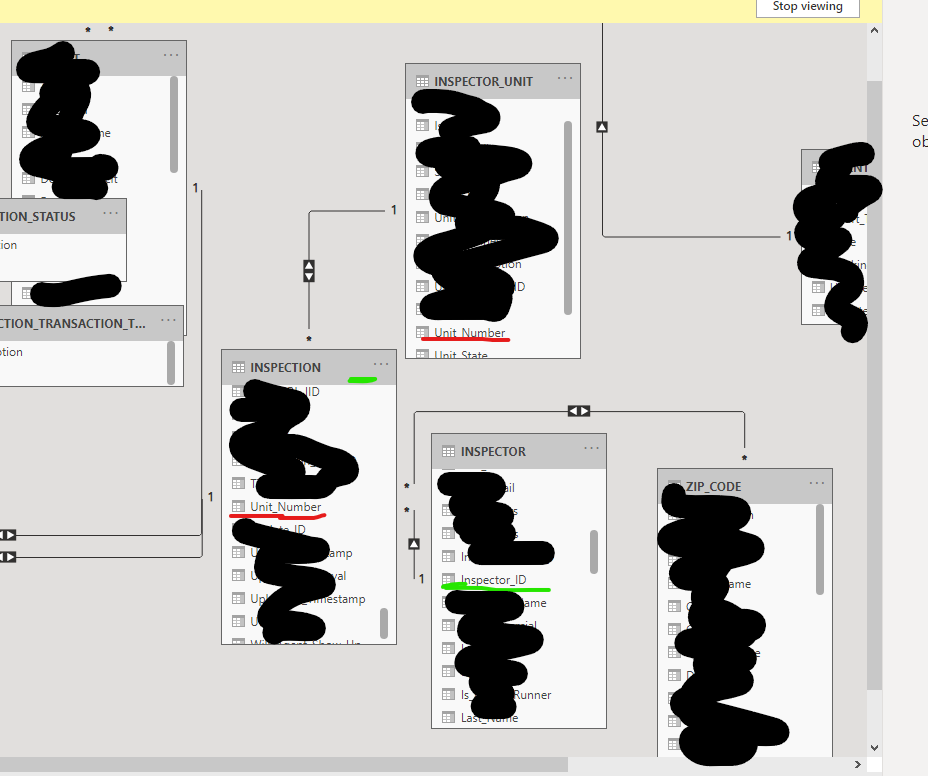
 

image.png


I have an RLS filter on my Unit table to determine what  units to show based on what Regional VP is logged in:


[RVP_Email] = userprincipalname()


and that works fine. and it Filters the Unit list, so i need to take the unit_numbers that are left after being filter and then filter the inspector table so i can have the list of inspectors.


Ive tried things similar to:

  • LOOKUPVALUE but i know that can only return a single value
  • CALCULATE ( VALUES(INSPECTION[unit_number]),
    FILTER (
    ALLSELECTED( INSPECTION ),
    INSPECTION[unit_number] in VALUES(INSPECTOR_UNIT[unit_number] ) )
    )
  •  [unit_number] in VALUES(INSPECTOR_UNIT[unit_n

But i get the error in measures, on the RLS box.  

image.png


Any help would be greatly appreciated, Thanks!

1 ACCEPTED SOLUTION
AllisonKennedy
Community Champion
Community Champion

The unit table doesn't filter the inspector table - cross filter direction won't let the unit flow against the arrow into inspector table. (I don't recommend both cross filter direction, but that would allow the filtering). 


Also be sure to tick 'apply security filters in both directions' when you have both cross filter direction. 


Not sure if this trick also works with RLS, but you could try creating a filter to show inspectors only when COUNTROWS(Inspection)>0


https://www.sqlbi.com/articles/bidirectional-relationships-and-ambiguity-in-dax/


Please @mention me in your reply if you want a response.

Copying DAX from this post? Click here for a hack to quickly replace it with your own table names

Has this post solved your problem? Please Accept as Solution so that others can find it quickly and to let the community know your problem has been solved.
If you found this post helpful, please give Kudos C

I work as a Microsoft trainer and consultant, specialising in Power BI and Power Query.
www.excelwithallison.com

View solution in original post

1 REPLY 1
AllisonKennedy
Community Champion
Community Champion

The unit table doesn't filter the inspector table - cross filter direction won't let the unit flow against the arrow into inspector table. (I don't recommend both cross filter direction, but that would allow the filtering). 


Also be sure to tick 'apply security filters in both directions' when you have both cross filter direction. 


Not sure if this trick also works with RLS, but you could try creating a filter to show inspectors only when COUNTROWS(Inspection)>0


https://www.sqlbi.com/articles/bidirectional-relationships-and-ambiguity-in-dax/


Please @mention me in your reply if you want a response.

Copying DAX from this post? Click here for a hack to quickly replace it with your own table names

Has this post solved your problem? Please Accept as Solution so that others can find it quickly and to let the community know your problem has been solved.
If you found this post helpful, please give Kudos C

I work as a Microsoft trainer and consultant, specialising in Power BI and Power Query.
www.excelwithallison.com

Helpful resources

Announcements
Power BI DataViz World Championships

Power BI Dataviz World Championships

The Power BI Data Visualization World Championships is back! Get ahead of the game and start preparing now!

December 2025 Power BI Update Carousel

Power BI Monthly Update - December 2025

Check out the December 2025 Power BI Holiday Recap!

FabCon Atlanta 2026 carousel

FabCon Atlanta 2026

Join us at FabCon Atlanta, March 16-20, for the ultimate Fabric, Power BI, AI and SQL community-led event. Save $200 with code FABCOMM.