cancel
Showing results for 
Search instead for 
Did you mean: 

The Power BI Data Visualization World Championships is back! Get ahead of the game and start preparing now! Learn more

Reply
krishnak
New Member

Look up value help needed

Hi All, I am a beginner and working on a visual. The problem is best illustrated by the following table.

DateValueRequired Avg Value
4/1/2019342Avg of 342, 298
3/1/2019354Avg of 354, 298
2/1/2019308Avg of 308, 298
1/1/2019298Avg of 298, 298
3/1/2018344Avg of 344, 306
2/1/2018322Avg of 322, 306
1/1/2018306Avg of 306, 306


The resulting column should give an average of selected row value and the value for the beginning of the year. For 2019,  the year beginning value is the value for 1/1/2019 and for 2018, the value is for 1/1/2018.  

I added column in Data View extracting the year of the row and tried using it the LOOKUPVALUE function -

=LOOKUPVALUE([Value], [DATE],DATE (Year (extracted value), 1, 1)

It appears that I cannot use the value from another column in the Search value function.

Please advise me how I can solve this problem.

Thanks in advance.

1 ACCEPTED SOLUTION
vivran22
Community Champion
Community Champion

Hello @krishnak ,


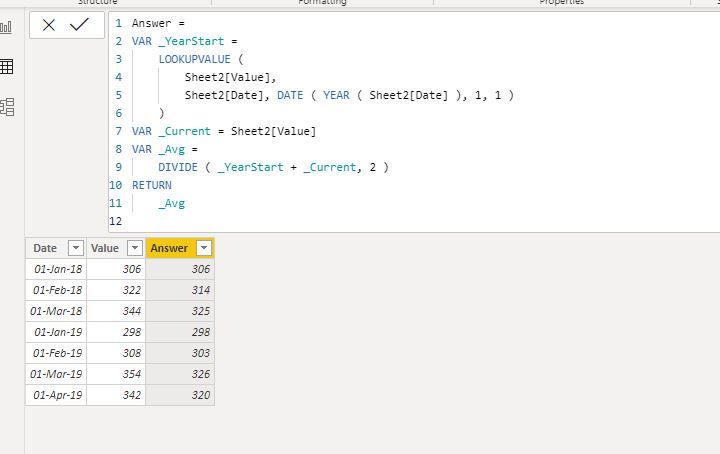
You may try this:

Answer = 
VAR _YearStart =
    LOOKUPVALUE (
        Sheet2[Value],
        Sheet2[Date], DATE ( YEAR ( Sheet2[Date] ), 1, 1 )
    )
VAR _Current = Sheet2[Value]
VAR _Avg =
    DIVIDE ( _YearStart + _Current, 2 )
RETURN
    _Avg


Result

Capture.JPG


Cheers!
Vivek

If it helps, please mark it as a solution
Kudos would be a cherry on the top 🙂 (Hit the thumbs up button!)
If it doesn't, then please share a sample data along with the expected results (preferably an excel file and not an image)


https://www.vivran.in/

Connect on LinkedIn

View solution in original post

4 REPLIES 4
amitchandak
Super User
Super User

@krishnak , to me it seems like YTD, you have measures like below using time intelligence and calendar

YTD QTY = TOTALYTD(Average('order'[Qty]),'Date'[Date])
LYTD QTY = TOTALYTD(Average('order'[Qty]),dateadd('Date'[Date],-1,year))


To get the best of the time intelligence function. Make sure you have a date calendar and it has been marked as the date in model view. Also, join it with the date column of your fact/s. Refer :
https://radacad.com/creating-calendar-table-in-power-bi-using-dax-functions
https://www.archerpoint.com/blog/Posts/creating-date-table-power-bi
https://www.sqlbi.com/articles/creating-a-simple-date-table-in-dax/

See if my webinar on Time Intelligence can help: https://community.powerbi.com/t5/Webinars-and-Video-Gallery/PowerBI-Time-Intelligence-Calendar-WTD-Y...


Appreciate your Kudos.

Share with Power BI Enthusiasts: Full Power BI Video (20 Hours) YouTube
Microsoft Fabric Series 60+ Videos YouTube
Microsoft Fabric Hindi End to End YouTube

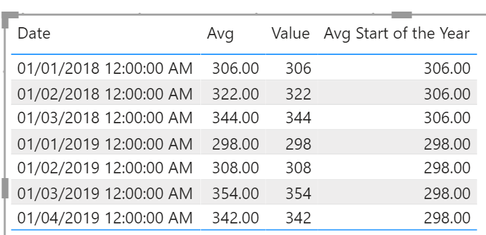
@krishnak it should be following measures


Avg = AVERAGE ( Table[Value] )

Avg Start of the Year = 
VAR __dateStartOfTheYear = DATE ( YEAR ( MAX( 'Table'[Date] ) ), 1, 1 )
RETURN
CALCULATE ( [Avg], ALL ( 'Table' ), 'Table'[Date] = __dateStartOfTheYear )


Output


image.png

I would  Kudos if my solution helped. 👉 If you can spend time posting the question, you can also make efforts to give Kudos whoever helped to solve your problem. It is a token of appreciation!


Subscribe to the @PowerBIHowTo YT channel for an upcoming video on List and Record functions in Power Query!!

Learn Power BI and Fabric - subscribe to our YT channel - Click here: @PowerBIHowTo

If my solution proved useful, I'd be delighted to receive Kudos. When you put effort into asking a question, it's equally thoughtful to acknowledge and give Kudos to the individual who helped you solve the problem. It's a small gesture that shows appreciation and encouragement! ❤


Did I answer your question? Mark my post as a solution. Proud to be a Super User! Appreciate your Kudos 🙂
Feel free to email me with any of your BI needs.

Thank you Vivek and others for looking at my problem and offering solutions.

Now I realize that I have other issues in the table to be resolved - like the day in January of each year is not always the 1st - sometimes it is the 3rd or 4th. That is another issue I have to sort out. 

Thank you all for the prompt response - you are awesome!

Krishna


vivran22
Community Champion
Community Champion

Hello @krishnak ,


You may try this:

Answer = 
VAR _YearStart =
    LOOKUPVALUE (
        Sheet2[Value],
        Sheet2[Date], DATE ( YEAR ( Sheet2[Date] ), 1, 1 )
    )
VAR _Current = Sheet2[Value]
VAR _Avg =
    DIVIDE ( _YearStart + _Current, 2 )
RETURN
    _Avg


Result

Capture.JPG


Cheers!
Vivek

If it helps, please mark it as a solution
Kudos would be a cherry on the top 🙂 (Hit the thumbs up button!)
If it doesn't, then please share a sample data along with the expected results (preferably an excel file and not an image)


https://www.vivran.in/

Connect on LinkedIn

Helpful resources

Announcements
Power BI DataViz World Championships

Power BI Dataviz World Championships

The Power BI Data Visualization World Championships is back! Get ahead of the game and start preparing now!

December 2025 Power BI Update Carousel

Power BI Monthly Update - December 2025

Check out the December 2025 Power BI Holiday Recap!

FabCon Atlanta 2026 carousel

FabCon Atlanta 2026

Join us at FabCon Atlanta, March 16-20, for the ultimate Fabric, Power BI, AI and SQL community-led event. Save $200 with code FABCOMM.