cancel
Showing results for 
Search instead for 
Did you mean: 

The Power BI Data Visualization World Championships is back! It's time to submit your entry. Live now!

Reply
LauraBueno
Helper III
Helper III

Look up value Column in DirectQuery Mode

Hello,


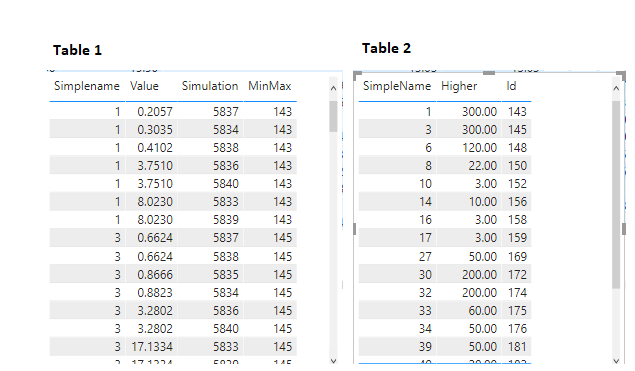
I have two tables in Direct Query mode related via a Many to One relationship (Please see below). I would like to find the value within column 'MinMax' column from Table 1 in the column 'Id' in Table 2 and retrieve the value within column 'Higher' of Table 2.

Tables.png


If I use the expression below just for a single valuer from MinMax column of table 1, it works:


Test = LOOKUPVALUE(Table 2['Higher'], Table 2['Id'],143)


However I don't know how I could modify the expression above to do all values within MinMax column of Table1.


Any help would be really appreciated!


thanks!

2 REPLIES 2
Anonymous
Not applicable

HI @LauraBueno,

AFAIK, current power bi has limited most of Dax functions usage in calculated column/table if you are work with 'direct query' mode. I'd like to suggest you use measure expression instead.
To extract the current row content, you can try to use aggregate function min/max or selectedvalue functions.

Regards,

Xiaoxin Sheng

lbendlin
Super User
Super User

You cannot use LOOKUPVALUE() as it cannot handle your M:M ambiguity (it can only return a scalar value, not a table).  Use TREATAS() instead.

Helpful resources

Announcements
Power BI DataViz World Championships

Power BI Dataviz World Championships

The Power BI Data Visualization World Championships is back! It's time to submit your entry.

January Power BI Update Carousel

Power BI Monthly Update - January 2026

Check out the January 2026 Power BI update to learn about new features.

FabCon Atlanta 2026 carousel

FabCon Atlanta 2026

Join us at FabCon Atlanta, March 16-20, for the ultimate Fabric, Power BI, AI and SQL community-led event. Save $200 with code FABCOMM.