Join us at FabCon Atlanta from March 16 - 20, 2026, for the ultimate Fabric, Power BI, AI and SQL community-led event. Save $200 with code FABCOMM.
Register now!The Power BI Data Visualization World Championships is back! Get ahead of the game and start preparing now! Learn more
Hi,
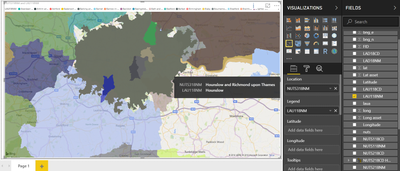
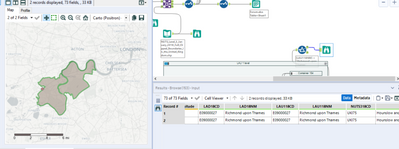
I've created an Excel file that contains geospatial information on NUTS 3 and LAU 1 level. It works for all regions but London. Instead of breaking the city up by borough, it creates a shape for all of London for boroughs such as Richmond upon Thames of City of London. I do get the borough boundaries for Southwark though. The boundaries are definitely correct in my original file as both Tableau and Alteryx display each individual borough.
Does it maybe have to do with naming conventions? So maybe PBI knows the City of London as City? But how would I know which names to use instead?
Hi @Anonymous
I would suggest you to provide Latitude, and Longitude for the map visual so to get more exact location point.
https://docs.microsoft.com/en-us/power-bi/visuals/power-bi-map-tips-and-tricks
Best Regards
Maggie
Community Support Team _ Maggie Li
If this post helps, then please consider Accept it as the solution to help the other members find it more quickly.
Thanks for the link.
I've tried that (both as long/lat and uncategorised field), but it makes my shapes disappear altogether unfortunately.
I've downloaded an official template from here: https://data.london.gov.uk/dataset/excel-mapping-template-for-london-boroughs-and-wards and get the same results. How come Power BI doesn't recognise the boroughs and is there a way around it other than creating a topoJSON?
The Power BI Data Visualization World Championships is back! Get ahead of the game and start preparing now!
Check out the November 2025 Power BI update to learn about new features.
| User | Count |
|---|---|
| 59 | |
| 43 | |
| 42 | |
| 23 | |
| 17 |
| User | Count |
|---|---|
| 190 | |
| 122 | |
| 96 | |
| 66 | |
| 47 |