cancel
Showing results for 
Search instead for 
Did you mean: 

Get Fabric certified for FREE! Don't miss your chance! Learn more

Reply
Anonymous
Not applicable

Location of SQL Statement dialog on Azure Cosmos DB v2(beta) connector

Hello all.  I did find the thread for "Azure Cosmos DB V2 Connector for Power BI - Missing Query option - Reg" which was addressing this issue but there was no clear resolution. 

Where is the SQL Statement (optional) window on Azure Cosmos DB v2(beta)

3 REPLIES 3
Anonymous
Not applicable

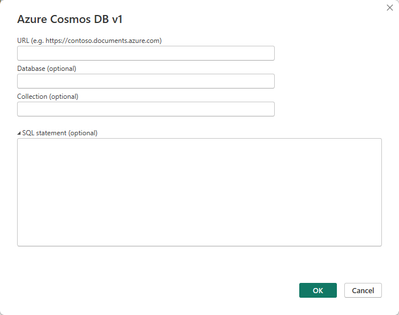
What is odd is the Azure Cosmos DB v1 connector has the "SQL statement (optional)" dialog:

jfieck_0-1713758231375.png

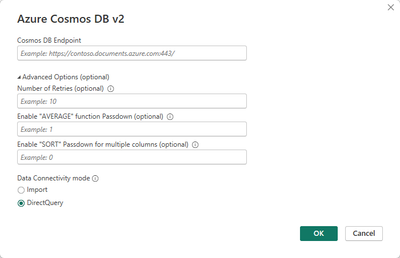
But the Azure Cosmos DB v2(beta) connector is not showing it:

jfieck_1-1713758291806.png

The power query for v2 is CosmosDB.Contents .   I have been looking to see if I'm supposed to put something like query="select * from c" or something like that but have gotten over this yet.


The two articles referenced in the thread from the top didn't help much.  

Is the "SQL statement (optional)" window intentionally keep out of v2 by design?

Anonymous
Not applicable

Hi @Anonymous,

Since this data connector still in public beta, so its optional parameter may not be similar as the GA version data connectors(azure cosmos v1 ). Perhaps you can try to contact to the dev team to get further support.

Power Query connector feedback - Power Query | Microsoft Learn

Regards,

Xiaoxin Sheng

Anonymous
Not applicable

Thanks @v-shex I will ask the Power Query connector team...

Helpful resources

Announcements
Sticker Challenge 2026 Carousel

Join our Community Sticker Challenge 2026

If you love stickers, then you will definitely want to check out our Community Sticker Challenge!

January Power BI Update Carousel

Power BI Monthly Update - January 2026

Check out the January 2026 Power BI update to learn about new features.

FabCon Atlanta 2026 carousel

FabCon Atlanta 2026

Join us at FabCon Atlanta, March 16-20, for the ultimate Fabric, Power BI, AI and SQL community-led event. Save $200 with code FABCOMM.