This time we’re going bigger than ever. Fabric, Power BI, SQL, AI and more. We're covering it all. You won't want to miss it.
Learn moreDid you hear? There's a new SQL AI Developer certification (DP-800). Start preparing now and be one of the first to get certified. Register now
Hello,
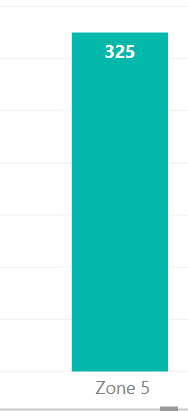
I implemented Row Level Security on my report and I have three main rows. An overall Head, an Area Manager and a Branch Manager. They all use the same dashboard but I want the chart below to change and display based on their roles. Currently it shows only by Areas and users who are not area managers have to drill down to view. I want to remove that extra step as it requires training.
For instance,
When the branch Manager logs in, they should see the chart showing their branch and not based on zone their branch belongs to. See below
Solved! Go to Solution.
Hi @SimonSeez ,
check the blog below maybe it can give you some help on achieving a workaround.
Regards
Miguel Félix
Proud to be a Super User!
Check out my blog: Power BI em PortuguêsHi @SimonSeez ,
Please refer to these similar blogs:
Dynamic Row Level Security with Manager Level Access in Power BI;
Dynamic Row Level Security with Organizational Hierarchy Power BI.
Best Regards,
Icey
If this post helps, then please consider Accept it as the solution to help the other members find it more quickly.
Hi @SimonSeez ,
check the blog below maybe it can give you some help on achieving a workaround.
Regards
Miguel Félix
Proud to be a Super User!
Check out my blog: Power BI em PortuguêsCheck out the April 2026 Power BI update to learn about new features.
Sign up to receive a private message when registration opens and key events begin.
If you have recently started exploring Fabric, we'd love to hear how it's going. Your feedback can help with product improvements.
| User | Count |
|---|---|
| 35 | |
| 32 | |
| 25 | |
| 23 | |
| 16 |
| User | Count |
|---|---|
| 65 | |
| 50 | |
| 30 | |
| 23 | |
| 23 |