Join us at FabCon Atlanta from March 16 - 20, 2026, for the ultimate Fabric, Power BI, AI and SQL community-led event. Save $200 with code FABCOMM.
Register now!The Power BI Data Visualization World Championships is back! Get ahead of the game and start preparing now! Learn more
Hi there,
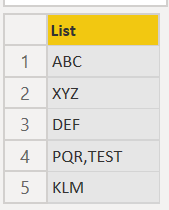
I have a list.
One or many of the of the items contains a COMMA.
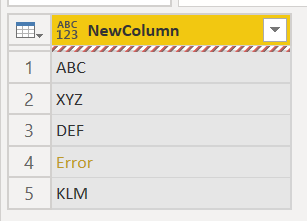
I now want to convert the list to a Table with single column. The item with COMMA brings an error.
How can I solve this error?
Here is the example code:
let
Source = Table.FromRows(Json.Document(Binary.Decompress(Binary.FromText("i45WcnRyVorViVaKiIwC0y6ubmA6IDBIJ8Q1OATM8fbxVYqNBQA=", BinaryEncoding.Base64), Compression.Deflate)), let _t = ((type nullable text) meta [Serialized.Text = true]) in type table [MyColumn = _t]),
#"Changed Type" = Table.TransformColumnTypes(Source,{{"MyColumn", type text}}),
MyList = #"Changed Type"[MyColumn],
MyTable = Table.FromList(MyList, null, {"NewColumn"})
in
MyTable
Any suggestions?
Many Thanks,
Regards,
Aykut
Solved! Go to Solution.
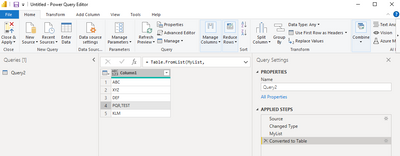
You can replace comma
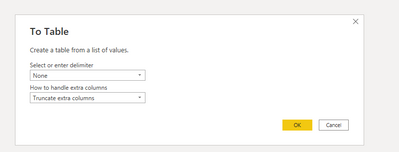
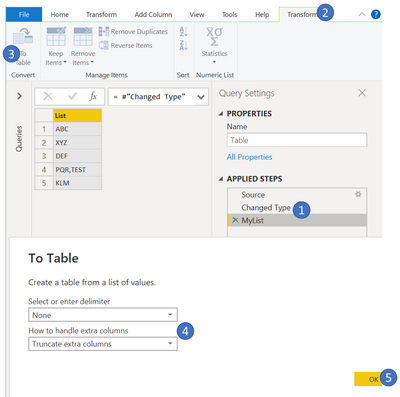
or convert the list to table with the truncate optiion
You can use the Splitter.SplitByNothing() function in the second argument of Table.FromList.
let
Source = Table.FromRows(Json.Document(Binary.Decompress(Binary.FromText("i45WcnRyVorViVaKiIwC0y6ubmA6IDBIJ8Q1OATM8fbxVYqNBQA=", BinaryEncoding.Base64), Compression.Deflate)), let _t = ((type nullable text) meta [Serialized.Text = true]) in type table [MyColumn = _t]),
#"Changed Type" = Table.TransformColumnTypes(Source,{{"MyColumn", type text}}),
MyList = #"Changed Type"[MyColumn],
MyTable = Table.FromList(MyList, Splitter.SplitByNothing(), {"NewColumn"})
in
MyTable
We want to help you but your description is too vaugue. Please write it again clearly.
Thank you for provide example input data !!!
But please povide the example desired output.
What do you wnat to do with PQR, TEST ?
Just remove the comm or split PQR and TST to 2 lines?
Remember not to share private data ... we don't want you to get into trouble. 😧
Take time and care to use the same table and field names in the input, output and description so we can understand your problem and help you.
You will get a quick response if you put time, care and effort into writing clear problem descriptions.
Vaugue descriptions can waste your time and ourtime.
Look foward to helping you when the above information is forthcoming
You can replace comma
or convert the list to table with the truncate optiion
Hi speedramps,
Thank you for your screenshot!
Now it works!
Thx, Regards,
Aykut
The Power BI Data Visualization World Championships is back! Get ahead of the game and start preparing now!
Check out the November 2025 Power BI update to learn about new features.
| User | Count |
|---|---|
| 59 | |
| 46 | |
| 42 | |
| 23 | |
| 17 |
| User | Count |
|---|---|
| 190 | |
| 122 | |
| 96 | |
| 66 | |
| 47 |