Join us at FabCon Vienna from September 15-18, 2025
The ultimate Fabric, Power BI, SQL, and AI community-led learning event. Save €200 with code FABCOMM.
Get registered- Power BI forums
- Get Help with Power BI
- Desktop
- Service
- Report Server
- Power Query
- Mobile Apps
- Developer
- DAX Commands and Tips
- Custom Visuals Development Discussion
- Health and Life Sciences
- Power BI Spanish forums
- Translated Spanish Desktop
- Training and Consulting
- Instructor Led Training
- Dashboard in a Day for Women, by Women
- Galleries
- Data Stories Gallery
- Themes Gallery
- Contests Gallery
- Quick Measures Gallery
- Notebook Gallery
- Translytical Task Flow Gallery
- TMDL Gallery
- R Script Showcase
- Webinars and Video Gallery
- Ideas
- Custom Visuals Ideas (read-only)
- Issues
- Issues
- Events
- Upcoming Events
Enhance your career with this limited time 50% discount on Fabric and Power BI exams. Ends August 31st. Request your voucher.
- Power BI forums
- Forums
- Get Help with Power BI
- Desktop
- List members not assigned to a project for a given...
- Subscribe to RSS Feed
- Mark Topic as New
- Mark Topic as Read
- Float this Topic for Current User
- Bookmark
- Subscribe
- Printer Friendly Page

- Mark as New
- Bookmark
- Subscribe
- Mute
- Subscribe to RSS Feed
- Permalink
- Report Inappropriate Content
List members not assigned to a project for a given date range
I have 3 tables, Projects, Members and Member Assignment as below.
Projects
| Project | Start Date | End date |
| Proj1 | 10 January 2020 | 13 March 2020 |
| Proj2 | 12 February 2020 | 30 April 2020 |
| Proj3 | 01 January 2020 | 22 May 2020 |
Members
| Member1 |
| Member2 |
| Member3 |
| Member4 |
| Member5 |
| Member6 |
Member Assignement
| Member | Project | Start Date | End date |
| Member1 | Proj1 | 15 January 2020 | 30 January 2020 |
| Member2 | Proj1 | 10 January 2020 | 13 March 2020 |
| Member1 | Proj1 | 01 March 2020 | 13 March 2020 |
| Member3 | Proj1 | 02 January 2020 | 12 February 2020 |
| Member4 | Proj1 | 25 February 2020 | 05 March 2020 |
| Member1 | Proj2 | 12 February 2020 | 30 April 2020 |
| Member3 | Proj2 | 01 April 2020 | 15 April 2020 |
| Member4 | Proj3 | 01 January 2020 | 22 May 2020 |
How can I list members who are NOT assigned in any project for a given calendar Start and End Date.
For eg, Member assignment Start Date 01 March 2020 to End Date 13th March 2020
| Member 6 | No assignment at all |
| Member 5 | No assignment at all |
| Member 3 | doesnt have assignment during (1-Mar-20 to 13-Mar-20) |
| Member 4 | Partial overlap for 5 days from 1st to 15th if it can be differentiated even better |
Kind regards,
Sunish
Solved! Go to Solution.


- Mark as New
- Bookmark
- Subscribe
- Mute
- Subscribe to RSS Feed
- Permalink
- Report Inappropriate Content
Hi, @sun_SACHA
You may use visual level filter to control the display of the visual.
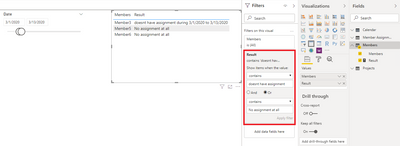
Best Regards
Allan
If this post helps, then please consider Accept it as the solution to help the other members find it more quickly.
- Mark as New
- Bookmark
- Subscribe
- Mute
- Subscribe to RSS Feed
- Permalink
- Report Inappropriate Content
Hi, @sun_SACHA
You may create a calculated table and a measure like below. The pbix file is attached in the end.
Calculated table:
Calendar = CALENDARAUTO()

Measure:
Result =
var cmember = SELECTEDVALUE('Members'[Members])
var _mindate =
CALCULATE(
    MIN('Calendar'[Date]),
    ALLSELECTED('Calendar')
)
var _maxdate =
CALCULATE(
    MAX('Calendar'[Date]),
    ALLSELECTED('Calendar')
)
return
IF(
    NOT(cmember in
    CALCULATETABLE(
        DISTINCT('Member Assignment'[Member]),
        ALL('Member Assignment')
    )),
    "No assignment at all",
        IF(
            SUMX(
                FILTER(
                    SUMMARIZE(
                        ALL('Member Assignment'),
                        'Member Assignment'[Member],
                        'Member Assignment'[Project],
                        'Member Assignment'[Start Date],
                        'Member Assignment'[End Date],
                        "flag",
                        IF(
                            NOT(
                                OR(
                                   'Member Assignment'[Start Date]>_maxdate,
                                   'Member Assignment'[End Date]<_mindate
                                )
                            ),
                            1,0
                        )
                    ),
                    [Member]=cmember
                ),
                [flag]
            )>0,
            "have assignment during "&_mindate&" to "&_maxdate,
            IF(
                SUMX(
                    FILTER(
                        SUMMARIZE(
                            ALL('Member Assignment'),
                            'Member Assignment'[Member],
                            'Member Assignment'[Project],
                            'Member Assignment'[Start Date],
                            'Member Assignment'[End Date],
                            "flag",
                            IF(
                                'Member Assignment'[Start Date]>_maxdate||'Member Assignment'[End Date]<_mindate,
                                1,0
                            )
                        ),
                        [Member]=cmember
                    ),
                    [flag]
                )>0,
             "doesnt have assignment during "&_mindate&" to "&_maxdate
        )
    )
)
Result:
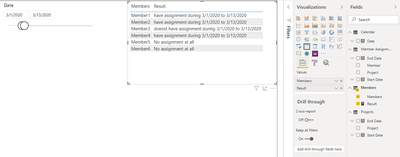
Best Regards
Allan
If this post helps, then please consider Accept it as the solution to help the other members find it more quickly.
- Mark as New
- Bookmark
- Subscribe
- Mute
- Subscribe to RSS Feed
- Permalink
- Report Inappropriate Content
Thanks you @v-alq-msft Allan for your effort in giving the solution.
The answer gave me an idea on how to do what's required, but would appreciate an exact solution, which is a listing of all members(Only member names needed) who ARE NOT assigned to any project given any date range or project selection filter.
For eg If I select Proj1 as per your pbix, only member4,6 should be listed, for Proj 2, Members2,4,5,6 and for Proj3 Members 1,2,3,5,6
Similarly for any date range, only memebers who are unassigned during that period should be listed. May be I was not very clear on my question adding to the ambiguity with the scenario where there is a partial period assignmenet.
- Mark as New
- Bookmark
- Subscribe
- Mute
- Subscribe to RSS Feed
- Permalink
- Report Inappropriate Content
Hi, @sun_SACHA
You may use visual level filter to control the display of the visual.
Best Regards
Allan
If this post helps, then please consider Accept it as the solution to help the other members find it more quickly.
- Mark as New
- Bookmark
- Subscribe
- Mute
- Subscribe to RSS Feed
- Permalink
- Report Inappropriate Content
I modified the Measure to just show as Assigned/Unassigned for all scenarios and by the using filter on visual Iam able to filter Unassigned.
Is it possible to have a slicer for Unassigned ?
- Mark as New
- Bookmark
- Subscribe
- Mute
- Subscribe to RSS Feed
- Permalink
- Report Inappropriate Content
Hi, @sun_SACHA
A measure is evaluated in the context of the cell of the pivot table or DAX query. You can't put a measure in a slicer which filters all the visual in a report page.
Best Regards
Allan
If this post helps, then please consider Accept it as the solution to help the other members find it more quickly.

Helpful resources

Power BI Monthly Update - August 2025
Check out the August 2025 Power BI update to learn about new features.

Fabric Community Update - August 2025
Find out what's new and trending in the Fabric community.


| User | Count |
|---|---|
| 78 | |
| 70 | |
| 55 | |
| 54 | |
| 42 |


