Join us at FabCon Atlanta from March 16 - 20, 2026, for the ultimate Fabric, Power BI, AI and SQL community-led event. Save $200 with code FABCOMM.
Register now!The Power BI Data Visualization World Championships is back! Get ahead of the game and start preparing now! Learn more
Hi all! Please I need your help with that 🙂
See the example below:
I have "list A" and "list B" in a table in Power BI, what I need is to create the "combination" (one by one) of these lists .
That is an example, the real list that I need to combine is more than a thousand data, so the combinations are more than a million, doing it manually would take a long time.
Thanks!!
Example:
List A - List B - Combination
1 a a 1
2 b b 1
3 c c 1
d d 1
f f 1
g g 1
a 2
b 2
c 2
d 2
f 2
g 2
a 3
b 3
c 3
d 3
f 3
g 3
Solved! Go to Solution.
Note sure about performance once you scale - maybe Power Query better. Here is a way to do using DAX.
Cartesian Product Tbl =
CROSSJOIN(
ListA,
ListB
)
//Use New Table under the modelling menu on the ribbon to create a Tbl with all combination listed
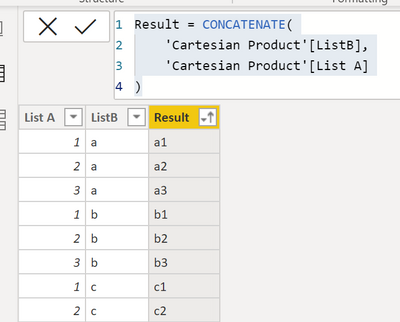
Create a calculated column to generate the result
Result = CONCATENATE(
'Cartesian Product Tbl'[ListB],
'Cartesian Product Tbl'[List A]
)
//New calculated column created in the new Tbl
Result
Reference: https://docs.microsoft.com/en-us/dax/crossjoin-function-dax
Please mark as Answer if this does what you need. Please like post if it helped. Kudos Appreciated
Note sure about performance once you scale - maybe Power Query better. Here is a way to do using DAX.
Cartesian Product Tbl =
CROSSJOIN(
ListA,
ListB
)
//Use New Table under the modelling menu on the ribbon to create a Tbl with all combination listed
Create a calculated column to generate the result
Result = CONCATENATE(
'Cartesian Product Tbl'[ListB],
'Cartesian Product Tbl'[List A]
)
//New calculated column created in the new Tbl
Result
Reference: https://docs.microsoft.com/en-us/dax/crossjoin-function-dax
Please mark as Answer if this does what you need. Please like post if it helped. Kudos Appreciated
Start with one of your Lists converted to a table (or starts as a table), then add a custom column with = NameOfSecondList. The NameOfSecondList should reference a query that is a list, to one column of another table (e.g., Query2[ColumnForList], or a manually constructed list with {1..1000} for example. Then you can click on the column header button and "Expand as new rows". You will then get a row for all combinations as shown.
Pat
To learn more about Power BI, follow me on Twitter or subscribe on YouTube.
The Power BI Data Visualization World Championships is back! Get ahead of the game and start preparing now!
| User | Count |
|---|---|
| 39 | |
| 38 | |
| 38 | |
| 28 | |
| 27 |
| User | Count |
|---|---|
| 124 | |
| 88 | |
| 73 | |
| 66 | |
| 65 |