Join us at FabCon Atlanta from March 16 - 20, 2026, for the ultimate Fabric, Power BI, AI and SQL community-led event. Save $200 with code FABCOMM.
Register now!The Power BI Data Visualization World Championships is back! Get ahead of the game and start preparing now! Learn more
Hi All,
I would like to create a line graph witth maker.
There are multiple lines in the graph but I need only one line with marker.
(1) Can I chose one line with marker by using line chart under vizualizations ?
(2) I also tried to use Chart Accent - Line use. When I try to draw rolling average (calculated by measure)
The following message apper : Sorry, an error happened while rendering your chart... Please try deleting the visual and start over again.What is possible cause of this message?
All the best,
cocomy
Solved! Go to Solution.
Hi MFelix,
Thank you very much for your help again. Is it possible to show just marker (like dot) but no line?
I could not find no color in the selection of color. Appreciate your help.
All the best,
cocomy
Hi @cocomy,
It's not possible to have no colour. You can make the line as thin as possible and them choose the color to match the background of your chart, and make the shapes on a different colour.
Regards,
MFelix
Regards
Miguel Félix
Proud to be a Super User!
Check out my blog: Power BI em PortuguêsHi @cocomy,
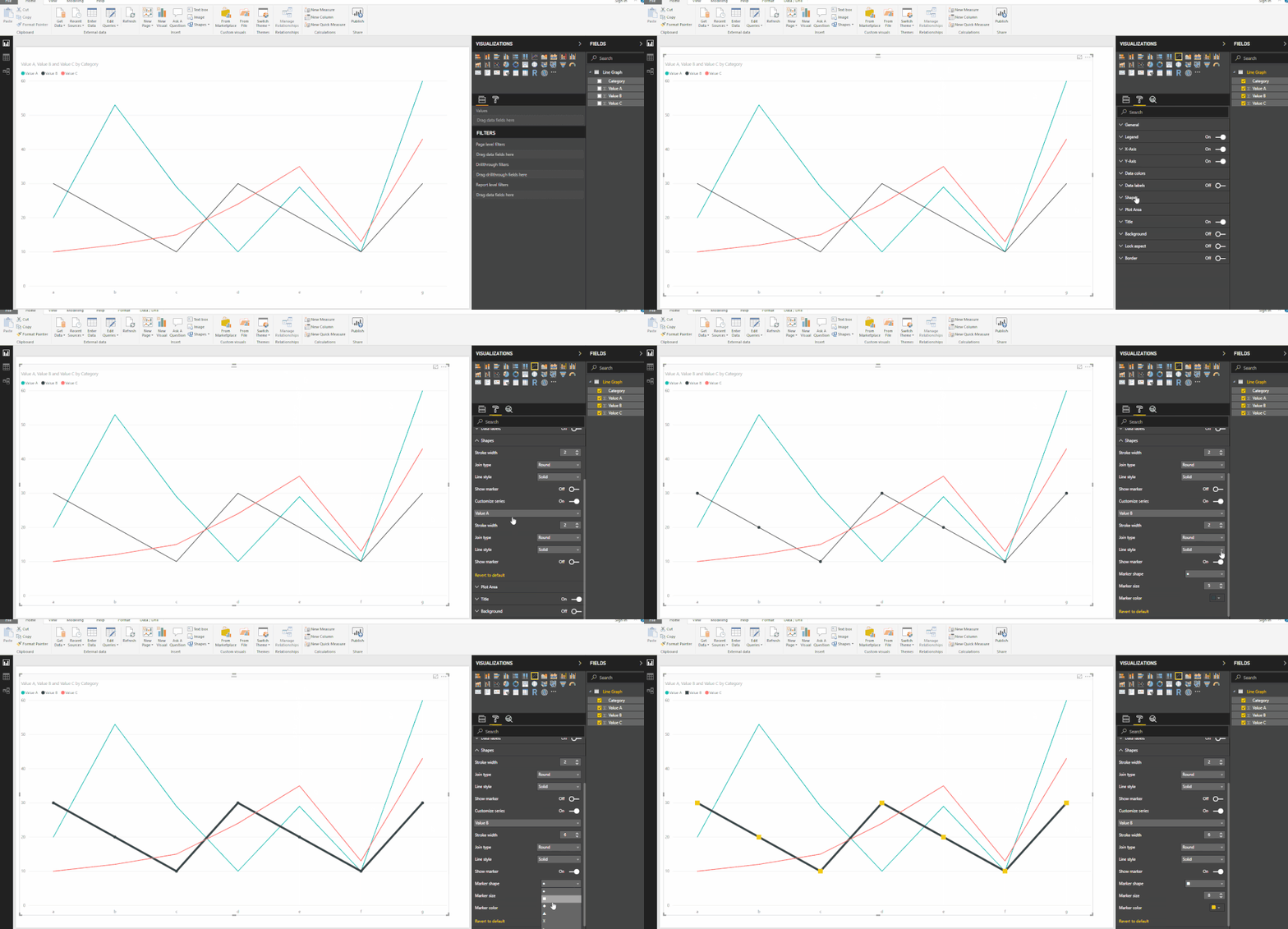
On the line graph options you need to follow these steps:
Regards,
MFelix
Regards
Miguel Félix
Proud to be a Super User!
Check out my blog: Power BI em PortuguêsHi MFelix,
Thank you very much for your help again. Is it possible to show just marker (like dot) but no line?
I could not find no color in the selection of color. Appreciate your help.
All the best,
cocomy
Hi @cocomy,
It's not possible to have no colour. You can make the line as thin as possible and them choose the color to match the background of your chart, and make the shapes on a different colour.
Regards,
MFelix
Regards
Miguel Félix
Proud to be a Super User!
Check out my blog: Power BI em PortuguêsHi MFelix,
Thank you very much for your post. Will try as thin as possible.
All the best,
cocomy
The Power BI Data Visualization World Championships is back! Get ahead of the game and start preparing now!
| User | Count |
|---|---|
| 39 | |
| 37 | |
| 33 | |
| 32 | |
| 29 |
| User | Count |
|---|---|
| 133 | |
| 88 | |
| 85 | |
| 68 | |
| 64 |