FabCon is coming to Atlanta
Join us at FabCon Atlanta from March 16 - 20, 2026, for the ultimate Fabric, Power BI, AI and SQL community-led event. Save $200 with code FABCOMM.
Register now!- Power BI forums
- Get Help with Power BI
- Desktop
- Service
- Report Server
- Power Query
- Mobile Apps
- Developer
- DAX Commands and Tips
- Custom Visuals Development Discussion
- Health and Life Sciences
- Power BI Spanish forums
- Translated Spanish Desktop
- Training and Consulting
- Instructor Led Training
- Dashboard in a Day for Women, by Women
- Galleries
- Data Stories Gallery
- Themes Gallery
- Contests Gallery
- QuickViz Gallery
- Quick Measures Gallery
- Visual Calculations Gallery
- Notebook Gallery
- Translytical Task Flow Gallery
- TMDL Gallery
- R Script Showcase
- Webinars and Video Gallery
- Ideas
- Custom Visuals Ideas (read-only)
- Issues
- Issues
- Events
- Upcoming Events
The Power BI Data Visualization World Championships is back! It's time to submit your entry. Live now!
- Power BI forums
- Forums
- Get Help with Power BI
- Desktop
- Line chart
- Subscribe to RSS Feed
- Mark Topic as New
- Mark Topic as Read
- Float this Topic for Current User
- Bookmark
- Subscribe
- Printer Friendly Page


- Mark as New
- Bookmark
- Subscribe
- Mute
- Subscribe to RSS Feed
- Permalink
- Report Inappropriate Content
Line chart
I need to creata a line chart from the below table. Line 1 should give me the distint count of user name based on True in column named "Learning Plan Completed". And Line 2 should give me distint count of user name based on Yes in column named "Course COMPLETED". Here am facing an issue with a common date for setting as X axis. i got two dates column named "Learning Plan Completed Date" & "Course DATE_COMPLETED. i need to get a idea to get month on X axis and it should have a connection with colums "Learning Plan Completed Date" & "Course DATE_COMPLETED".
| USERNAME | Learning Plan Completed | Learning Plan Completed Date | Course COMPLETED | Course DATE_COMPLETED |
| CHRISTOPHER.PEERS | FALSE | NO | ||
| danielle.mclarnon | FALSE | YES | 02/08/2019 | |
| leighann.worrall | FALSE | NO | ||
| rebecca.curran | TRUE | 02/06/2019 | YES | 01/10/2019 |
| steven.fraser | FALSE | YES | 02/11/2019 | |
| john.campbell | FALSE | NO | ||
| cormac.sweeney | FALSE | YES | 01/16/2019 | |
| ANDREW.SCHOFIELD | FALSE | NO | ||
| danielle.mclarnon | FALSE | NO | ||
| CHRISTOPHER.PEERS | FALSE | NO | ||
| leighann.worrall | FALSE | NO | ||
| rebecca.curran | TRUE | 02/06/2019 | YES | 01/31/2019 |
| steven.fraser | FALSE | NO | ||
| john.campbell | FALSE | NO | ||
| cormac.sweeney | FALSE | NO | ||
| ANDREW.SCHOFIELD | FALSE | NO | ||
| danielle.mclarnon | FALSE | NO | ||
| danielle.mclarnon | FALSE | NO | ||
| CHRISTOPHER.PEERS | FALSE | NO | ||
| CHRISTOPHER.PEERS | FALSE | NO | ||
| rebecca.curran | TRUE | 02/06/2019 | YES | 01/18/2019 |
| steven.fraser | FALSE | NO | ||
| john.campbell | FALSE | NO | ||
| cormac.sweeney | FALSE | NO | ||
| ANDREW.SCHOFIELD | FALSE | NO | ||
| leighann.worrall | FALSE | NO | ||
| rebecca.curran | TRUE | 02/06/2019 | NO | |
| john.campbell | FALSE | YES | 06/15/2018 | |
| steven.fraser | FALSE | NO | ||
| leighann.worrall | FALSE | NO | ||
| ANDREW.SCHOFIELD | FALSE | NO | ||
| cormac.sweeney | FALSE | NO | ||
| danielle.mclarnon | FALSE | YES | 06/15/2018 | |
| CHRISTOPHER.PEERS | FALSE | NO | ||
| john.campbell | FALSE | NO | ||
| ANDREW.SCHOFIELD | FALSE | YES | 04/23/2017 | |
| cormac.sweeney | FALSE | YES | 12/05/2018 | |
| steven.fraser | FALSE | YES | 02/20/2018 | |
| leighann.worrall | FALSE | NO | ||
| rebecca.curran | TRUE | 02/06/2019 | YES | 01/30/2019 |
| danielle.mclarnon | FALSE | NO |
Solved! Go to Solution.


- Mark as New
- Bookmark
- Subscribe
- Mute
- Subscribe to RSS Feed
- Permalink
- Report Inappropriate Content
Hi @unnijoy ,
New a calendar table which is unrelated to fact data table.
Date dim =
CALENDAR (
    MIN (
        MIN ( Sheet5[Learning Plan Completed Date] ),
        MIN ( Sheet5[Course DATE_COMPLETED] )
    ),
    MAX (
        MAX ( Sheet5[Learning Plan Completed Date] ),
        MAX ( Sheet5[Course DATE_COMPLETED] )
    )
)
Add [Date] from 'Date dim' table onto chart axis. Create measures as below to get the distinct count of user name.
Count True =
CALCULATE (
    DISTINCTCOUNT ( Sheet5[USERNAME] ),
    FILTER (
        ALL ( Sheet5 ),
        Sheet5[Learning Plan Completed] = "TRUE"
            && Sheet5[Learning Plan Completed Date].[Year]
                = SELECTEDVALUE ( 'Date dim'[Date].[Year] )
            && Sheet5[Learning Plan Completed Date].[MonthNo]
                = SELECTEDVALUE ( 'Date dim'[Date].[MonthNo] )
    )
)

Count Yes =
CALCULATE (
    DISTINCTCOUNT ( Sheet5[USERNAME] ),
    FILTER (
        ALL ( Sheet5 ),
        Sheet5[Course COMPLETED] = "YES"
            && Sheet5[Course DATE_COMPLETED].[Year] = SELECTEDVALUE ( 'Date dim'[Date].[Year] )
            && Sheet5[Course DATE_COMPLETED].[MonthNo]
                = SELECTEDVALUE ( 'Date dim'[Date].[MonthNo] )
    )
)
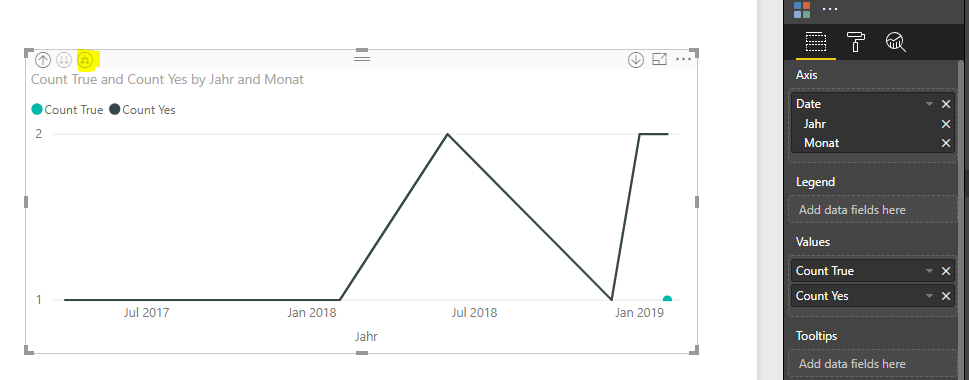
Best regards,
Yuliana Gu
If this post helps, then please consider Accept it as the solution to help the other members find it more quickly.
- Mark as New
- Bookmark
- Subscribe
- Mute
- Subscribe to RSS Feed
- Permalink
- Report Inappropriate Content
Thanks for your reply. For the graph is ging blank.
Do i need to set the relationship with new table and existing table fields
- Mark as New
- Bookmark
- Subscribe
- Mute
- Subscribe to RSS Feed
- Permalink
- Report Inappropriate Content
Hi @unnijoy ,
New a calendar table which is unrelated to fact data table.
Date dim =
CALENDAR (
    MIN (
        MIN ( Sheet5[Learning Plan Completed Date] ),
        MIN ( Sheet5[Course DATE_COMPLETED] )
    ),
    MAX (
        MAX ( Sheet5[Learning Plan Completed Date] ),
        MAX ( Sheet5[Course DATE_COMPLETED] )
    )
)
Add [Date] from 'Date dim' table onto chart axis. Create measures as below to get the distinct count of user name.
Count True =
CALCULATE (
    DISTINCTCOUNT ( Sheet5[USERNAME] ),
    FILTER (
        ALL ( Sheet5 ),
        Sheet5[Learning Plan Completed] = "TRUE"
            && Sheet5[Learning Plan Completed Date].[Year]
                = SELECTEDVALUE ( 'Date dim'[Date].[Year] )
            && Sheet5[Learning Plan Completed Date].[MonthNo]
                = SELECTEDVALUE ( 'Date dim'[Date].[MonthNo] )
    )
)

Count Yes =
CALCULATE (
    DISTINCTCOUNT ( Sheet5[USERNAME] ),
    FILTER (
        ALL ( Sheet5 ),
        Sheet5[Course COMPLETED] = "YES"
            && Sheet5[Course DATE_COMPLETED].[Year] = SELECTEDVALUE ( 'Date dim'[Date].[Year] )
            && Sheet5[Course DATE_COMPLETED].[MonthNo]
                = SELECTEDVALUE ( 'Date dim'[Date].[MonthNo] )
    )
)
Best regards,
Yuliana Gu
If this post helps, then please consider Accept it as the solution to help the other members find it more quickly.
- Mark as New
- Bookmark
- Subscribe
- Mute
- Subscribe to RSS Feed
- Permalink
- Report Inappropriate Content
Hi @v-yulgu-msft ,
The line graph is working fine. But i have filters based on Geography & Country. I am getting the overall data on the graph. But the graph is not changing based on filter selection. Below am attaching a sample data. Please help.
| USERNAME | COUNTRY | Region | Learning Plan Completed | Learning Plan Completed Date | Course COMPLETED | Course DATE_COMPLETED |
| CHRISTOPHER.PEERS | Canada | North America | FALSE | NO | ||
| leighann.worrall | Canada | North America | FALSE | YES | 3/10/2019 | |
| rebecca.curran | Canada | North America | TRUE | 02/06/2019 | YES | 1/10/2019 |
| steven.fraser | Canada | North America | FALSE | YES | 2/11/2019 | |
| denitsa.hristova | Bulgaria | Europe | TRUE | 03/19/2019 | YES | 3/9/2019 |
| Dilyana.kirilova | Bulgaria | Europe | FALSE | YES | 3/18/2019 | |
| mac.condino | Philippines | Philippines | TRUE | 03/12/2019 | YES | 3/8/2019 |
| ALISONN.ENTUNA | Philippines | Philippines | TRUE | 03/17/2019 | YES | 3/12/2019 |
| myles.catolos | Philippines | Philippines | TRUE | 03/24/2019 | YES | 3/23/2019 |
| gergana.milanova | Bulgaria | Europe | FALSE | YES | 3/5/2019 | |
| elitsa.zheleva1 | Bulgaria | Europe | FALSE | YES | 2/22/2019 | |
| emilia.trifonova | Bulgaria | Europe | FALSE | NO | ||
| luminita.giurgiu | Bulgaria | Europe | FALSE | YES | 2/25/2019 | |
| valentin.monovski | Bulgaria | Europe | FALSE | NO | ||
| ADRIAN.PRAPORGESCU | Bulgaria | Europe | FALSE | YES | 2/15/2019 | |
| daniel.tereshtenkov | Bulgaria | Europe | FALSE | NO | ||
| frederic.gakoya | Bulgaria | Europe | FALSE | NO | ||
| mihail.iliev | Bulgaria | Europe | FALSE | NO | ||
| boryana.stoyanova | Bulgaria | Europe | FALSE | NO | ||
| henrieta.muziyska | Bulgaria | Europe | FALSE | YES | 4/1/2019 | |
| yoana.trendafilova | Bulgaria | Europe | FALSE | NO | ||
| john.campbell | UK | Europe | FALSE | NO | ||
| cormac.sweeney | UK | Europe | FALSE | YES | 1/16/2019 | |
| ANDREW.SCHOFIELD | UK | Europe | FALSE | NO | ||
| danielle.mclarnon | UK | Europe | FALSE | YES | 2/8/2019 | |
| ADRIAN.PRAPORGESCU | Bulgaria | Europe | FALSE | NO | ||
| CHRISTOPHER.PEERS | Canada | North America | FALSE | NO | ||
| leighann.worrall | Canada | North America | FALSE | NO | ||
| cormac.sweeney | UK | Europe | FALSE | NO | ||
| frederic.gakoya | Bulgaria | Europe | FALSE | NO | ||
| mihail.iliev | Bulgaria | Europe | FALSE | NO | ||
| yoana.trendafilova | Bulgaria | Europe | FALSE | NO | ||
| valentin.monovski | Bulgaria | Europe | FALSE | NO | ||
| myles.catolos | Philippines | Philippines | TRUE | 03/24/2019 | YES | 3/23/2019 |
| ALISONN.ENTUNA | Philippines | Philippines | TRUE | 03/17/2019 | YES | 3/17/2019 |
| rebecca.curran | Canada | North America | TRUE | 02/06/2019 | YES | 1/31/2019 |
| steven.fraser | Canada | North America | FALSE | YES | 3/11/2019 | |
| john.campbell | UK | Europe | FALSE | NO | ||
| henrieta.muziyska | Bulgaria | Europe | FALSE | NO | ||
| gergana.milanova | Bulgaria | Europe | FALSE | NO | ||
| elitsa.zheleva1 | Bulgaria | Europe | FALSE | NO | ||
| emilia.trifonova | Bulgaria | Europe | FALSE | NO | ||
| luminita.giurgiu | Bulgaria | Europe | FALSE | NO | ||
| mac.condino | Philippines | Philippines | TRUE | 03/12/2019 | YES | 3/10/2019 |
| ANDREW.SCHOFIELD | UK | Europe | FALSE | NO | ||
| danielle.mclarnon | UK | Europe | FALSE | NO | ||
| daniel.tereshtenkov | Bulgaria | Europe | FALSE | NO | ||
| denitsa.hristova | Bulgaria | Europe | TRUE | 03/19/2019 | YES | 3/13/2019 |
| Dilyana.kirilova | Bulgaria | Europe | FALSE | NO |
- Mark as New
- Bookmark
- Subscribe
- Mute
- Subscribe to RSS Feed
- Permalink
- Report Inappropriate Content
- Mark as New
- Bookmark
- Subscribe
- Mute
- Subscribe to RSS Feed
- Permalink
- Report Inappropriate Content
Thanks for your reply. For the graph is ging blank.
Do i need to set the relationship with new table and existing table fields
- Mark as New
- Bookmark
- Subscribe
- Mute
- Subscribe to RSS Feed
- Permalink
- Report Inappropriate Content
Thanks you so much. Please discard my last reply. It was my mistake. when i slect the x axis. Now it is working fine. Good day

Helpful resources


| User | Count |
|---|---|
| 49 | |
| 37 | |
| 33 | |
| 22 | |
| 18 |


| User | Count |
|---|---|
| 132 | |
| 100 | |
| 56 | |
| 37 | |
| 37 |


