Join us at FabCon Atlanta from March 16 - 20, 2026, for the ultimate Fabric, Power BI, AI and SQL community-led event. Save $200 with code FABCOMM.
Register now!The Power BI Data Visualization World Championships is back! Get ahead of the game and start preparing now! Learn more
Hi,
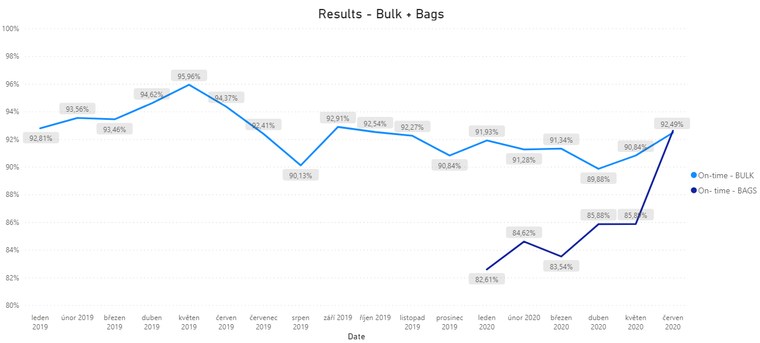
i need create this chart.
This chart is from my old report where I created secondary table but when I edit data - I must edit secondary table.
Now I create now report where I would like create new chart where I won´t have to have any secondary table.
- chart legend is "YES" and Type of loading
Thank you
Ondřej
@amitchandak, i don´t know how I insert two conditions (On-time? and Type of loading) into a chart.
Thank you
Ondřej
@Fidzi8 , you can not have two legends. nor two measures and legends.
So append these two and create one column and try
New Type = [Ontime] & " " & [Type]
Hi @Fidzi8 ,
Please share the sample data as well. We will understand your situations more clearly.
Hi,
@v-xuding-msft@, @amitchandak I don´t know how I have to edit chart.
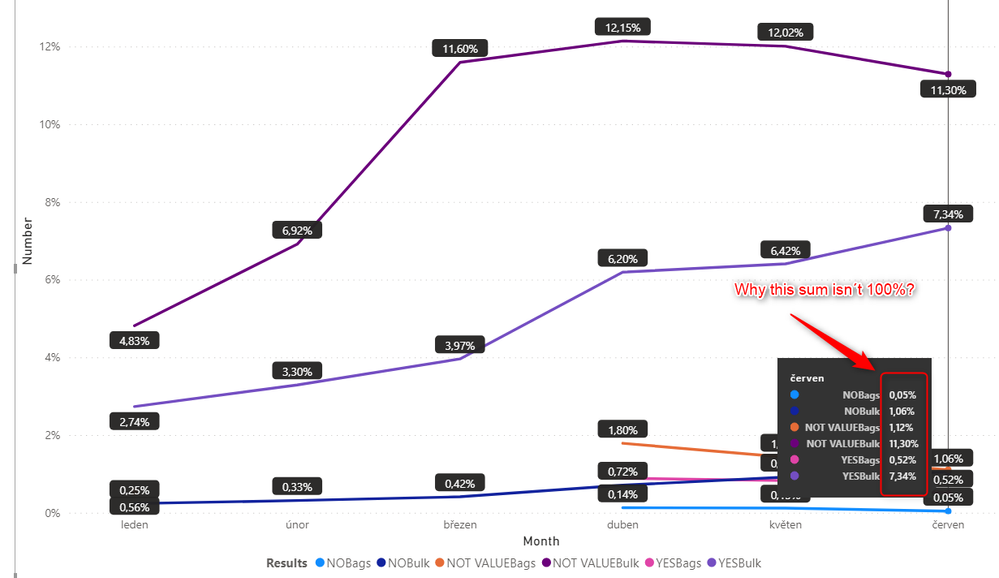
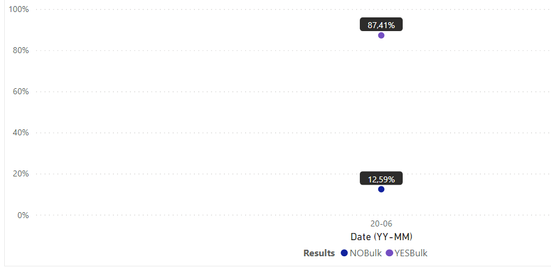
Now my chart shows sum all months as 100% but I need sum one moth as 100%.
Thank you
Ondřej
The Power BI Data Visualization World Championships is back! Get ahead of the game and start preparing now!
| User | Count |
|---|---|
| 39 | |
| 37 | |
| 33 | |
| 32 | |
| 29 |
| User | Count |
|---|---|
| 132 | |
| 88 | |
| 82 | |
| 68 | |
| 64 |