Join us at FabCon Atlanta from March 16 - 20, 2026, for the ultimate Fabric, Power BI, AI and SQL community-led event. Save $200 with code FABCOMM.
Register now!The Power BI Data Visualization World Championships is back! Get ahead of the game and start preparing now! Learn more
Hi,
I'd like to visualize headcount using the daily or monthly filed on X-axis in line chart instead of just yearly movements but when I use smaller granularity fields (such as mmm-yyyy) on x-axis, the line chart only shows part of the visual and the rest has to be scrolled using scroll bar to see the whole picture. Is there a way to express the entire picture of detailed line chart without scroll bar for smaller granularity information on X-axis? I don't need to see each label on X-axis but I need the line chart to be able to express the movements at smaller granularity level.
Thanks a lot for your advice.
Hi @DataNinja_777
Can you please show what are you trying to achieve?
Hi,
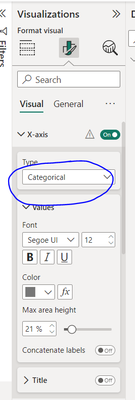
I am trying to get rid of the scroll bar in my line chart which has many data points on X-axis. I read in this community setting the X-axis as "Categorical" or "Continuous" will make this change, and this selection appears when year field is on X-axis, but when I put X-axis to a smaller granularity field such as yyyy-mm, the scroll bar automatically appears and I cannot get rid of it from the selection field above, which also has disappeared. The objective is to see the whole picture of smaller granularity data, without having to scroll which kind of loses the overall contect.
The Power BI Data Visualization World Championships is back! Get ahead of the game and start preparing now!
| User | Count |
|---|---|
| 40 | |
| 35 | |
| 34 | |
| 31 | |
| 28 |
| User | Count |
|---|---|
| 137 | |
| 102 | |
| 68 | |
| 66 | |
| 64 |