cancel
Showing results for 
Search instead for 
Did you mean: 

The Power BI Data Visualization World Championships is back! Get ahead of the game and start preparing now! Learn more

Reply
Anonymous
Not applicable

Line chart - forecasting function

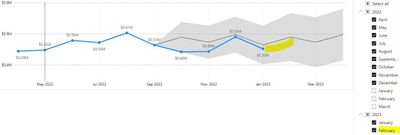
Hi, I am using Line Chart together with its Forecasting function to monitor monthly sales. The previous month data (which is Feb) is uploaded in the PowerBI. 

However, after a data refresh, I am not seeing the actual Feb Sales reflecting in the line chart, as well as there is no automatic forward month forecasting. It just stopped at actual Jan Sales.

Could someone help to advise if PowerBI is able to do automatic forward month forecasting? And also, how to make the actual Feb Sales appear on the line chart?


My current resolution is to recreate the page every month with the same visuals, in order for actual last month Sales and automatic forward month forecasting to be reflected in the visual. Thanks.


87c2de22-32ac-4bf8-854c-73bfbf8e11cd.jpg

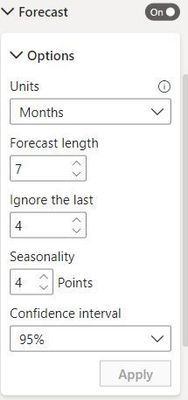
Forecasting setting in Line ChartForecasting setting in Line Chart  

1 ACCEPTED SOLUTION
Anonymous
Not applicable

Hi @Anonymous ,


As far as I know, Power BI will only display the data in data model. So please make sure you have refreshed your report and the data in Feb 2023 has been loaded into data model. 

Then you may refer to this offical blog to learn more details about forecast line.

For reference: Apply forecasting


Best Regards,
Rico Zhou


If this post helps, then please consider Accept it as the solution to help the other members find it more quickly.

View solution in original post

2 REPLIES 2
Anonymous
Not applicable

Hi @Anonymous ,


Thanks for the info. Yes, it's resolved after I refresh my report. Thanks!


Best regards,

Sarah

Anonymous
Not applicable

Hi @Anonymous ,


As far as I know, Power BI will only display the data in data model. So please make sure you have refreshed your report and the data in Feb 2023 has been loaded into data model. 

Then you may refer to this offical blog to learn more details about forecast line.

For reference: Apply forecasting


Best Regards,
Rico Zhou


If this post helps, then please consider Accept it as the solution to help the other members find it more quickly.

Helpful resources

Announcements
Power BI DataViz World Championships

Power BI Dataviz World Championships

The Power BI Data Visualization World Championships is back! Get ahead of the game and start preparing now!

December 2025 Power BI Update Carousel

Power BI Monthly Update - December 2025

Check out the December 2025 Power BI Holiday Recap!

FabCon Atlanta 2026 carousel

FabCon Atlanta 2026

Join us at FabCon Atlanta, March 16-20, for the ultimate Fabric, Power BI, AI and SQL community-led event. Save $200 with code FABCOMM.

Top Solution Authors