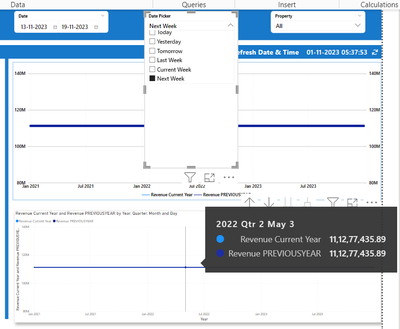
Hi Everyone,I'm using the below measure as a date picker slicer. Now I need to show year-over-year (2021–2023) revenue in a line chart. If I select last week from the date picker slicer, then all three years of revenue should display in the visual with their last week data, for example, 2022 last week data and 2023 last week data comparison. I tried from the end but was unable to crack it. Can any one help me on this?
MTD/QTD/YTD =
var TodayDate = TODAY()
var Yesterday = TODAY()-1
var Tomorrow = TODAY()+1
var StartofWeek = CALCULATE(MAX('Date'[StartofWeek]),'Date'[Date] = TODAY())
var EndofWeek = CALCULATE(MAX('Date'[EndofWeek]),'Date'[Date] = TODAY())
var MonthStart = CALCULATE(STARTOFMONTH('Date'[Date]),YEAR('Date'[Date]) = YEAR(TodayDate), MONTH('Date'[Date]) = MONTH(TodayDate))
var CurrentMonthEnd = EOMONTH(today(),0)
var LastMonthStart = EOMONTH(TODAY(),-2)+1
//CALCULATE(STARTOFMONTH('Date'[Date]),YEAR('Date'[Date]) = YEAR(TodayDate), MONTH('Date'[Date]) = MONTH(TodayDate)-1)
var LastMonthEnd = EOMONTH(today(),-1)
var NextMonthEnd = EOMONTH(today(),1)
var QuraterStart = CALCULATE(STARTOFQUARTER('Date'[Date]),YEAR('Date'[Date]) = YEAR(TodayDate), QUARTER('Date'[Date]) = QUARTER(TodayDate))
var QuarterEnd = CALCULATE(ENDOFQUARTER('Date'[Date]),YEAR('Date'[Date]) = YEAR(TodayDate), QUARTER('Date'[Date]) = QUARTER(TodayDate))
var LastQuarterStart = calculate(STARTOFQUARTER('Date'[Date]),'Date'[Date] = TODAY())-92
//CALCULATE(STARTOFQUARTER('Date'[Date]),YEAR('Date'[Date]) = YEAR(TodayDate), QUARTER('Date'[Date]) = QUARTER(TodayDate)-1)
var LastQuarterEnd = calculate(STARTOFQUARTER('Date'[Date]),'Date'[Date] = TODAY())-1
// CALCULATE(ENDOFQUARTER('Date'[Date]),YEAR('Date'[Date]) = YEAR(TodayDate), QUARTER('Date'[Date]) = QUARTER(TodayDate)-1)
var NextQuarterEnd = CALCULATE(ENDOFQUARTER('Date'[Date]),YEAR('Date'[Date]) = YEAR(TodayDate)+1,QUARTER('Date'[Date]) = 1)
-- QUARTER('Date'[Date]) = QUARTER(TodayDate)+1)
var YearStart = CALCULATE(STARTOFYEAR('Date'[Date]),YEAR('Date'[Date]) = YEAR(TodayDate))
var YearEnd = CALCULATE(ENDOFYEAR('Date'[Date]),YEAR('Date'[Date]) = YEAR(TodayDate))
var LastYearStart = CALCULATE(STARTOFYEAR('Date'[Date]),YEAR('Date'[Date]) = YEAR(TodayDate)-1)
var LastYearEnd = CALCULATE(ENDOFYEAR('Date'[Date]),YEAR('Date'[Date]) = YEAR(TodayDate)-1)
var NextYearEnd = CALCULATE(ENDOFYEAR('Date'[Date]),YEAR('Date'[Date]) = YEAR(TodayDate)+1)
Here are the measueres which i wrote to comapre the revenue
Revenue Current Year = CALCULATE( SUM(RevenueBooked[Revenue]), FILTER( ALL('Date'), 'Date'[Date] >= MIN('Date'[Date]) && 'Date'[Date] <= MAX('Date'[Date]) ) )
Revenue PREVIOUSYEAR = CALCULATE( [Revenue Current Year], SAMEPERIODLASTYEAR('Date'[Date]) )
But Im getting the sale revenue for both years