cancel
Showing results for 
Search instead for 
Did you mean: 

Level up your Power BI skills this month - build one visual each week and tell better stories with data! Get started

Reply
crln-blue
Post Patron
Post Patron

Line and stacked column chart suddenly blank when column series (legend for stacked) is added

Hello!


I found an unexpected behavior in PowerBI. 

For me, it is unexpected because I have the same report (just a different source, the report below has an excel file source but all of the calculations are also the same with the other report) as seen below:
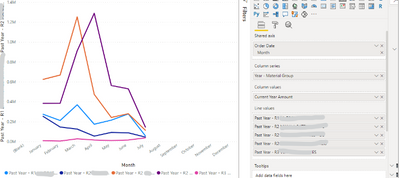
crln-blue_4-1610650479758.png


So I recreated the report above and changed the source file to somewhere from SQL Server. All computations are the same, etc etc. The other reports are fine except that for this:
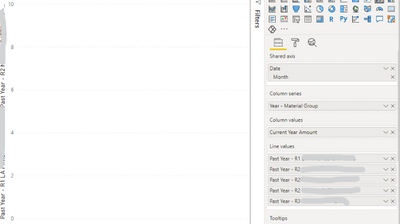
crln-blue_3-1610650025954.png

The line chart which has values are all gone. For context, all of my line chart has values. Column values, "Current Year Amount" has no values because of its filter date. This scenario is also similar with my report which has an excel source. 


If I remove the data from the Column Series field, the chart is okay:
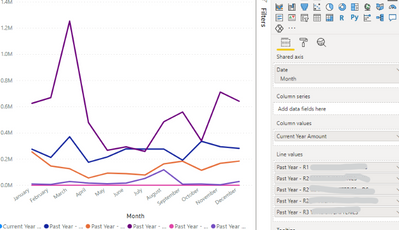
 

crln-blue_0-1610650970463.png


As we all know, both the column series and the column values are the fields for the stacked column chart. So I have a measure for the values and for it to be a stacked column chart, we need to place a column under the column series field. But it seems like the Column Series data makes my chart blank. Why is this? Is there anything that I should set up? 


Thanks in advance!

1 ACCEPTED SOLUTION
crln-blue
Post Patron
Post Patron

I'll close this thread now. I don't know why but it managed to solve on its own after dragging and dropping the Date values again. 

View solution in original post

1 REPLY 1
crln-blue
Post Patron
Post Patron

I'll close this thread now. I don't know why but it managed to solve on its own after dragging and dropping the Date values again. 

Helpful resources

Announcements
April Power BI Update Carousel

Power BI Monthly Update - April 2026

Check out the April 2026 Power BI update to learn about new features.

Fabric SQL PBI Data Days

Data Days 2026 coming soon!

Sign up to receive a private message when registration opens and key events begin.

New to Fabric survey Carousel

New to Fabric Survey

If you have recently started exploring Fabric, we'd love to hear how it's going. Your feedback can help with product improvements.

Power BI DataViz World Championships carousel

Power BI DataViz World Championships - June 2026

A new Power BI DataViz World Championship is coming this June! Don't miss out on submitting your entry.