cancel
Showing results for 
Search instead for 
Did you mean: 

The Power BI Data Visualization World Championships is back! It's time to submit your entry. Live now!

Reply
atiyah
Regular Visitor

Line Chart dots

Hi, 


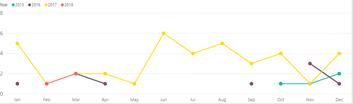
Does anyone know how to connect the line graph dots like in the Picture 2?

I cant find a way how connect the line if the previous/next month have nil data. 

For example in Picture 1: 2016 Sep=1; Oct= nil data; Nov=3, the line only connect if there is a data on each month.


Picture1 (Power Bi):                                                                                Picture 2 (Power Pivot): 

Capture.PNG                   Capture.PNG


1 ACCEPTED SOLUTION
Anonymous
Not applicable

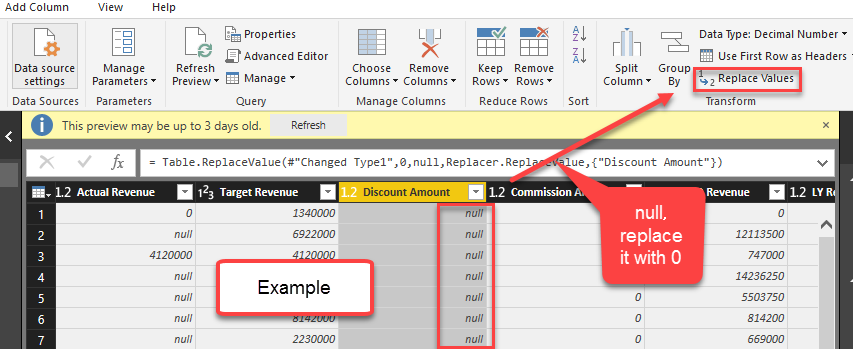
Go to Edit Query, check if column for generating the line graph contains null value. If it is, replace the null value with 0. Then you should get the chart as you want.


Below is an example for your reference.

2018-03-29_14-48-00.png


View solution in original post

2 REPLIES 2
Anonymous
Not applicable

Go to Edit Query, check if column for generating the line graph contains null value. If it is, replace the null value with 0. Then you should get the chart as you want.


Below is an example for your reference.

2018-03-29_14-48-00.png


Thank you so much Jessica Seiya!

Really appreciate it. 

Now I know where is wrong.


Helpful resources

Announcements
Power BI DataViz World Championships

Power BI Dataviz World Championships

The Power BI Data Visualization World Championships is back! It's time to submit your entry.

January Power BI Update Carousel

Power BI Monthly Update - January 2026

Check out the January 2026 Power BI update to learn about new features.

FabCon Atlanta 2026 carousel

FabCon Atlanta 2026

Join us at FabCon Atlanta, March 16-20, for the ultimate Fabric, Power BI, AI and SQL community-led event. Save $200 with code FABCOMM.