cancel
Showing results for 
Search instead for 
Did you mean: 

The Power BI Data Visualization World Championships is back! Get ahead of the game and start preparing now! Learn more

Reply
hangell
Frequent Visitor

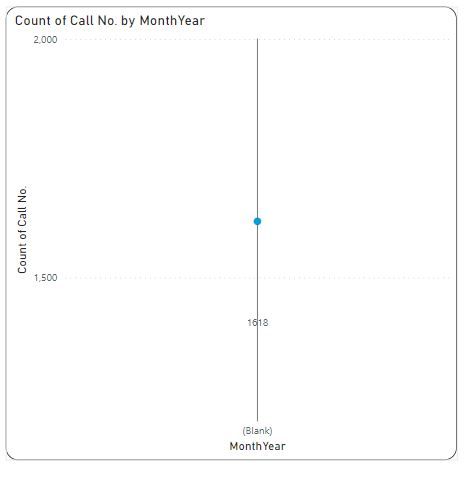
Line Chart X Axis (Date) showing "Blank"

I have a set of data  where issues/calls are logged into a spreadsheet. I want to show a line graph over the entire time span of the data which is approx 3 years. My go-to method for something like this is to create a Date Table using the following steps, inspiration for this was taken from here: https://community.powerbi.com/t5/Desktop/How-to-show-2-years-on-x-axis-of-bar-chart-when-displaying/... and has worked well for me for 18 months now:

1) DateTable = CALENDAR(DATE(2018,1,1),DATE(2030,12,31))
2) YearMonthNumber = (Year(DateTable[Date])) * 12 + Month( DateTable[Date])
3) MonthYear = Format(DateTable[Date],"mmm") & "-" & Format(DateTable[Date],"yyyy")
4) Sort MonthYear by YearMonthNumber


Then I link a column from the data which is a Date type, in this case "Issue Logged On" to DateTable[Date], then I would insert a line graph, put DateTable[MonthYear] on the X-Axis and a column from the Data in this case "Call No." as the Y-Axis set to "Count of".

This time though the line graph simply shows on the X Axis "Blank" and the Y-Axis just displays the total number of issues. 

I've done this hundreds of times before with similar data with no issues but cannot fathom why the X-Axis is showing "Blank".X-Axis Blank.JPG
 

Thanks


1 ACCEPTED SOLUTION
HotChilli
Super User
Super User

Looks like the relationship is not working.

Maybe "Issue Logged On" has a time portion in it which prevents matching with the date table?

You can test this by removing DateTable[MonthYear] from the x-axis and putting "Issue Logged On" there instead.  Do you get a reasonable-looking chart?

If so, remove "Issue Logged On" from x-axis and put the DateTable[Date] there. Does it look the same?

View solution in original post

1 REPLY 1
HotChilli
Super User
Super User

Looks like the relationship is not working.

Maybe "Issue Logged On" has a time portion in it which prevents matching with the date table?

You can test this by removing DateTable[MonthYear] from the x-axis and putting "Issue Logged On" there instead.  Do you get a reasonable-looking chart?

If so, remove "Issue Logged On" from x-axis and put the DateTable[Date] there. Does it look the same?

Helpful resources

Announcements
Power BI DataViz World Championships

Power BI Dataviz World Championships

The Power BI Data Visualization World Championships is back! Get ahead of the game and start preparing now!

December 2025 Power BI Update Carousel

Power BI Monthly Update - December 2025

Check out the December 2025 Power BI Holiday Recap!

FabCon Atlanta 2026 carousel

FabCon Atlanta 2026

Join us at FabCon Atlanta, March 16-20, for the ultimate Fabric, Power BI, AI and SQL community-led event. Save $200 with code FABCOMM.