cancel
Showing results for 
Search instead for 
Did you mean: 

The Power BI Data Visualization World Championships is back! Get ahead of the game and start preparing now! Learn more

Reply
CNH
Helper I
Helper I

Line Chart Visualisation


Further to my other post, could I add to this question. Having plotted actual revenue I would like to also plot 2 targets, Target 1 and Target 2.


For year 1, Target 1 lets say is 100,000 and target 2 is 120,000. 


For year 2, Target 1 lets say is 105,000 and target 2 is 130,000. 


For year 3, Target 1 lets say is 110,000 and target 2 is 140,000. 


I would like these to plot in a ray for each fiscal year, ie year 1 Target 1 rises from zero to 100,000 over the year time line etc


Is there a measure that I could write in Power BI to provide the data to populate.


Alternatively the data for my revenue is coming from an excel spreadsheet - I could easily introduce a new worksheet "Target" which has the three year dates populated and either daily or an accumulating total for Target 1 and Target 2.


Hopefully you can assist here. I have tried to do the excel spreadsheet worksheet but it hasn't worked.


Thanking you 


I am attaching a number of documents.


Firstly the visualisation that I am hoping to achieve
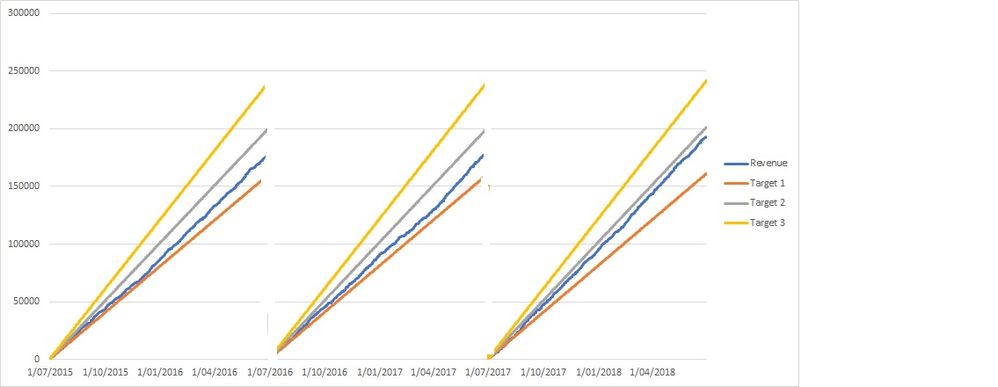
Graphs revenue and target.jpg


I am also attaching  the spreadsheet with the data that I used to create the aformention chart.


The following link is the file that I used to generate the graph

https://1drv.ms/x/s!ArtOMe8OWNmVgwLWmTLoBrGMJsGu


The following file is the the type of raw data that I will be linking to Power BI and therefore will generate the visualization from there


https://1drv.ms/x/s!ArtOMe8OWNmVgwH0fYylIygfrJU3


{I have shown the target data in either ab accumulative form or in a daily isolated value - it will not be an issue to generate in either manner.}


Please let me know if you need any clarification.


1 ACCEPTED SOLUTION

Hi all, 


I have now achieved the outcome I am after. 


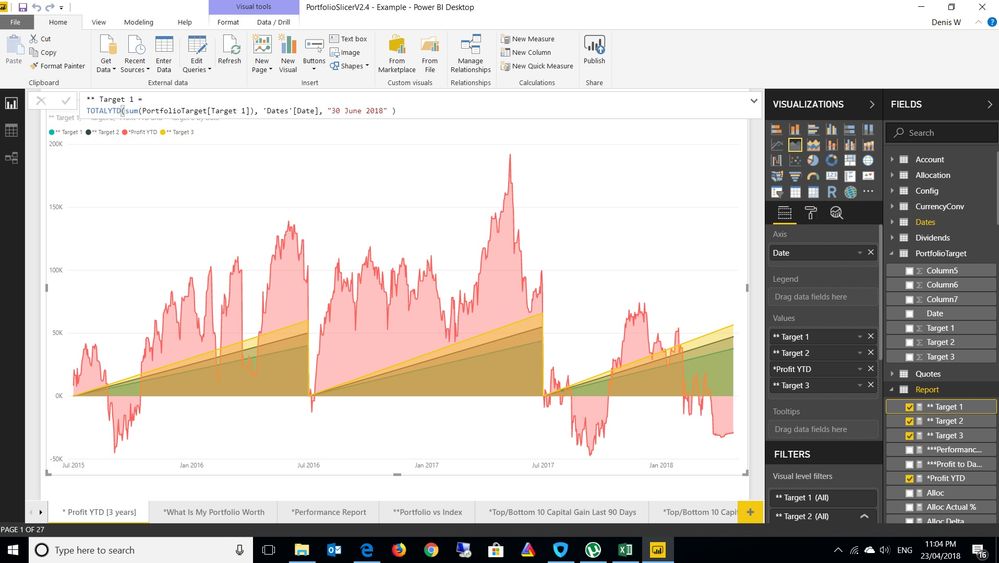
One of the issues I had was I was using a line chart, I have changed this to an area chart  and with new measures defined all seems good.


I will look further at this tomorrow with actual data rather than sample data and see whether my expected outcomes have been achieved.

3 year chart with target.jpg


View solution in original post

2 REPLIES 2
v-yuta-msft
Community Support
Community Support

Hi CNH,


Based on your description, you want to have a visual in power bi which can fit your data automactically, right?


R visual can meet your requirement, please refer to this documentation:

https://docs.microsoft.com/en-us/power-bi/desktop-r-visuals


Regards,

Jimmy Tao

Hi all, 


I have now achieved the outcome I am after. 


One of the issues I had was I was using a line chart, I have changed this to an area chart  and with new measures defined all seems good.


I will look further at this tomorrow with actual data rather than sample data and see whether my expected outcomes have been achieved.

3 year chart with target.jpg


Helpful resources

Announcements
Power BI DataViz World Championships

Power BI Dataviz World Championships

The Power BI Data Visualization World Championships is back! Get ahead of the game and start preparing now!

December 2025 Power BI Update Carousel

Power BI Monthly Update - December 2025

Check out the December 2025 Power BI Holiday Recap!

FabCon Atlanta 2026 carousel

FabCon Atlanta 2026

Join us at FabCon Atlanta, March 16-20, for the ultimate Fabric, Power BI, AI and SQL community-led event. Save $200 with code FABCOMM.