cancel
Showing results for 
Search instead for 
Did you mean: 

Vote for your favorite vizzies from the Power BI Dataviz World Championship submissions. Vote now!

Reply
Anonymous
Not applicable

Line Chart Overlapping

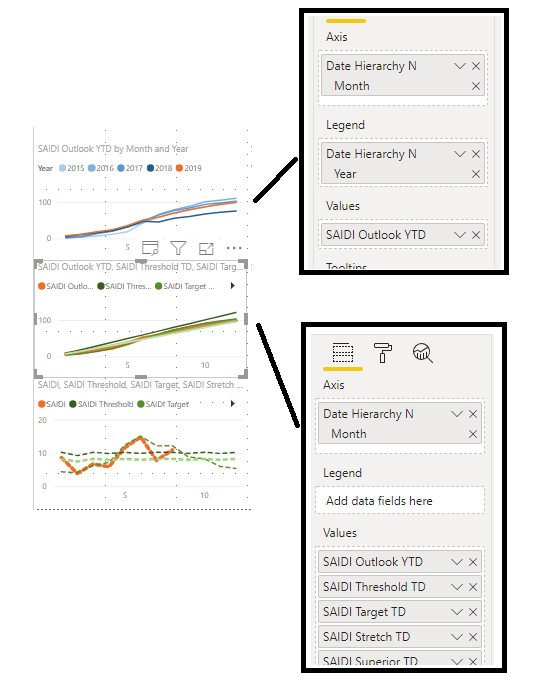
Is there a way to specify the order which the lines are drawn in? I have a report that shows some views of my data with some small-ish line charts. These are nearly perfect except that the line I really want to stand out is drawn behind all the others. The two graphs at the bottom have multiple fields in the 'values' and I even tried to re-arrange these to put the 'outlook' field at the bottom of the list to see if that made a difference, but it did not. When I open them up in focus mode they are just fine, but small like this makes them a hard to read. I know I can change colors on the other lines, but I can't adjust the transparency either. The dashed lines sort of work but I'd still rather just draw them normally and have my priority line on top. SAIDI overlaps.png

1 REPLY 1
deldersveld
Resident Rockstar
Resident Rockstar

There is no way to control or force the order.

Helpful resources

Announcements
Sticker Challenge 2026 Carousel

Join our Community Sticker Challenge 2026

If you love stickers, then you will definitely want to check out our Community Sticker Challenge!

January Power BI Update Carousel

Power BI Monthly Update - January 2026

Check out the January 2026 Power BI update to learn about new features.

FabCon Atlanta 2026 carousel

FabCon Atlanta 2026

Join us at FabCon Atlanta, March 16-20, for the ultimate Fabric, Power BI, AI and SQL community-led event. Save $200 with code FABCOMM.