Don't miss your chance to take exam DP-600 or DP-700 on us!
Request nowLearn from the best! Meet the four finalists headed to the FINALS of the Power BI Dataviz World Championships! Register now
Hello PBI Community -
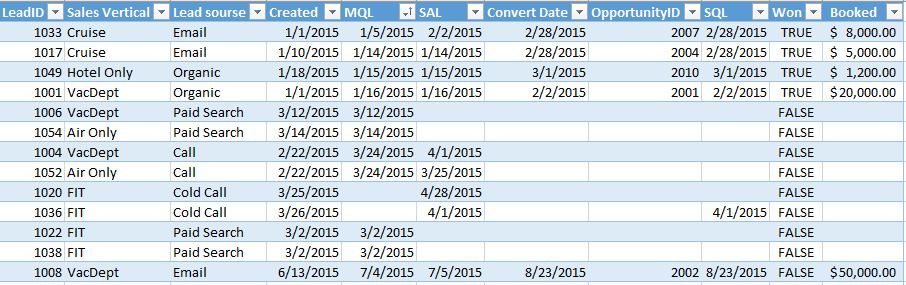
I am a bit of a newbie to PBI and looking at it for a solution to modeling a lead funnel. My data consists of a series of lead stage changes stamped with dates. Basically I want to know a count of how many leads were created, qualified, won, etc. MTD, QTD, YTD. We use standard funnel stages from SFDC
Lead Created
Marketing Qualified (MQL)
Sales Accepted (SAL)
Sales Qualified (SQL)
Won/Lost
Additonally I would like to filter leads that were produced from marketing activity such as lead source = email, paid search, incoming calls, orgainic vs. those creaded from sales lead source = cold calls.
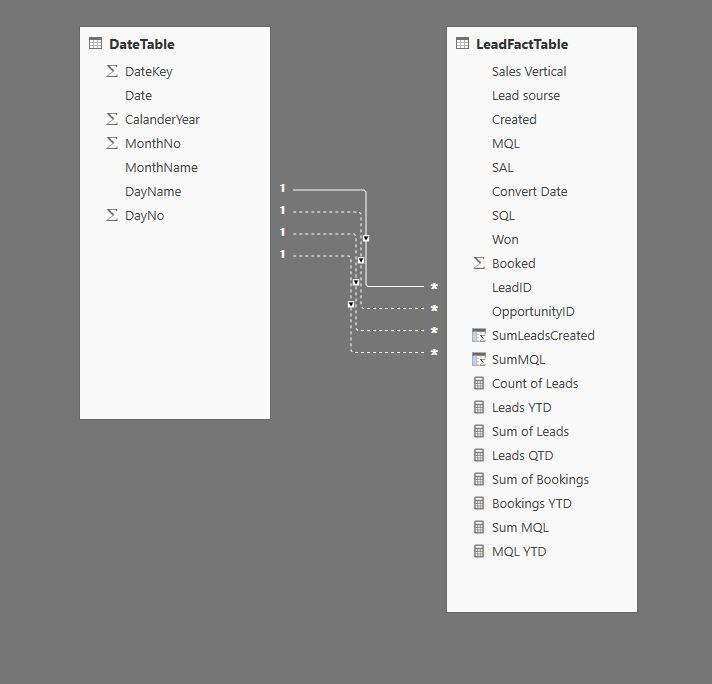
So far I have created a data model consiting of a dimDate, Sales Force Lead data (as shown in the example screenshot), and a lead ID table, but because of the time intellegence and multiple date relationships and filters can't seem to get it to work. Any tips on setting up my model, dax functions,etc would be appreciated.
OK, so it looks like you have multiple dates in your LeadFactTable that you are relating to your DateTable. This is a pretty common thing. One way to get around this issue is to use the USERELATIONSHIP function found here:
Another method is to use multiple Date tables, one for each date. I have had some success in then linking all of these data tables to yet ANOTHER date table and then using that final date table in visualizations. That gets really messy and confusing the more dates you have. You can just use the multiple date tables (without the "final" date table), but you will have to pay attention to which date table you are using in your visuals. Carefully name your date tables and the "Date" column differently to avoid gnashing of teeth.
Have a look here for building a similar type of thing with Microsoft CRM, it will give you some formulas that you might find useful.
Also, I recommend DAX Patterns for your MTD, YTD type of stuff.
Share feedback directly with Fabric product managers, participate in targeted research studies and influence the Fabric roadmap.
Check out the February 2026 Power BI update to learn about new features.
| User | Count |
|---|---|
| 50 | |
| 40 | |
| 37 | |
| 14 | |
| 14 |
| User | Count |
|---|---|
| 85 | |
| 69 | |
| 37 | |
| 28 | |
| 27 |