This time we’re going bigger than ever. Fabric, Power BI, SQL, AI and more. We're covering it all. You won't want to miss it.
Learn moreLevel up your Power BI skills this month - build one visual each week and tell better stories with data! Get started
Hi ALL
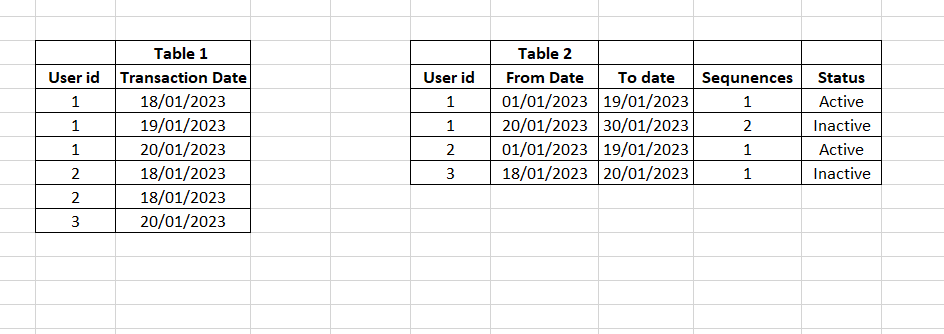
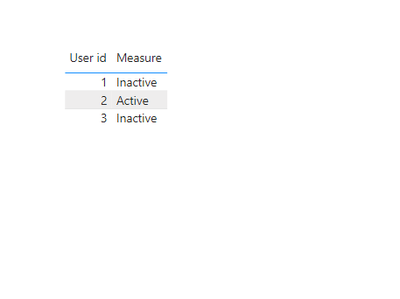
We need to show the membership status on the selected transaction date for each user. In another fact table, we have the membership status for specific date ranges and sequences. Finally, we need to show the selected transaction date between which membership status they have and the latest sequence values. If anyone can figure this measure out, please let me know
The output should be like this
Solved! Go to Solution.
@Anonymous , Create a new column in table 1
New =
var _max =maxx(filter(Table2, Table1[user_id] = Table2[user_id] && Table1[Transaction Date] >= Table2[Start Date]
&& Table1[Transaction Date] <= Table2[End Date]) , Table2[Status])
return
coalesce(_max, "Inactive")
Hi @Anonymous ,
Please try below steps:
1. create a measure with below dax formula
Measure =
VAR cur_uid =
SELECTEDVALUE ( Table1[User id] )
VAR max_date =
MAXX (
FILTER ( ALL ( Table1 ), Table1[User id] = cur_uid ),
[Transaction Date]
)
VAR tmp =
FILTER ( ALL ( Table2 ), Table2[User id] = cur_uid )
VAR tmp1 =
ADDCOLUMNS (
tmp,
"Flag",
IF ( max_date >= Table2[From Date] && max_date <= Table2[To Date], 1 )
)
VAR val =
CALCULATE ( MAX ( Table2[Sequnence] ), FILTER ( tmp1, [Flag] = 1 ) )
VAR _result =
CALCULATE (
MAX ( Table2[Status] ),
FILTER ( ALL ( Table2 ), Table2[User id] = cur_uid && Table2[Sequnence] = val )
)
RETURN
_result
2. add a table visual with Table1 field and measure
Please refer the attached .pbix file.
Best regards,
Community Support Team_Binbin Yu
If this post helps, then please consider Accept it as the solution to help the other members find it more quickly.
@Anonymous , Create a new column in table 1
New =
var _max =maxx(filter(Table2, Table1[user_id] = Table2[user_id] && Table1[Transaction Date] >= Table2[Start Date]
&& Table1[Transaction Date] <= Table2[End Date]) , Table2[Status])
return
coalesce(_max, "Inactive")
Check out the April 2026 Power BI update to learn about new features.
Sign up to receive a private message when registration opens and key events begin.
If you have recently started exploring Fabric, we'd love to hear how it's going. Your feedback can help with product improvements.
| User | Count |
|---|---|
| 36 | |
| 29 | |
| 29 | |
| 21 | |
| 18 |
| User | Count |
|---|---|
| 71 | |
| 43 | |
| 33 | |
| 24 | |
| 23 |