Join us at FabCon Atlanta from March 16 - 20, 2026, for the ultimate Fabric, Power BI, AI and SQL community-led event. Save $200 with code FABCOMM.
Register now!Get Fabric Certified for FREE during Fabric Data Days. Don't miss your chance! Request now
So, I have a problem.
There are about 20 KPIs I'm trying to build based on surveys where I need to have a unique count of outlet-id's if the survey response is 1. The caveat is that I need to capture the latest value only and if the latest value is 0 even if the previous value is 1, The outlet needs to be skipped in the count.
Is there a way to do this?
I'm currently using this dax measure:
KPI1= CALCULATE(DISTINCTCOUNT(MasterTable_Core[OutletID]),MasterTable_Core[Date],
FILTER (
CALCULATETABLE (
SUMMARIZE (
'MasterTable_Core',
'MasterTable_Core'[OutletID],
'MasterTable_Core'[Date],
"IsLatest", IF (
'MasterTable_Core'[Date]
= CALCULATE (
LASTDATE('MasterTable_Core'[Date]),
ALLEXCEPT ( 'MasterTable_Core', 'MasterTable_Core'[outletid],MasterTable_Core[OutletName],MasterTable_Core[FiscalMonth] )
),
1
)
),
MasterTable_Core[KPI1] = 1
),
[IsLatest] = 1
)
)
You may use RANKX Function to add a calculated column first.
@v-chuncz-msft Thank you for the reply!, But that works in the same way my code does.
The problem I'm facing is a bit odd.
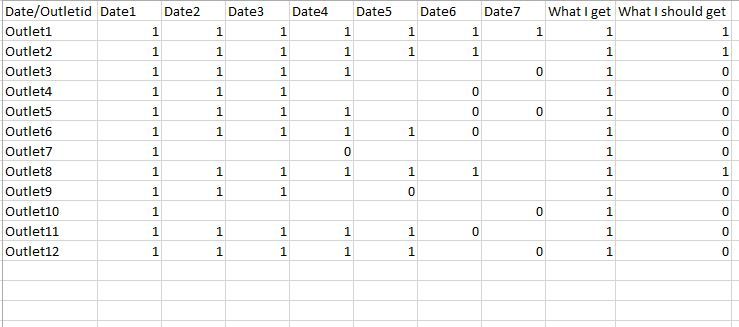
Below is an example: I have 12 outlets, visited by a sales rep for 7 days and they take the same survey in the outlets each time.
I should take only the latest record, whether it is a zero or a one and then take a sum of that to find the KPI Value.
What all the DAX queries are doing is essentially taking the last non zero value or taking a sum at outlet level and giving that as one. Any ideas on how I could handle this?
Thanks for taking the time!
Check out the November 2025 Power BI update to learn about new features.
Advance your Data & AI career with 50 days of live learning, contests, hands-on challenges, study groups & certifications and more!