Join us at FabCon Atlanta from March 16 - 20, 2026, for the ultimate Fabric, Power BI, AI and SQL community-led event. Save $200 with code FABCOMM.
Register now!The Power BI Data Visualization World Championships is back! Get ahead of the game and start preparing now! Learn more
I have a date column that has corresponding values. Instead of just seeing all of the dates or just one date. I want to know if there is a way where across the whole column it only takes every month's last date. So for example If my data has September 1 - December 31st I only want to see the last dates in one table for those months.
Solved! Go to Solution.
Hi @ADCOPBI ,
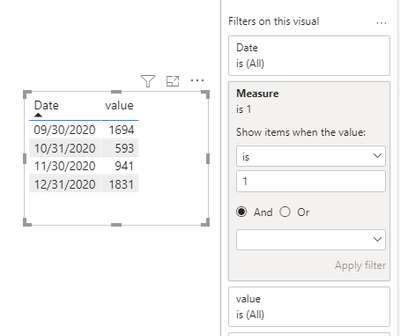
Based on your description, you can create a measure as follows.
Measure =
var x1=ENDOFMONTH('Table'[Date])
return
IF(MAX('Table'[Date])=x1,1,0)
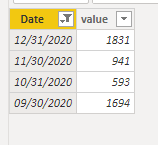
Result:
Hope that's what you were looking for.
Best Regards,
Yuna
If this post helps, then please consider Accept it as the solution to help the other members find it more quickly.
Hi @ADCOPBI ,
Based on your description, you can create a measure as follows.
Measure =
var x1=ENDOFMONTH('Table'[Date])
return
IF(MAX('Table'[Date])=x1,1,0)
Result:
Hope that's what you were looking for.
Best Regards,
Yuna
If this post helps, then please consider Accept it as the solution to help the other members find it more quickly.
Yes. Add a transformation step in Power Query using the Date.EndOfMonth function
The Power BI Data Visualization World Championships is back! Get ahead of the game and start preparing now!
| User | Count |
|---|---|
| 63 | |
| 55 | |
| 42 | |
| 41 | |
| 23 |
| User | Count |
|---|---|
| 171 | |
| 136 | |
| 119 | |
| 80 | |
| 54 |