Join us at FabCon Atlanta from March 16 - 20, 2026, for the ultimate Fabric, Power BI, AI and SQL community-led event. Save $200 with code FABCOMM.
Register now!Vote for your favorite vizzies from the Power BI Dataviz World Championship submissions. Vote now!
Hi everyone,
I am trying to get the distribution of sales for the last date on various products. But I only want from the max date, not from the last of each column. For example:
Date Apple Banana
21-05-2022 50 50
27-06-2022 50 0
So in the bar chart i want 100% apple not 100% apple and 50% Banana because is taking the last date of each column instead the max date.
Thanks
Solved! Go to Solution.
Hi, @coryan
Please try the following methods.
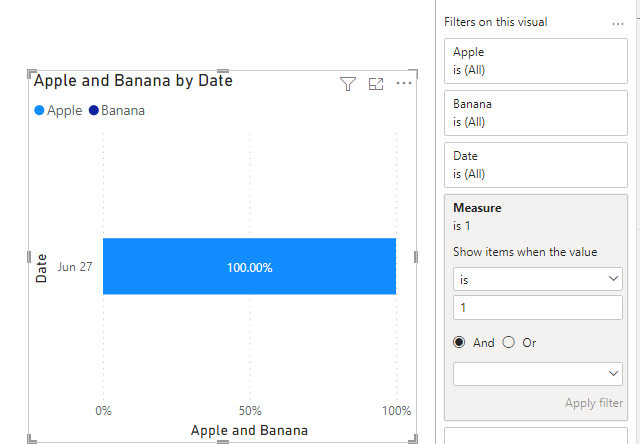
Measure = IF(SELECTEDVALUE('Table'[Date ])=CALCULATE(MAX('Table'[Date ]),ALL('Table')),1,0)
Put the measure into the filter of the bar chart and set it equal to 1.
Is this the result you expect?
Best Regards,
Community Support Team _Charlotte
If this post helps, then please consider Accept it as the solution to help the other members find it more quickly.
Hi, @coryan
Please try the following methods.
Measure = IF(SELECTEDVALUE('Table'[Date ])=CALCULATE(MAX('Table'[Date ]),ALL('Table')),1,0)
Put the measure into the filter of the bar chart and set it equal to 1.
Is this the result you expect?
Best Regards,
Community Support Team _Charlotte
If this post helps, then please consider Accept it as the solution to help the other members find it more quickly.
@coryan , Nor very clear
one way is to have a measure like
calculate( lastnonblankvalue(Table[Date], Sum(Table[Apple]) ), allselected(Table[Date]) )
calculate( lastnonblankvalue(Table[Date], Sum(Table[banana]) ), allselected(Table[Date]) )
or
measure =
var _max = maxx(allselected(Table), Table[Date])
return calculate( Sum(Table[Apple]), filter(Table, Table[Date] = _max) )
measure 2=
var _max = maxx(allselected(Table), Table[Date])
return calculate( Sum(Table[Banana]), filter(Table, Table[Date] = _max) )
The information you have provided is not making the problem clear to me. Can you please explain with an example.
Appreciate your Kudos.
Vote for your favorite vizzies from the Power BI World Championship submissions!
If you love stickers, then you will definitely want to check out our Community Sticker Challenge!
Check out the January 2026 Power BI update to learn about new features.
| User | Count |
|---|---|
| 64 | |
| 53 | |
| 42 | |
| 20 | |
| 17 |
| User | Count |
|---|---|
| 124 | |
| 105 | |
| 44 | |
| 32 | |
| 24 |