Hello guys,
How are you doing?
I'm currently working on a project to determine the activation of clients based on the date of their last purchase.
Each client can have multiple contracts made in different dates, so we determined as follows:
- Last contract was on 2021 is critical;
- Last contract from 01/01/2022 until 6 months before today needs atention;
- Last contract 6 month til today is OK.
I've used this formula to check their activity status:
Atividade = IF(Fato_Comex_Movimento[Ano_PI]<=2021,"Crítico",IF(MONTH(TODAY())-Fato_Comex_Movimento[Mês PI]<=6,"OK","Atenção"))
And the result was this matrix:
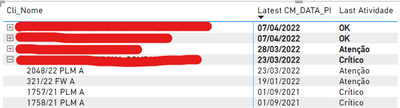
But as you can see in the image, the last contract of the client 4 was on 23/03/2022 so it should be "Atention", not "Critical"
So the expected result should be like this:
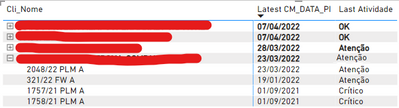
If I change to "First Ativididade" instead of "Last Atividade" the matrix becomes even worse...
How can I fix this?
At the end I would need to inform how many are OK, Atention or Critical. But I think I can do that using filters on the cards for the dashboard.


