Join us at FabCon Atlanta from March 16 - 20, 2026, for the ultimate Fabric, Power BI, AI and SQL community-led event. Save $200 with code FABCOMM.
Register now!The Power BI Data Visualization World Championships is back! Get ahead of the game and start preparing now! Learn more
Hi,
I have a set of data by month and a calendar table that defines the fiscal month/quarter/year. Our fiscal year starts in November.
I need to select the value representing the last value in the fiscal quarter.
For example:
(Q1) Nov = 3
(Q1) Dec = 5
(Q1) Jan = 2
(Q2) Feb = 33
(Q2) Mar = 34
(Q2) Apr = 21
...
...
Expecting result for Q1 = 2; Q2 = 21
Any suggestion on how should I write my DAX formula?
Solved! Go to Solution.
Hi @Anonymous ,
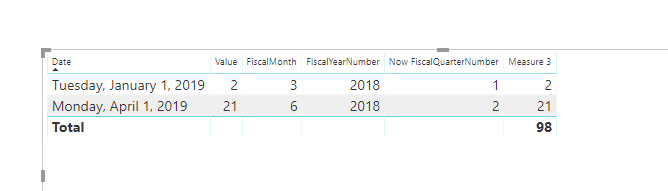
To create a measure as below.
Measure 3 = var maxd = CALCULATE(MAX('Table1'[Date]),ALLEXCEPT(Table1,Table1[Now FiscalQuarterNumber]))
return
IF(MAX('Table1'[Date])=maxd,SUM(Table1[Value]),BLANK())
Hi @Anonymous ,
To create a measure as below.
Measure 3 = var maxd = CALCULATE(MAX('Table1'[Date]),ALLEXCEPT(Table1,Table1[Now FiscalQuarterNumber]))
return
IF(MAX('Table1'[Date])=maxd,SUM(Table1[Value]),BLANK())
Thank you - I used a slight variation of the formula from https://community.powerbi.com/t5/Desktop/Conditional-measure-for-last-month-in-quarter/m-p/452534/hi...
For reference, I used:
Measure = calculate(
max(DimData[Value]),
filter(
ALLEXCEPT(DimData, DimData[FisQtrYr]),
DimData[MonthDate] = MAX(DimData[MonthDate])
),
filter(DimData, [Level 2] = "Volumes")
)The Power BI Data Visualization World Championships is back! Get ahead of the game and start preparing now!
| User | Count |
|---|---|
| 38 | |
| 36 | |
| 33 | |
| 30 | |
| 28 |
| User | Count |
|---|---|
| 128 | |
| 88 | |
| 79 | |
| 67 | |
| 62 |